26
3
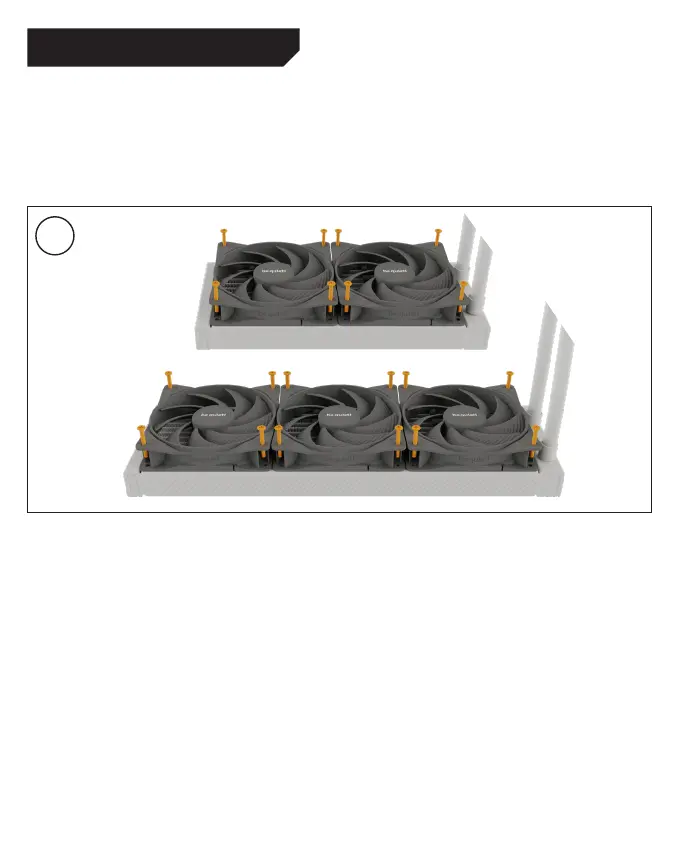
Mounting the fans on the radiator
Affix the fans to the radiator. We recommend installation
in a push configuration. Next, mount the fans on the hose
side. Now connect the fans to the CPU connection of the
motherboard with the ARGB-PWM-Hub.
Befestigung der Lüfter am Radiator
Befestige die Lüfter am Radiator. Wir empfehlen die
Installation in einer Push Konfiguration. Montiere die
Lüfter auf der Schlauchseite. Nutze den ARGB-PWM-Hub,
um die Lüfter an den CPU-Anschluss des Mainboards
anzuschließen.
Montage des ventilateurs sur le radiateur
Fixez les ventilateurs au radiateur. Nous recommandons une
installation en mode extraction (push). Montez les ventilateurs
sur la face du tuyau. Connectez maintenant les ventilateurs
au processeur de la carte mere a l’aide du hub ARGB-PWM.
Montaje de los ventiladores en el radiador
Fije los ventiladores al radiador. Recomendamos la in-
stalación en una configuración de empuje. A continuación,
monte los ventiladores en el lado de la conexión de la
manguera. Ahora conecte los ventiladores a la conexión
CPU de la placa base con el ARGB-PWM-Hub.
安裝固定支架
將Intel間隔螺帽A固定在先前定位的Intel背板上。 然後將Intel
安裝支架放置在Intel間隔螺帽A上,並使用 安裝支架鎖緊螺絲
做固定。 您可以使用任何十字螺絲起子來進行固定。
安装固定桥
将Intel间隔螺母A拧到先前定位的Intel背板上。然后将Intel安
装支架放置在Intel间隔螺母A上,并用安装支架紧固螺钉固
定。您可以用任何十字螺丝刀进行固定。
Intel LGA 1700 / 1200 / 1150 / 1151 / 1155




 To Next Page