Need help?
Do you have a question about the Bea-fon M5 Premium and is the answer not in the manual?
Important safety warnings for phone usage, including traffic, flight, and hospital environments.
Instructions for correctly inserting the battery and SIM/Micro SD cards into the phone.
Guide to powering the phone on/off and entering the SIM card PIN code for security.
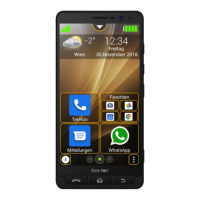
Steps to activate the Beafon user interface as the default desktop.
Detailed technical data including network bands, storage, battery, dimensions, and sensors.
 General
| Screen shape | Flat |
|---|---|
| Display diagonal | 5.5 \ |
| Touch technology | Multi-touch |
| Display resolution | - pixels |
| Processor family | - |
| Processor frequency | - GHz |
| RAM capacity | 2 GB |
| Internal storage capacity | 16 GB |
| Rear camera type | Single camera |
| Rear camera resolution (numeric) | 13 MP |
| Front camera resolution (numeric) | 8 MP |
| USB connector type | Micro-USB |
| Form factor | Bar |
| Product color | Black |
| Wireless charging | No |
| Talk time (3G) | - h |
| Battery capacity | - mAh |
| Platform | Android |
| App distribution platform | Google Play |
 Weight and Dimensions
| Width | - mm |
|---|---|
| Weight | - g |

 To Next Page