HELPFUL TERMS
Bluetooth: A technology used for
WIRELESS
CONNECTION.
Most
smart
phones and media players are equipped with Bluetooth, which allows them
to
connect wirelessly
to
the Blazar.
Bluetooth
Device:
Any
device equipped with
BLUETOOTH
technology. For our
purposes, when
we
say
"Bluetooth
Device"
we
are referring
to
the phone,
tablet or media player
you
are using.
Bluetooth Pairing: Establishing a new connection between the Blazar and a
Bluetooth
Device.
Pairing
Mode:
For
2 devices
to
establish a Bluetooth connection, they must
both
be
in
PAIRING
MODE.
This means both devices are searching for a
NEW
connection.
Bluetooth
Connect:
Establishing a connection
AFTER
the Blazar has already
been paired
with
a device.
Two
devices can
be
PAIRED
but
not
CONNECTED,
however, they cannot
be
CONNECTED
if
they have
not
been
PAIRED.
Search
Mode
:
When
the Blazar
is
in
SEARCH
MODE
it
is
trying
to
CONNECT
with
a device that has already been
PAIRED.
Noise-Canceling
Microphone
[MIC):
A built-in microphone that allows the
Blazar
to
act as a speakerphone for your connected Bluetooth phone. The
MIC
is
noise-canceling, meaning
it
blocks out room-noise
to
ensure your
phone call
is
clear and crisp.
NFC:
NFC
stands
for
Near
Field
Communication.
The
Blazar
is
equipped
with
NFC
so
you
can establish a Bluetooth connection
with
a Bluetooth
Device
by
touching the device
to
the top
of
the Blazar. [Bluetooth
Device
must
be
equipped
with
NFC)
Dual Stereo Pairing: A technology contained
in
the Blazar allowing 2 Blazar
Speakers
to
be
paired
TOGETHER.
One
speaker
will
take the
role
of
the
LEFT
channel, while the other
will
take the role
of
the
RIGHT
channel. This
provides a true stereo listening experience while increasing the volume
output and range
of
the Blazar.
BLAZAR CONNECTIONS OVERVIEW
There are 3 ways
to
pair and
I
or connect the Blazar Speaker
to
your audio
device.
1.
Bluetooth
Connection
a.
Via
standard pairing mode
b.
Via
NFC
pairing mode
2. Dual Stereo Pairing
[with
an additional Blazar Speaker)
3.
Wired
3.5mm Auxiliary
Connection
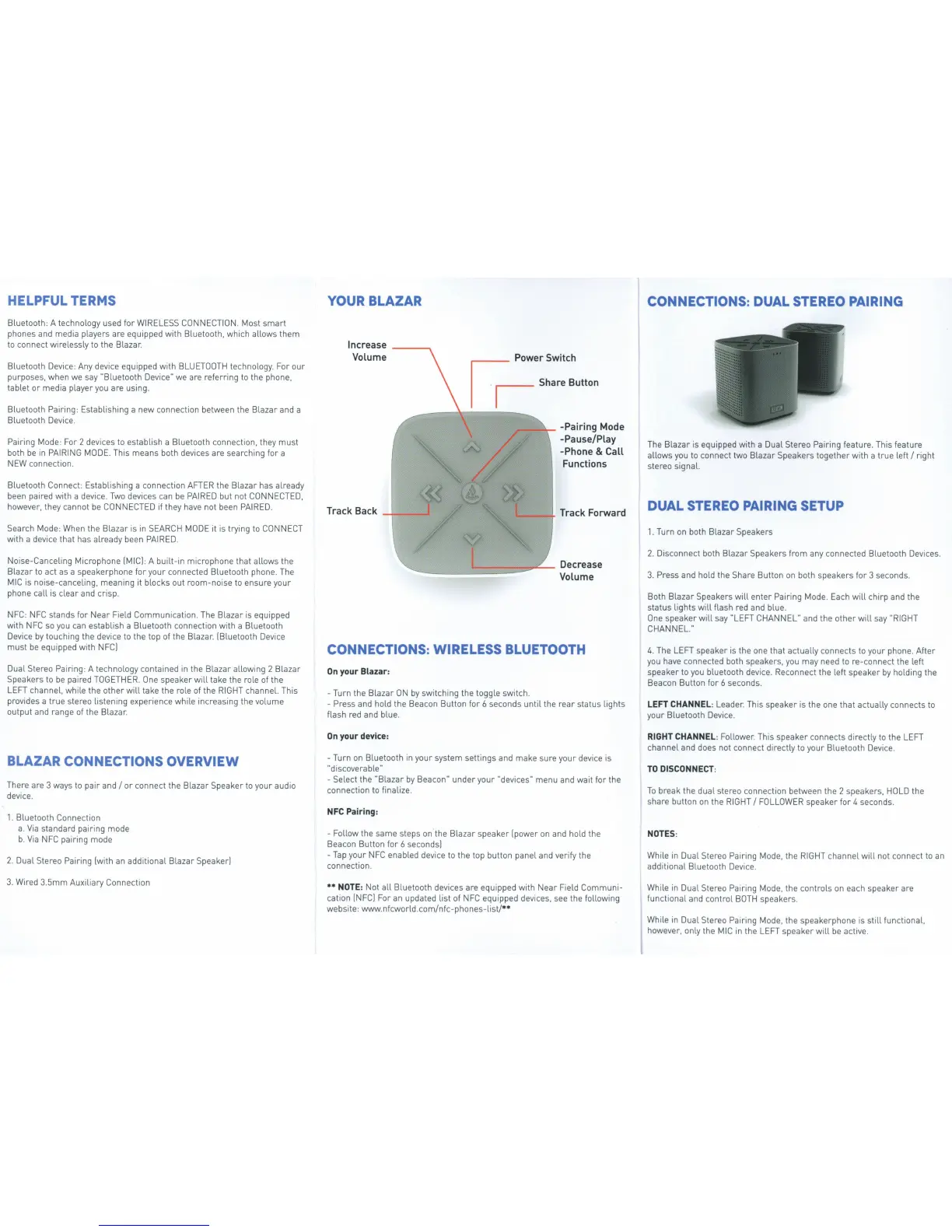
YOUR BLAZAR
Increase
Volume
Power Switch
~ ~
Share
Button
,.--
~
-
-Pairing Mode
-Pause/Play
-Phone
&
Call
Functions
CONNECTIONS: WIRELESS BLUETOOTH
On
your Blazar:
-Turn the Blazar
ON
by
switching the toggle switch.
- Press and
hold
the Beacon Button for 6 seconds until the rear status lights
flash
red
and blue.
On
your device:
-Turn
on
Bluetooth
in
your system settings and make sure your device
is
"discoverable"
-Select
the
"Blazar
by
Beacon" under your
"devices" menu and wait
for
the
connection
to
finalize .
NFC
Pairing:
-
Follow
the
same
steps
on
the Blazar speaker [power
on
and
hold
the
Beacon Button for 6 seconds)
-Tap your
NFC
enabled device
to
the top button panel and
verify
the
connection.
••
NOTE:
Not
all Bluetooth devices are equipped
with
Near
Field
Communi-
cation
[NFC)
For an updated list
of
NFC
equipped devices,
see
the
following
website: www.nfcworld.comlnfc-phones-listl••
CONNECTIONS:
DUAL
STEREO PAIRING
The Blazar
is
equipped
with
a Dual Stereo Pairing feature. This feature
allows
you
to
connect
two
Blazar Speakers together with a true left
I
right
stereo signal.
DUAL
STEREO PAIRING
SETUP
1.
Turn
on
both Blazar Speakers
2.
Disconnect both Blazar Speakers from any connected Bluetooth Devices.
3.
Press and
hold
the Share Button
on
both speakers for 3 seconds.
Both
Blazar Speakers
will
enter Pairing
Mode.
Each
will
chirp and the
status lights
will
flash
red
and blue.
One
speaker
will
say
"LEFT
CHANNEL"
and the other
will
say
"RIGHT
CHANNEL
."
4.
The
LEFT
speaker
is
the one that actually connects
to
your phone. After
you
have connected both speakers,
you
may need
to
re-connect the left
speaker
to
you
bluetooth device. Reconnect the left speaker
by
holding the
Beacon Button
for
6 seconds.
LEFT
CHANNEL:
Leader. This speaker
is
the one that actually connects
to
your Bluetooth
Device.
RIGHT
CHANNEL:
Follower. This
speaker
connects directly
to
the
LEFT
channel and does not connect directly
to
your Bluetooth
Device.
TO
DISCONNECT
:
To
break the dual stereo connection between the 2 speakers,
HOLD
the
share button
on
the
RIGHT
I
FOLLOWER
speaker for 4 seconds.
NOTES
:
While
in
Dual Stereo Pairing
Mode,
the
RIGHT
channel
will
not
connect
to
an
additional Bluetooth
Device
.
While
in
Dual Stereo Pairing
Mode,
the controls
on
each speaker are
functional and control
BOTH
speakers.
While
in
Dual Stereo Pairing
Mode,
the speakerphone
is
still functional,
however,
only
the
MIC
in
the
LEFT
speaker
will
be
active.


 To Next Page
 Loading...