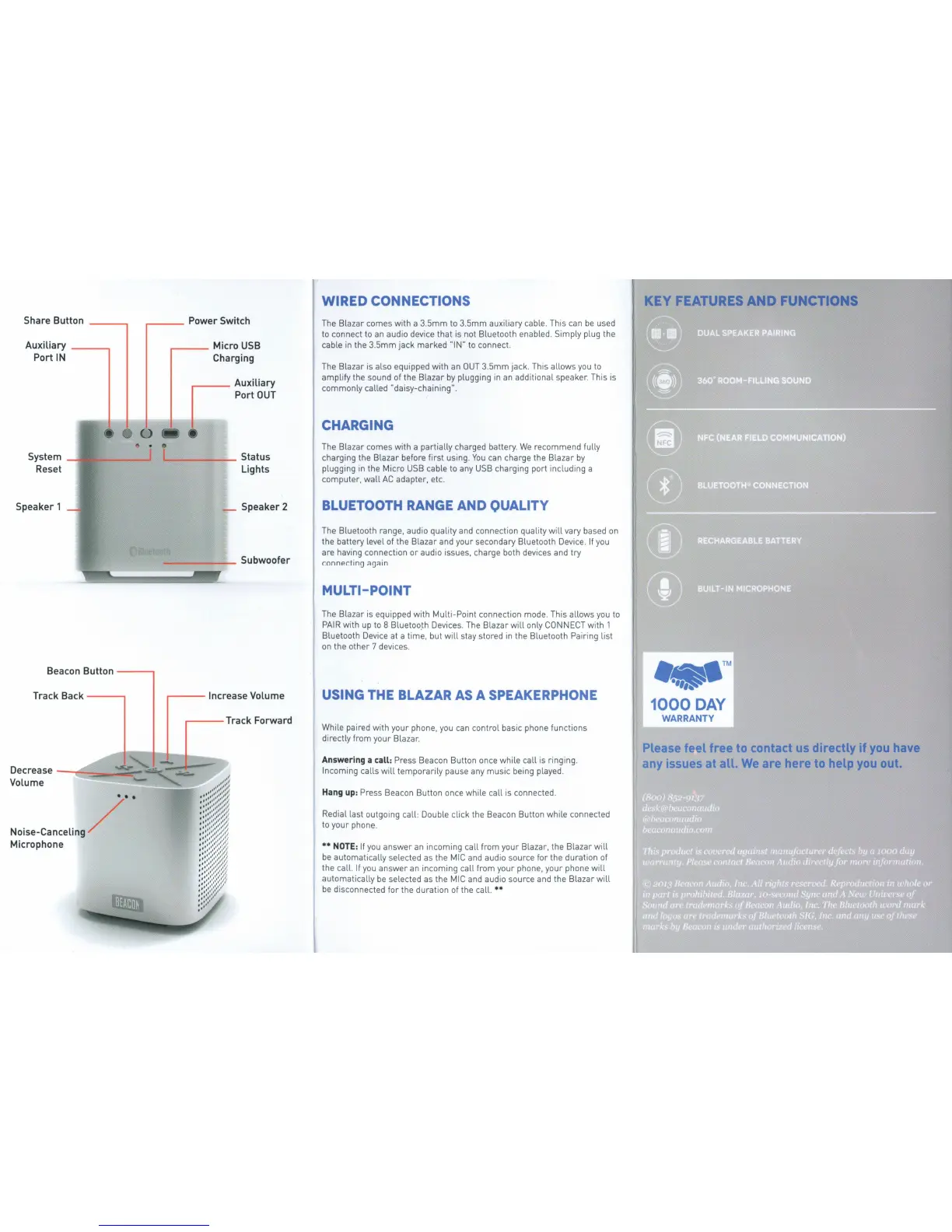
Share Button
-----,
Auxiliary
---..,
Port
IN
System
Reset
Speaker 1
Beacon Button
---..,
Track Back
---..,
De
crease -
-=c::::
:::::;--ie:-
-
Volume
Noise-Cance
li
ng
/ ' •
Microphone
,...----
Micro
USB
Charging
~
Auxiliary
I
----
Port
OUT
.__
_____
Status
Lights
Speaker 2
------
Subwoofer
,----
Increase Volume
,...---
Track Forward
WIRED
CONNECTIONS
The Blazar comes with a 3.5mm
to
3.5mm auxiliary cable. This can
be
used
to
connect
to
an audio device that
is
not Bluetooth enabled. Simply plug the
cable
in
the 3.5mm jack marked "I
N"
to
connect.
The Blazar
is
also equipped
with
an
OUT
3.5mm jack. This allows
you
to
amplify the sound
of
the Blazar
by
plugging
in
an additional speaker. This
is
commonly called "daisy-chaining".
CHARGING
The
Blazar comes
with
a partially charged battery.
We
recommend
fully
charging the Blaza r before first using.
You
can charge the Blazar
by
plugging
in
the
Micro
USB
cable
to
any
USB
charging port including a
computer, wall
AC
adapter, etc.
BLUETOOTH RANGE
AND
QUALITY
The
Bluetooth range, audio quality and connection quality
will
vary
based
on
the battery level
of
the Blazar and your secondary Bluetooth
Device
.
If
you
are having connection or audio issues, charge both devices and try
connecting again.
MULTI-POINT
The Blazar
is
equipped
with
Multi-Point connection mode. This allows
you
to
PAIR
with
up
to
8 Bluetoo.th Devices.
The
Blazar will
only
CONNECT
with
1
Bluetooth
Device
at a time, but
will
stay stored
in
the Bluetooth Pairi
ng
list
on
the other 7 devices.
USING THE BLAZAR
AS
A SPEAKERPHONE
Wh
i
le
paired
with
your phone,
you
can control basic phone functions
directly from your Blazar.
Answering a call: Press Beacon Button once
wh
i
le
call
is
ringing .
Incoming calls
will
temporarily pause any music being played.
Hang up: Press Beacon Button once while call
is
connected.
Redial last outgoi
ng
call: Double
cl
i
ck
the Beacon Button while connected
to
your phone.
**NOTE:
If
you
answer an incoming call from your Blazar, the
Bla
z
ar
will
be
automatically selected
as
the
MIC
and audio source
for
the duration
of
th
e call.
If
you
answer an incoming call from your phone, your phone
will
automatically
be
selected
as
the
MIC
and audio source and the Blazar
will
be
disconnected for the duration
of
the call.**
i KEY FEATURES
AND
FUNCTIONS
...
TM
1000
DAY
WARRANTY
Please
feel free
to
contact
us
directly if
you
have
any
issues
at
all.
We
are here
to
help
you
out.


 To Next Page
 Loading...