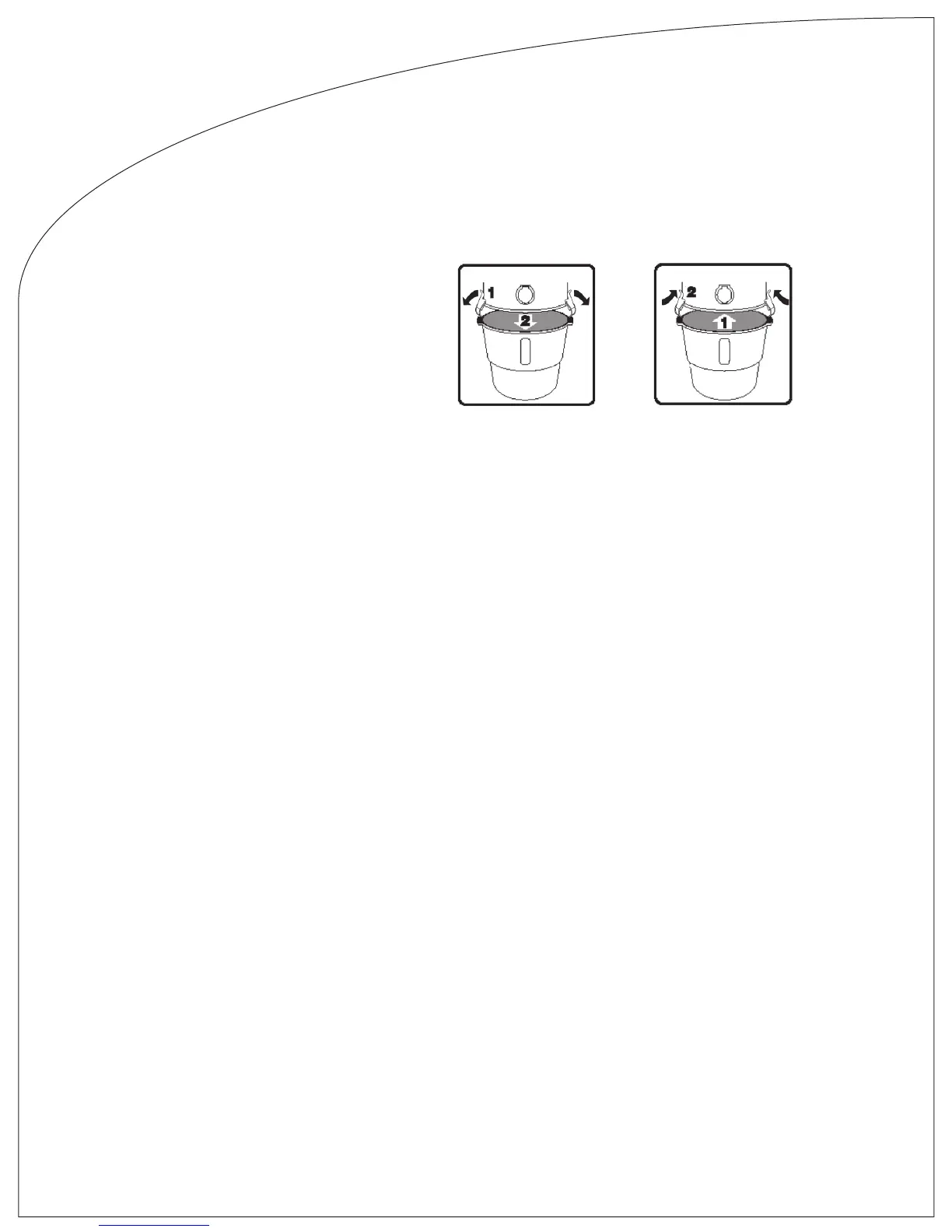
Bucket
Your Beam Built-in Vacuum has two swing-down clasps that provide a rm tight
hold to the bucket. To remove the dirt bucket to empty, or check lter, hold
bucket lip and pull locking tab outward to release clasp. Both sides must be
released to remove bucket. Note: If bucket is full or otherwise contains heavy
debris, you must have a rm hold on the bucket to prevent spillage.
Trouble Shooting
Partial Loss Of Suction
1. Clean out dirt receptacle. Inspect and clean lter (see Filter Maintenance). Replace dirt receptacle.
2. Turn ON power unit with on/off button. Then check the suction at each inlet. If it is not the same at each one, the line is partially
clogged. To locate the clogged area in the system, start with the inlet closest to the power unit and check the suction. Continue to
check each successive inlet until you locate the inlet where a loss In suction is occurring. The clog will be between that inlet and
the previous one you checked. To remove the clog, carefully Insert an electrician’s sh tape in the inlet and push the obstruction
through. Or, with another vacuum, you can reverse the suction in the system to remove the clog. If neither method is successful,
call your Beam dealer.
3. Have your authorized Beam dealer check the gasket under the motor and the gasket located where the dirt receptacle
attaches to the upper cylinder.
Total Loss Of Suction (with motor running)
1. Check the hose for obstruction.
2. Turn on power unit with the on/off button and follow the same procedure as in step #2 above. However, with a total loss of
suction at all inlets, if the problem is a clog in the system, it would be located between the power unit and the rst inlet.
Motor Refuses To Start
1. Check fuses or breakers (trip switches) in the electric panels in your house.
2. If your power unit has a control light, the green light will indicate when the unit has proper voltage and the low-voltage circuit is
supplying power to the inlets. Should the light be on, but the motor starts only with the on/off button and not at the inlets, the
problem is broken low-voltage wiring to the wall inlets.
Call your authorized Beam dealer.
Automatic Shutoff
In the unlikely event the unit is unintentionally left ON, your central vacuum has two different safe guards to automatically turn
OFF the unit to protect your vacuum from motor damage.
The rst safe guard is a 30 minute timer which will automatically turn OFF the power unit after 30 minutes of continual use. To
restart, remove the hose from the wall inlet and reinsert, the power unit should come back ON.
The second safe guard is thermal protection shutoff to prevent any accidental overheating of the vacuum motor and will
automatically turn OFF the unit. To restart, unplug the power unit from the wall for 2-minutes allowing the power unit to cool down
and reset itself. After the 2-minute period, plug the power unit back into the wall and turn the power unit ON. If the power unit
does not turn ON, repeat the procedure one more time for extra cooling time. If the power is still not operational, please contact
your authorized dealer or distributor.
Beam Owner’s Manual English


 To Next Page