
 Need help?
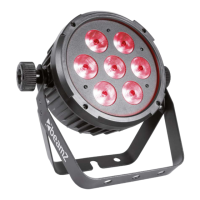
Do you have a question about the Beamz UplIght Par and is the answer not in the manual?
Read manual, observe warnings, ensure ventilation, check power cord, avoid short intervals, no dimmer use, install in ventilated place.
Verify mains voltage, use protected circuit, ensure grounding, handle plug correctly, unplug during lightning or disuse.
Allow air space, block area below, use safety rope for height >100cm, avoid direct sunlight on lens.
Avoid heat/moisture/dust, do not touch hot housing, use indoors, avoid flammable materials, allow acclimatization after transport.
Carefully unpack, check for damage, retain packing material, notify shipper if damaged.
Connect to mains voltage matching unit specifications, use protected circuit with ground.
Connect controller output to first unit's DMX input, chain units by connecting output to next input.
Close DMX line on last unit using a 120 Ohm resistor between signal (-) and signal (+).
Toggle blackout, activate automatic light programs and select different auto programs.
Activate sound-reactive mode and adjust sound sensitivity using SENSITIVITY button.
Control strobe speed, select gradual color change, and adjust fade speed for various modes.
Select one of eight static colors and adjust brightness using R, G, B, UV buttons or 1-9.
Disconnect power, use soft cloth/low-pressure air, avoid solvents, clean glass gently, dry thoroughly.
Check power, cables, controller connection, DMX line, unit addressing, or potential internal faults.
Address errors after reset, overheating, or intermittent light output by cooling, cleaning, or checking power supply.
Lists DMX address setting, remote control functions, and dimming/color/strobe/sound parameters.
Details functions for Master dimmer, Color (R, G, B, UV), Strobe, and Function (color output, jumping, pulse, sound).
Diagram illustrating the pinout for connecting RJ45 to XLR DMX cables.
Details rated voltage, battery, LED type, beam angle, illuminance, DMX channels, functions, dimensions, and weight.
 General
| LEDs | RGBW |
|---|---|
| Light Source | LED |
| Voltage | 100-240VAC |
| IP Rating | IP20 |
| Power Supply | 100-240V AC, 50/60Hz |
| Housing Material | Aluminum |
| Control Modes | DMX |
| Control | DMX |


 To Next Page