34 English
7.9 Temperature/humidity history of the last 24 hours
The main unit automacally records the weather data from the past 24 hours.
1. Press the "HISTORY" buon to check the historical record of the current channel
for the last one hour.
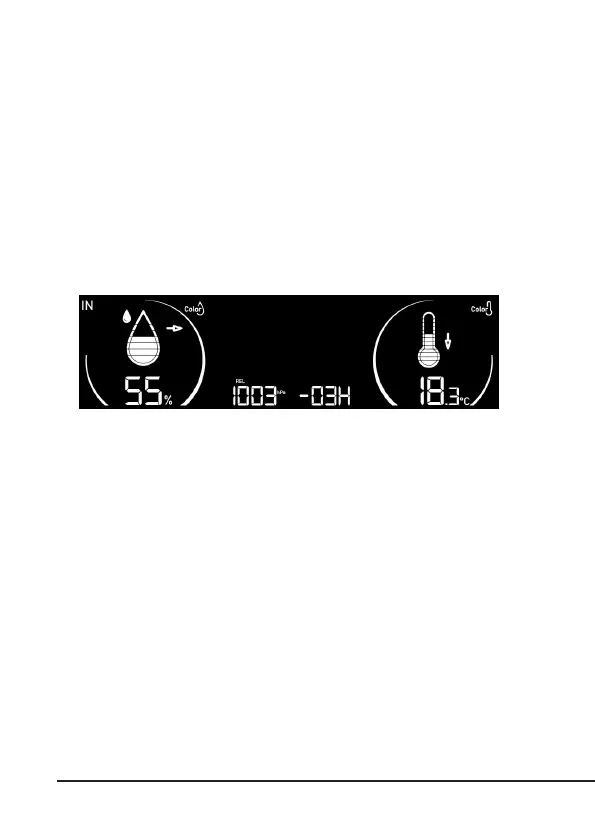
2. Press the "history" buon repeatedly to display the historic weather records of
the past 2,3,4,5 ...24 hours. The example below shows the values of 3 hours (-03H).
The weather staon switches back to normal mode in the event of inacvity.
8. MAX/MIN data records
The base staon stores the MAX/MIN weather data records since the last manual
reset.
1. In normal mode, press the "MEM/-" buon once to display the maximum
temperature of the current channels.
2. Press the "MEM/-" buon repeatedly to show the Max/Min display with
me stamp in this order: Maximum temperature -> Minimum temperature
-> Maximum humidity -> Minimum humidity -> Back to the normal mode.
3. When the MAX/MIN values are displayed, the display returns back to
normal mode aer 6 seconds.
4. To delete the MAX/MIN records of the current display channel, press and
hold the MEM buon for 2 seconds when the device displays the maximum
recording. You will hear a "beep" when the reset has been carried out.



 To Next Page