Tips
After the cleaning cycle is completed, pull out the robot gently. Then, the relevant cleaning
data will be synchronized once the APP automatically connects (the robot must be within the
Wi-Fi coverage area).
When the robotic pool cleaner does not have enough power to complete this cleaning task,
it will automatically climb the wall and stop on the surface next to the wall, and the panel
indicator on the robot will show solid orange.
To ensure the robot's cleaning performance and lifespan, do not take out the filter basket
during cleaning.
11
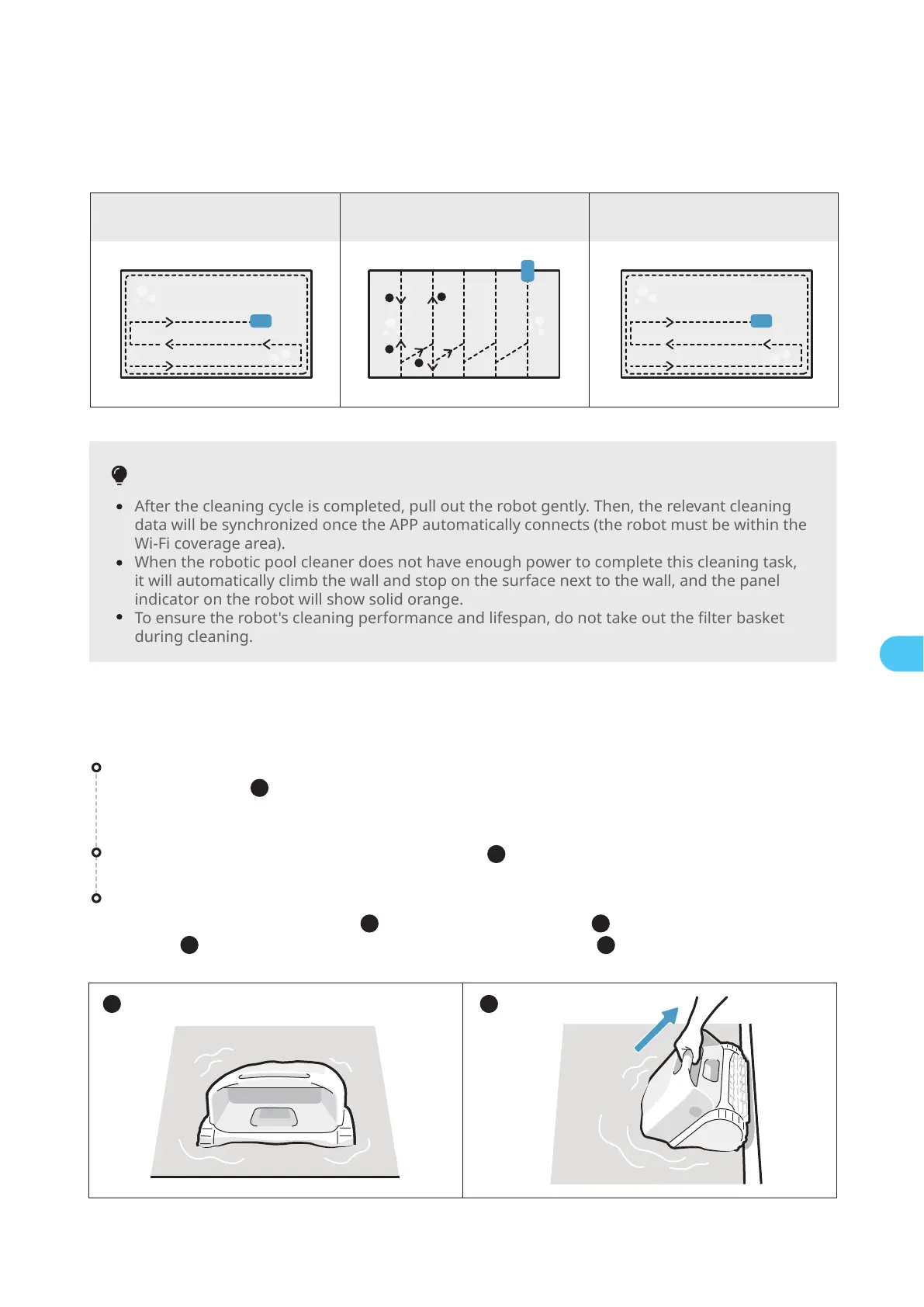
7.4 During Cleaning
Cleaning Path:
Pull the robot out of the swimming pool gently ( ).
After the cleaning task is completed, the robotic pool cleaner will automatically moor at the
edge of the pool ( ).
If left idle for an extended period, the robot will descend to the pool floor to conserve power. To
retrieve it, the supplied hook can be utilized.
7.5 After Cleaning
1
2
Clean the filter basket
Open the top cover of the robot ( ), take out the filter basket ( ), separate the outer and inner
baskets ( ). Rinse the baskets and re-assemble it into the robot ( ).
3
5
6
4
Floor Wall Surface
2
1
3
4
1 2
EN
* The robotic pool cleaner will automatically disconnect from the phone after entering the water.


 To Next Page
 Loading...