6
EN
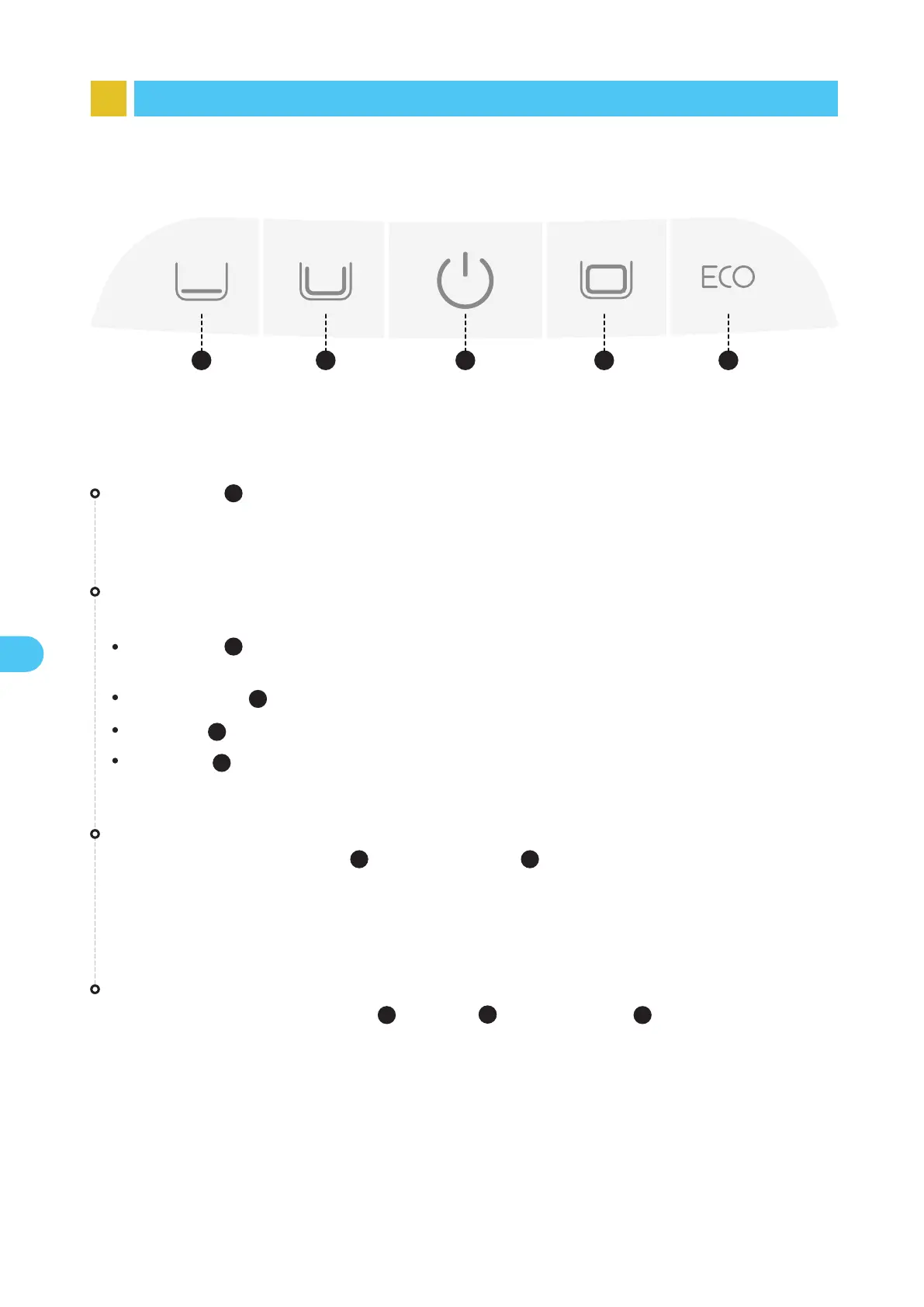
5 Button Functions
1 2 43 5
Factory Reset
Press and hold the "Standard Mode ( )", "Power ( )" and "Pro Mode ( )" buttons simultaneously
for about 10s to restore the factory settings.
Hotspot Configuration
Press and hold both the "Power ( )" and "Quick Mode ( )" buttons simultaneously for about 3s to
trigger the hotspot configuration.
Power Button
Short press to turn the robot on, and press and hold for about 3s to turn it off.
3
3
3
Short press the corresponding mode button to switch.
Quick mode ( ): Clean the floor once;
(The default mode upon factory settings)
Standard mode ( ): Clean once in the order of floor, walls and waterline;
Pro mode ( ): Clean once in the order of floor, walls, waterline and surface;
ECO mode ( ): By default, clean the floor every two days.
Mode Button
1
2
5
4
1
2
4
3
5


 To Next Page