WARNING
The Bebcare iQ should not be regarded as a medical device. Premature
babies or those considered to be at risk should be under the supervision of
your doctor or health personnel.
Direct supervision of your baby at a regular interval by a responsible
adult is strongly recommended in addition to using this baby monitor.
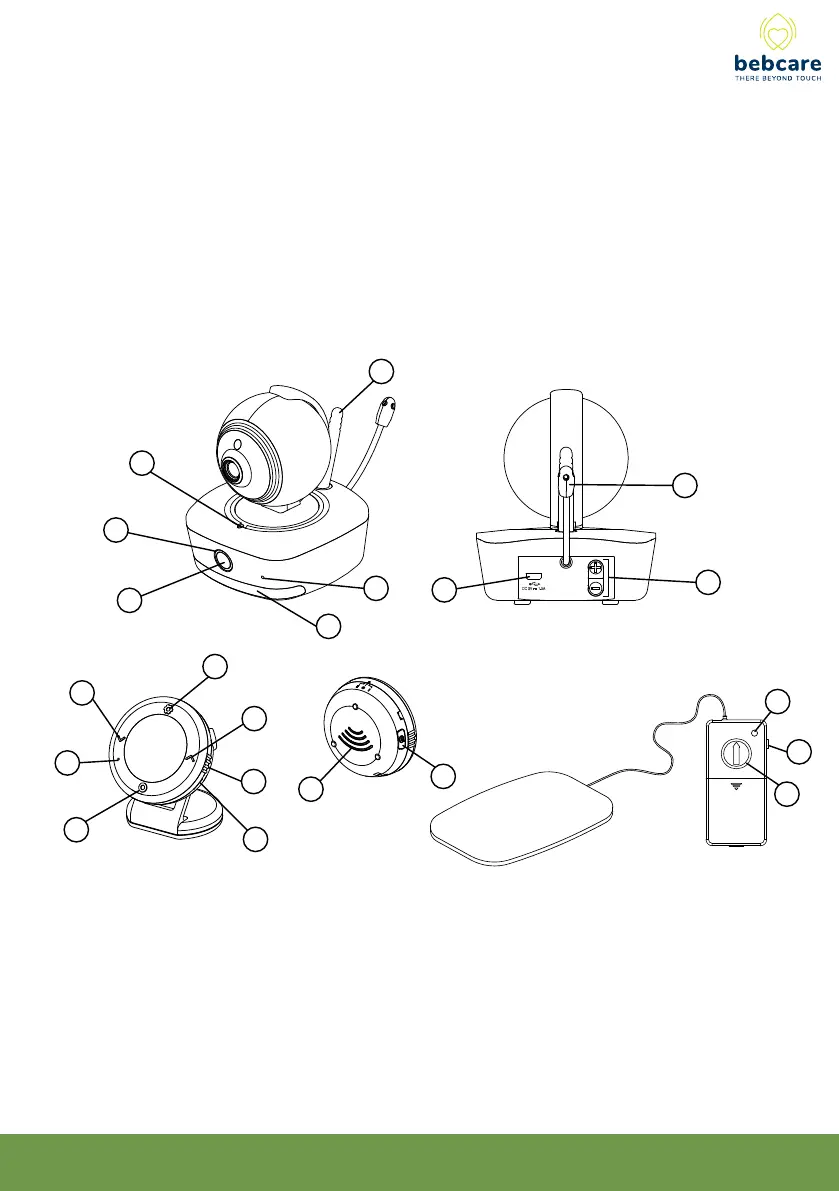
CONTROL LAYOUT and ICONS
10
4
5
1
2
3
9
7
6
14
18
13
12
15
16
17
11
20
19
21
8
1. Power button
2. Power indicator
Green - On
Pulsating green
-Ultra safe mode
3. Wi indicator
Blue - WiFi on
Flashing Red
- Connecting to router
4. Mic
5. Night light
6. USB port
7. Antenna
8. Volume up/
down button
9. Temperature sensor
10. Setting button
Long press to enter
setting mode /Short
press to show settings
[ Normal mode ]
To conrm
[ Setting mode]
16. Side ring to turn on/o/vibration
17. USB port
18. Speaker
19. Movement indicator
20. Movement sensitivity Knob
21. Alarm hold button
11. Talk button
12. Volume down
[Normal mode]
To select
[ Setting mode]
13. Mic
14. Wi on/o or
Ultra-green mode selection
15. Volme up [ Normal mode ]
To Select [Setting mode ]
4



 To Next Page