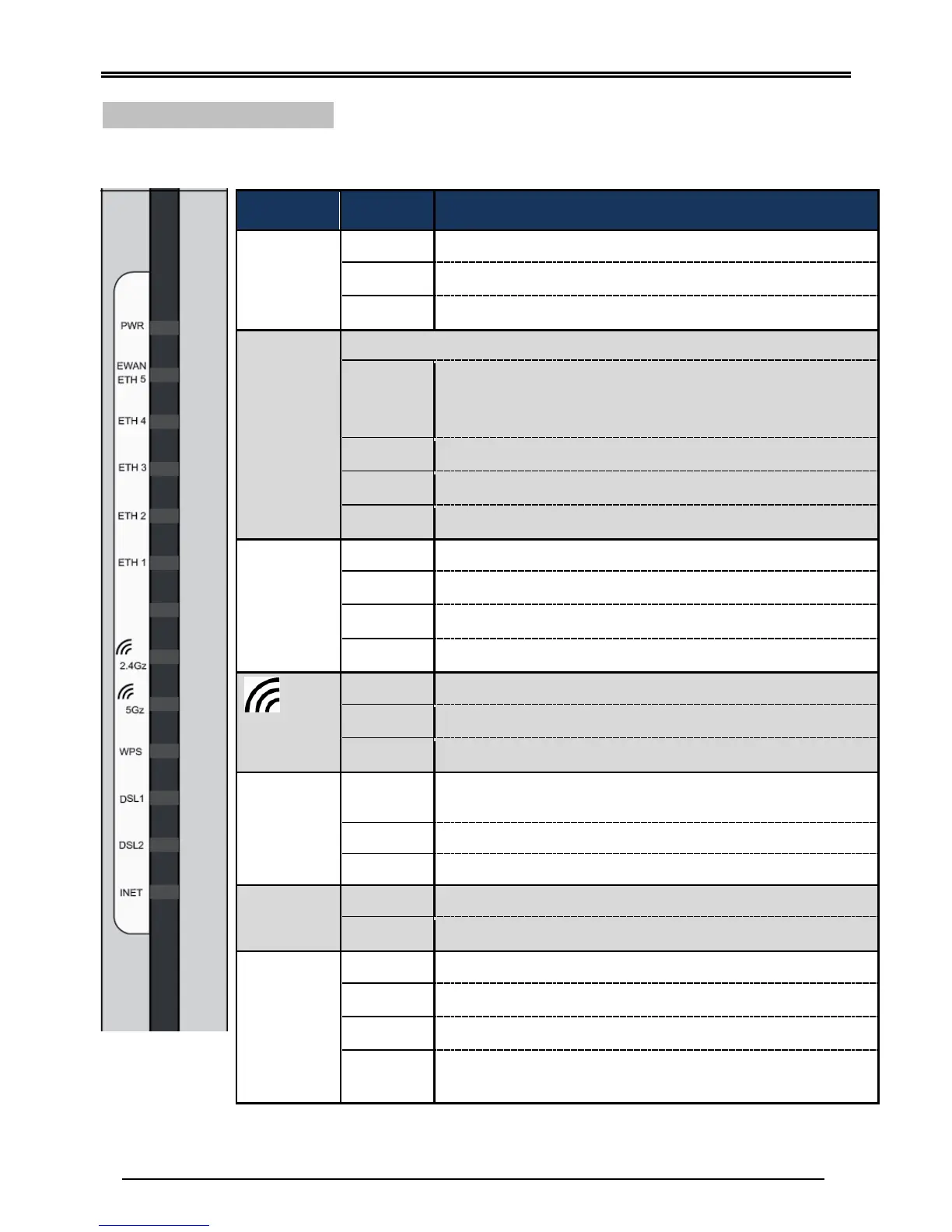
System failure or in emergency mode
Gigabit
EWAN /
ETH 5
(Ethernet)
Can be configured to be WAN port for broadband connectivity
Ethernet LAN : Connected to an Gigabit (1000Mbps)
Ethernet device
Ethernet WAN: Successfully connected with a broadband
connection device
LAN port is connected to an 10/100Mbps Ethernet device
Data being transmitted/received
No device is connected to the Ethernet port
Gigabit
ETH 1~4
(Ethernet)
LAN port is connected to an 1000Mbps Ethernet device
LAN port is connected to an 10/100Mbps Ethernet device
Data being transmitted/received
No device is connected to the Ethernet port
Wireless connection established
Data being transmitted / received
Wireless being turned off
Wireless device(s) being connected successfully via WPS
mode
WPS is enabled and trying to establish a WPS connection.
Successfully connected to an ADSL DSLAM (Line Synced).
IP received and traffic is passing thru the device.
Data being transmitted / received
BEC 8920AC is unable to get a public (WAN) IP address
BEC 8920AC is either in bridged mode or WAN (DSL)
connection is not ready


 To Next Page