14
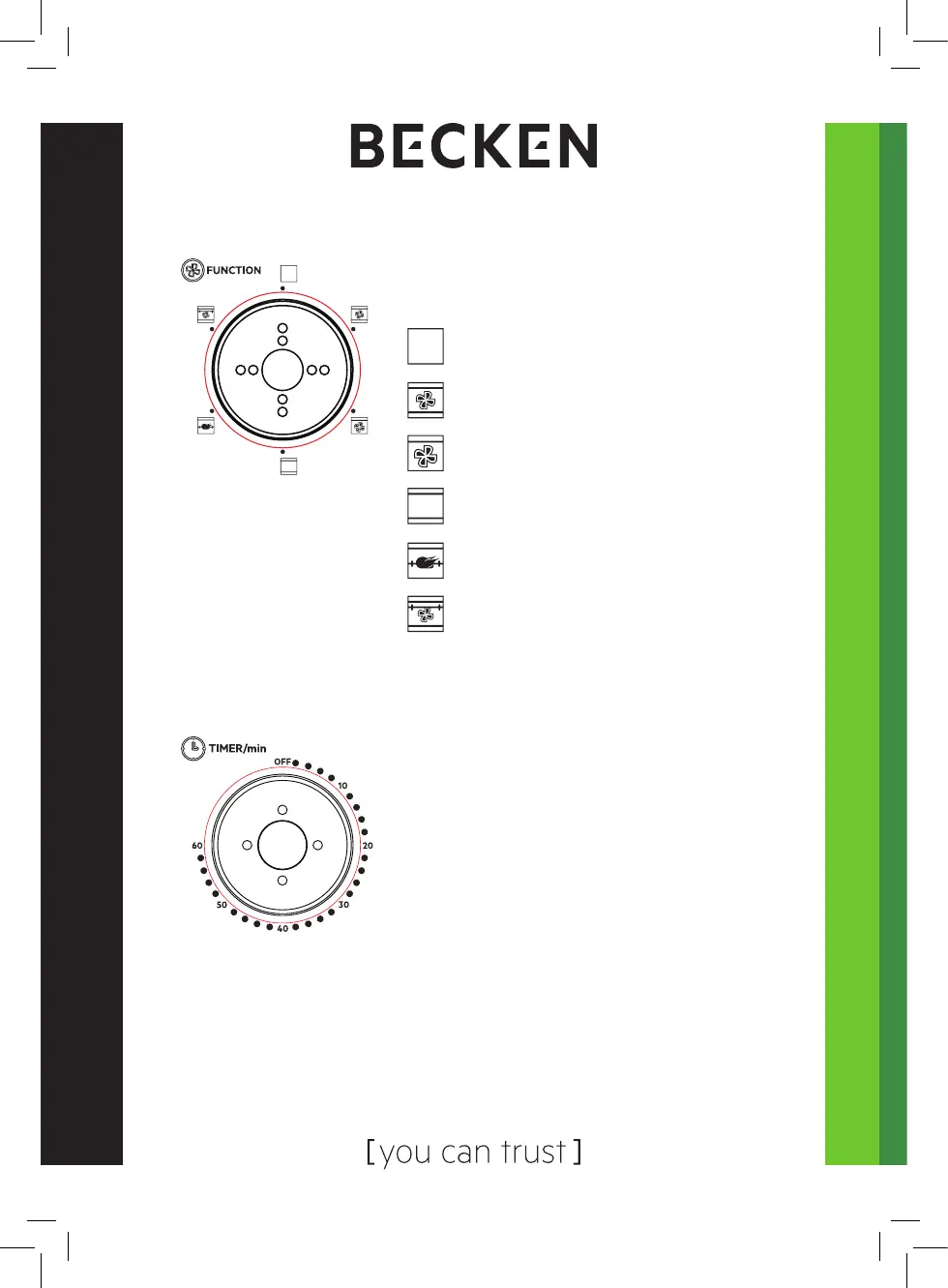
Function Control
• Select the suitable heating element
according to the dishes you are going
to cook.
Timer Control
The front Indicator light indicates whether the oven is switched on or not.
• Set the arrow on the “Timer” to the
number which indicates the cooking time
(minutes) according to the dishes you are
going to cook.
• Set the “Timer” by turning it clockwise. The
oven will turn o automatically at the end
of the selected time and a bell will ring.
NOTE: When setting the timer to less than 5 mins, turn it past 6 mins.
and then back to the desired time.
• The oven can be turned o manually during cooking by turning the
“Timer” anti-clockwise to the “OFF” position.
OFF
Upper & Lower Heating + Convection
Function
Upper Heating + Convection Function
Upper & Lower Heating
Upper Heating + Rotisserie
Upper & Lower Heating + Convection
Function + Rotisserie


 To Next Page