5
- Only professional technicians should service the device. Opening or
removing covers may result in exposure to dangerous voltage points or
other risks.
- Unplug the device from the wall outlet and refer to professional service
personnel for the following conditions:
o If liquid has been spilled into the product
o If the device has been exposed to rain or water
o If the device does not operate normally when following the operation
instructions
o If the device exhibits a distinct change in performance
1.3. Main Features
- Plug & play, quick installation
- Use existing electrical wiring to connect your devices to the Internet
- Ideal solution for connecting computers and peripherals to the network
- Audio & Video compatible
- Low consumption: 3.5 W max
- High speed data transfer rates up to 200 Mbps
- High speed internet access, file transfer and sharing as well as audio and
video streaming
- Reliable and efficient connection for computers and peripherals such as
printers, NAS, cameras, game consoles, and other multimedia devices
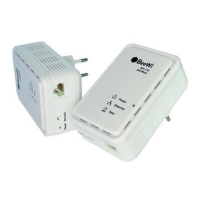
1.4. Short Description
Ethernet Port :
Connect to the broadband router, the computer or other device via supplied
RJ45 Ethernet cable.
Buttons :
RST (reset):Restore the factory defaults.
SECURITY (Network Membership Key): Set the membership state.
- Pressing and holding the SECURITY button for more than 10 seconds ran-
domizes the NMK value.
- Pressing and holding the SECURITY button for more than 3.0 seconds
makes the adapter a member of the existing network.
ENGLISH


 To Next Page