10 11Quick Start Guide
SPACE FX
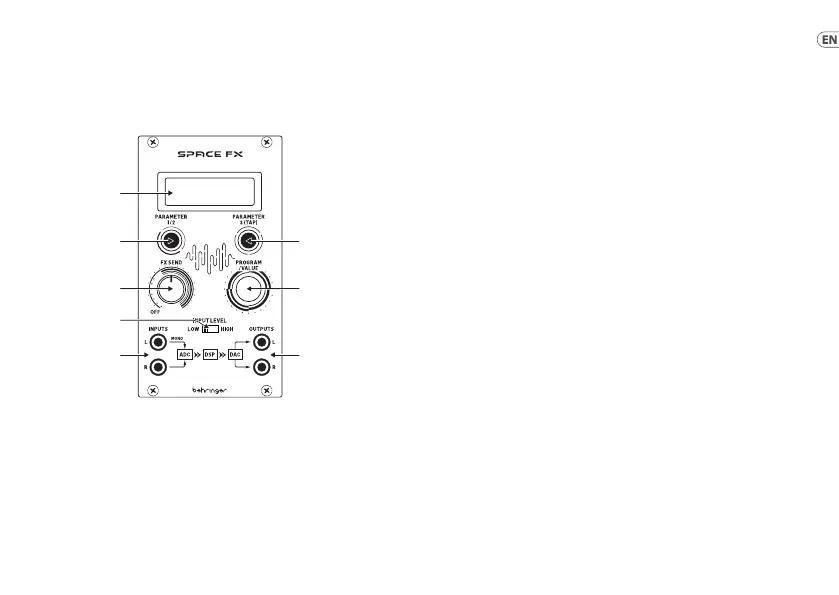
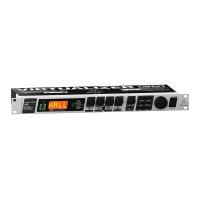
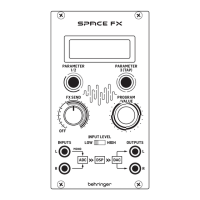
SPACE FX Controls
(EN) Controls
(1) DISPLAY SCREEN – this screen
shows the parameters for the
eects programs and their
respective settings.
(2) PARAMETER 1 & 2 CONTROL
– this button switches between
adjustment of parameters 1
and 2. By default parameter 1
is adjusted, pressing the control
switches to adjustment of
parameter 2.
(3) PARAMETER 3 & TAP CONTROL
– this button selects parameter
3 for adjustment, and can be
used as a Tap control where
appropriate (see parameter
table below).
(4) FX SEND – Use this control to
adjust the amount of FX added,
from minimum to maximum
eect when fullyclockwise.
(5) PROGRAM/VALUE – use
this control to select the
required program and to adjust
parameter values in conjunction
with buttons 2 and 3.
(6) INPUT LEVEL – use this switch
to select low level input for
Eurorack signals or high level for
line level.
(7) INPUTS – the Space FX can
process a stereo input or mono
input to the left socket.
(8) OUTPUTS – stereo output of the
processed signal.





 To Next Page