Voice Recorder
is a compact electronic module, placed on the
upper door, covered by a plastic case.
The main functions are “voice recorder”,
“clock” and “alarm”.
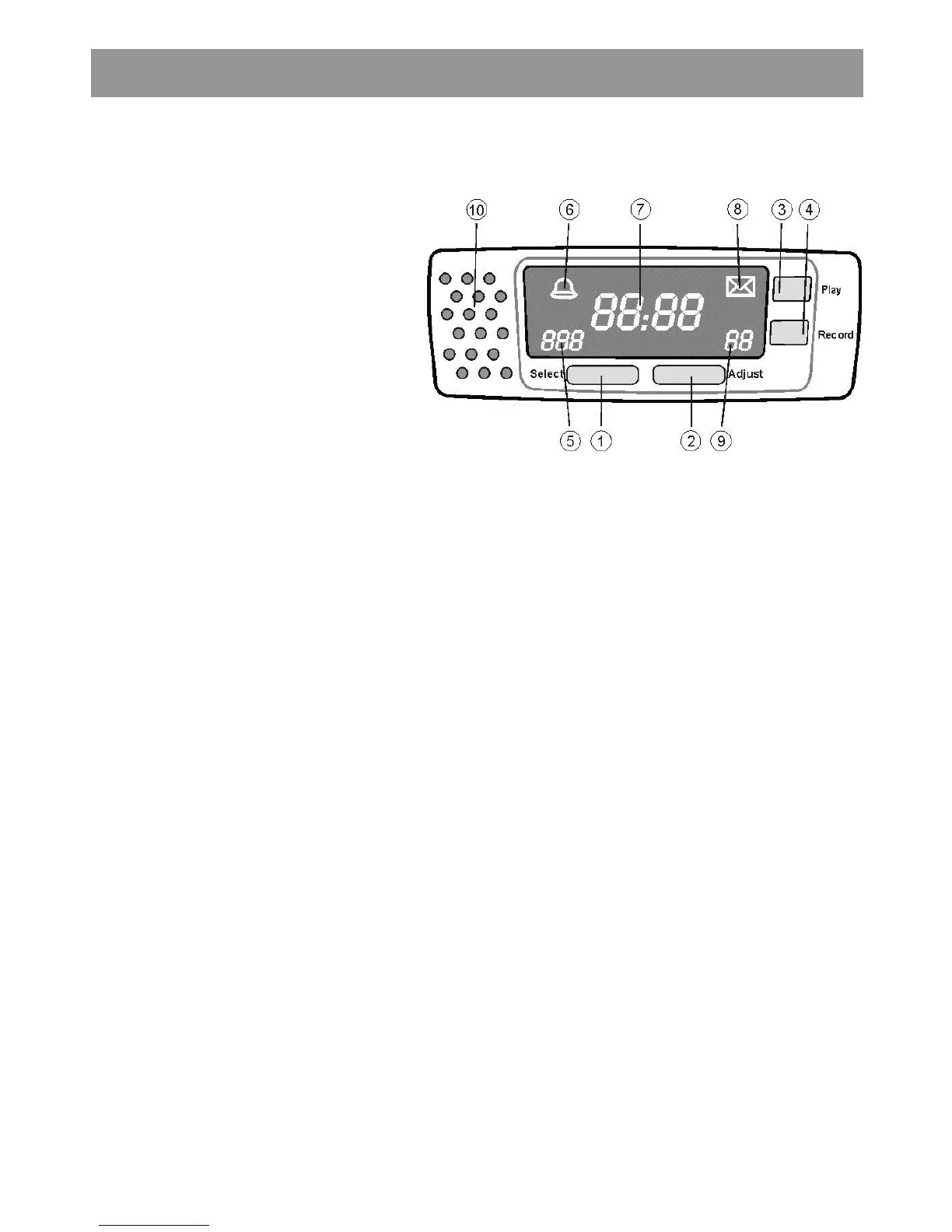
1. Select - allows to chose a function
2. Adjust - modifies values for the
selected function
3. Play - plays a previously recorded
message
4. Record - allows to record a message
5. Timer counter display
6. Bell graphic sign
7. Clock display
8. Graphic sign for Voice Recorder
9. Voice recorder display
10. Microphone / speaker
Timer (alarm)
The display of the time at the end of which the
alarm will be active is indicated by a display (5).
After power is on, the value of the timer is set
at 000 minute.
When Select button is pressed, timer
counter(5) digits will blink and the ring bell
(6)sign will be on. Press Adjust (2) button
until you reach the value you want to
memorise. Selected value is memorised and
timer function becomes active if Select button
is pressed or no other button will be pressed
for 5 seconds. When the time is elapsed, the
alarm will be on and an intermittent sound will
be heard. The alarm will automatically stop
after 5 minutes, or when any button will be
pressed.
Clock
The clock function allows to display time in
electronic mode. If Select button (1) is
pressed twice, then hour can be adjusted.
The hour digits will blink for 5 s and value can
be changed using Adjust button (2). If Select
button is pressed one more time, selected
value for hour is stored and minute digits will
blink. Minute value can be modified by
pressing the Adjust button. The selected
value is stored, only if Select button is
pressed. If after the modification of the hour or
minutes the Select button is not pressed, the
adjusted value will not be saved.
Voice recorder
The Voice recorder function allows the user
to record a max 60 s message. A 30 s default
message is available when power is on, or
when the recorded message was deleted.
Envelope sign (8) indicates that a new
message is in memory and it was not read.
When a message is recorded and it was not
read, the graphic sygn envelope (8) is active.
A counter (9) displays the duration of the
record.
To record a message it is required to keep
pressed the Record button (4). Counter digits
(9) will blink then it will display the duration of
the record, which will remain until listening the
message. When Record button is released,
the envelope sign will be active and the
recorded message will be stored.
To listen a recorded message it is necessary
to press the Play button (3). After message
was played, envelope sign will be off, but
recorded message will not be deleted and can
be listened again. When the message is
listened the seconds counter will display the
remaining time until the message is finished. If
the user wants to stop listening the Play
button will be pressed again. When a new
message is recorded the previous one will be
erased. If a power cut occurs, or Record
button is pressed for 2 s, then the recorded
message is deleted.



 To Next Page