Dishwasher / User’s Manual
13 / 43
EN
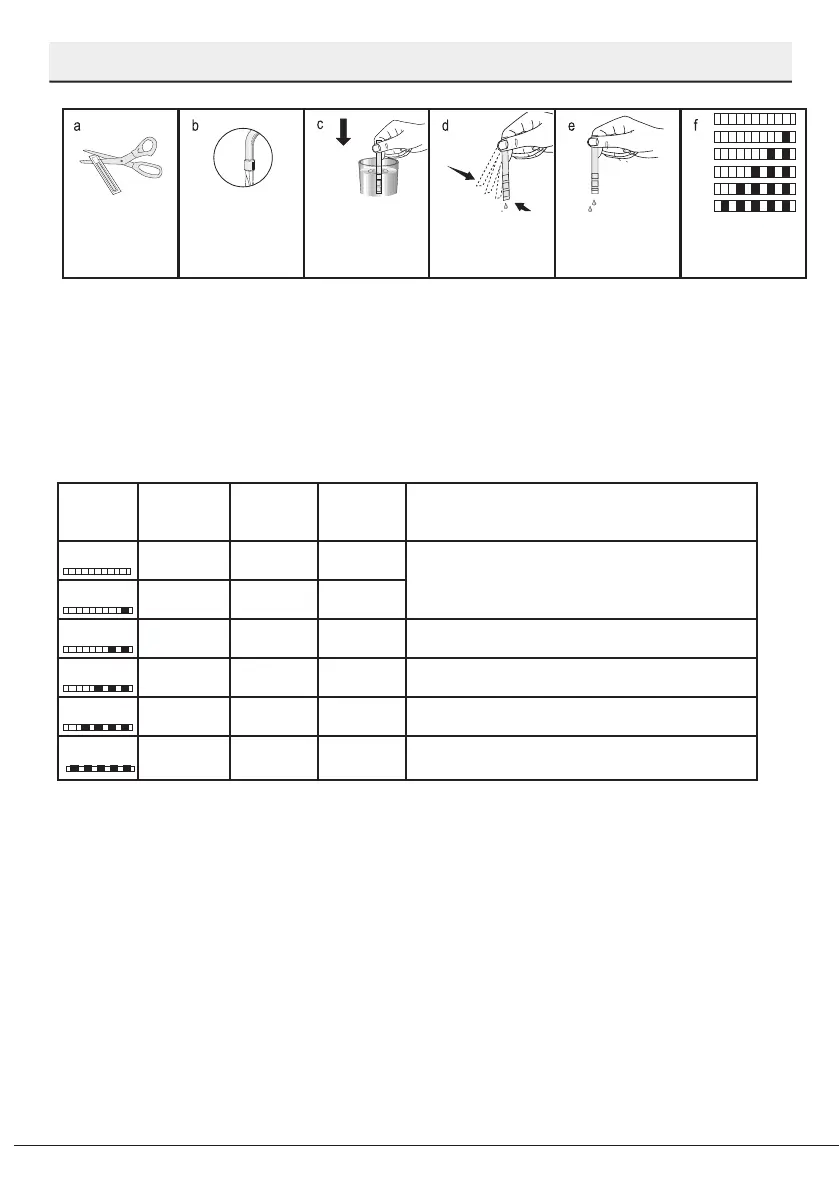
Preparation
Unpack the test
strip.
Open the tap and
let the water ow for
approx. 1 minute.
Dip in the test strip
into the water for 1
second.
Take out the strip
from the water and
shake it.
Wait for 1 minute.
Make the necessary
adjustment
according to the test
strip.
After detecting the water hardness:
1. After turning on your machine, press and hold the Delayed Start and Start/Pause/Cancel keys
respectively.
2. Using the Delayed Start key, turn on LEDs 9 and 3.
3. Use the function keys to adjust the water hardness level.
4. Press On / Off key to save the setting.
Water hardness level adjustment table
Hardness
Level
English Water
Hardness °dE
German Water
Hardness °dH
French* Water
Hardness °dF
Water Hardness Level Indicator
Level 0
0-5 0-4 0-8
On the 1
st
level, the 1
st
programme LED turns on.
Level 1
6-9 5-7 9-13
Level 2
10-15 8-12 14-22 On the 2
nd
level, the 2
nd
programme LED turns on.
Level 3
16-19 13-15 23-27 On the 3
rd
level, the 3
rd
programme LED turns on.
Level 4
20-24 16-19 28-34 On the 4
th
level, the 4
th
programme LED turns on.
Level 5
25-62 20-50 35-90
On the 5
th
level, the 1
st
, 2
nd
, 3
rd
and 4
th
programme LEDs
turn on.
If the hardness level of the water that you use is above 90°dF (French standard for water
hardness) or if you are using well water, than it is recommended to use filter and water
purification devices.If the hardness level of the water that you use is below 7°dH, there is no
need to use salt in your dishwasher. In this case, the Salt Indicator light on the control panel of
your dishwasher will light continuously.
If the water hardness is set to level 1, the Salt Indicator will light continuously although it is not
necessary to use salt. If you use salt under this condition, salt will not be consumed and the lamp
will not illuminate.


 To Next Page