9 - EN
Starting the programme
Press Start / Pause button to start the programme.
Programme follow-up light showing the startup of
the programme will turn on.
Progress of programme
Progress of a running programme can be followed
from the Programme Follow-up indicator with the
lights "Running" and "End/Cancel".
C
Ifthemachinedoesnotpasstothespinning
step, automatic unbalanced load detection
system might have been activated due to the
unbalanced distribution of the laundry in the
machine.
Loading door lock
There is a locking system on the loading door of the
machine that prevents opening of the door in cases
when the water level is unsuitable.
Ifyouwanttoopenloadingdoorwhenthemachine
is in use, press "Start / Pause" button to pause the
machine."DoorOpen"lightwillstartflashingwhen
the machine is switched to Pause mode. Machine
checksthelevelofthewaterinside.Ifthelevel
issuitable,"DoorOpen"lightilluminatessteadily
within 1-2 minutes and the loading door can be
opened.
Ifthelevelisunsuitable,"DoorOpen"lightturnsoff
andtheloadingdoorcannotbeopened.Ifyouare
obligedtoopentheloadingdoorwhenthe"Door
Open" light is off, you have to cancel the current
programme; see "Cancelling the programme".
Switching the machine to pause mode
Press the "Start / Pause" button to switch the
machine to pause mode while a programme is
running. "Running" light starts flashing on the
Programme Follow-up indicator to show that the
machine has been switched to the pause mode.
Whentheloadingdoorisreadytobeopened,
"DoorOpen"lightwillilluminatecontinuously.
Adding or taking out laundry
Press "Start / Pause" button to switch the machine
topausemode.Whenthemachineisswitchedto
pausemode,"Running"lightflashes.Waituntilthe
LoadingDoorcanbeopened.OpentheLoading
Doorandaddortakeoutthelaundry.
ClosetheLoadingDoor.Press"Start/Pause"
button to start the machine.
C
The door can be opened if the water level is
suitable.Dooropensymbolflashesuntilthe
loading door gets ready to be opened. The
symbol's light is steady when the door is ready
to open. You can open the door to add/take
out laundry.
Cancelling the programme
To cancel the programme, turn the Programme
Selection knob to select another programme.
Previous programme will be cancelled. "End/
Cancel" light will flash continuously to notify that the
programme has been cancelled.
C
Ifyoustartanewprogrammeaftercancelling
the previous one, this new programme will start
without draining the water in the machine.
C
Ifyoumustcertainlyopentheloadingdoor
whenthe“DoorOpen”lightisoff,youneed
to use "Spin+Pump" programme. See
"Spin+Pump"
Re-spinning the laundry
Unbalancedloadcontrolsystemcanprevent
spinning because of unbalanced load of laundry in
themachine.Ifyouwouldliketospinagain:
Rearrange the laundry in the machine. Select
Spin+Pump programme and press “Start / Pause"
button.
End of programme
"End/Cancel" light on the programme follow-up
indicator will light up once the programme comes
toanend;and"DoorOpen"symbolflashesfor
1-2minutesuntilthedoorisreadytoopen.When
"DoorOpen"symbolissteadilyilluminated,the
door can be opened.
To turn off the machine, turn program selection
knob to "On / Off" position. Take out your laundry
and close the loading door. The machine will be
ready for the next run.
Door Open
"DoorOpen"symbolisilluminatedwhenthedooris
readytoopen.Itflashesuntilthedoorgetsreadyto
open.Ifthe"DoorOpen"symbolisnotilluminated,
do not force the door to open. The symbol's light is
steady when the door is ready to open.
5 Maintenance and cleaning
Servicelifeoftheproductextendsandfrequently
faced problems decrease if cleaned at regular
intervals.
Cleaning the detergent drawer
Clean the detergent drawer at regular intervals
(every 4-5 washing cycles) as shown below in order
to prevent accumulation of powder detergent in
time.
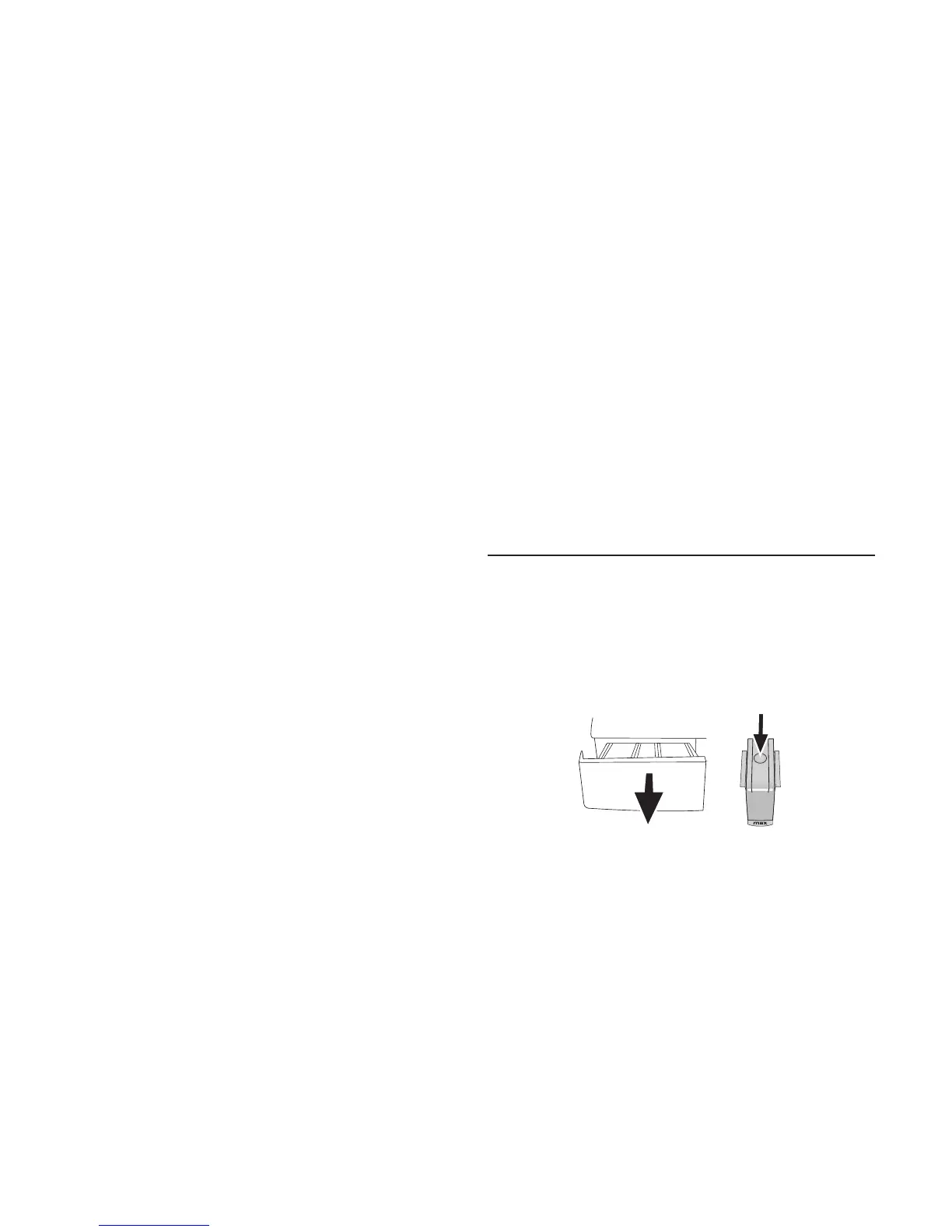
Press the dotted point on the siphon in the softener
compartment and pull towards you until the
compartment is removed from the machine.
C
Ifmorethannormalamountofwaterand
softener mixture starts to gather in the softener
compartment, the siphon must be cleaned.
Washthedetergentdrawerandthesiphonwith
plentyoflukewarmwaterinawashbasin.Wear
protective gloves or use an appropriate brush to
avoid touching of the residues in the drawer with
yourskinwhencleaning.Insertthedrawerback
into its place after cleaning and make sure that it is
seated well.
Cleaning the loading door and the drum
Residues of softener, detergent and dirt may
accumulate in your machine in time and may cause
unpleasant odours and washing complaints. To
avoidthis,usetheDrumCleaningprogramme.
IfyourmachinedoesnothaveaDrumCleaning



 To Next Page