T24-V42(-V02)LON+T24-MP Operation and setting
Standby
mode
Normal
mode
Commissioning
mode
Override
mode
Parameter setpoint
Temperature setpoint
Temperature display
......
......
Normal mode
Actual room temperature display
Factory setting of setpoint is 24ºC
Controller operation menu
Sub-menu
Device start after power ON
Start-up
3
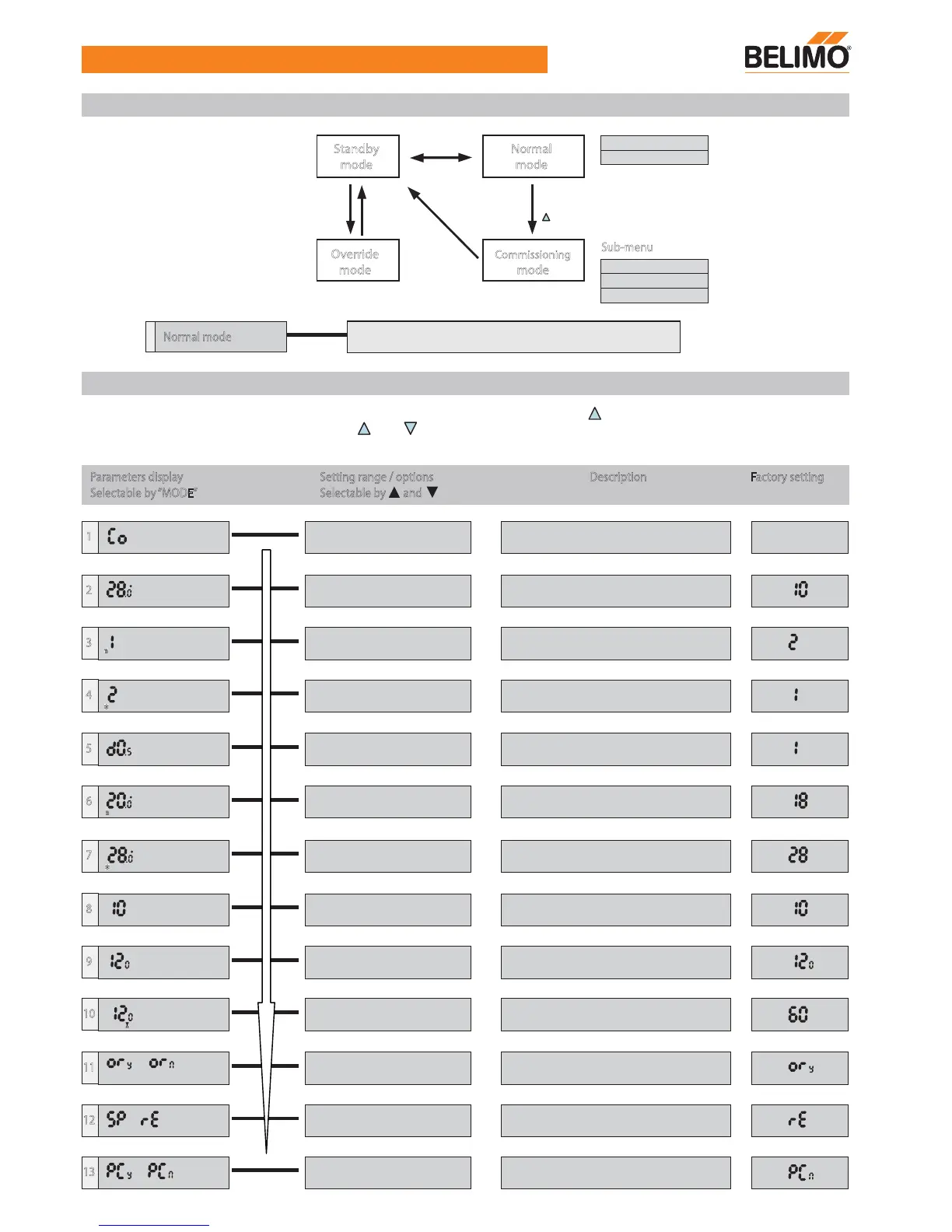
Menu structure
Parameters display Setting range / options
Selectable by andSelectable by “MODE”
Description Factory setting
1
Start to commissioning mode
(All input/output signals will switch off)
2
Minimum setpoint limitation in
Normal mode
10.0...30.0 (ºC), step 0.5
C
Eco
3
P-band in heating mode1...3 (K), step 1
4
P-band in cooling mode
5
Deadband range0.5, 1.0, 2.0 (K)
6
Setpoint of heating in Economy mode10.0...20.0 (ºC), step 0.5
1...3 (K), step 1
C
Eco
7
Setpoint of cooling in Economy mode
8
Application number selection10, 20, 30, 40, 50, 60, 21, 31,
41, 61, 12, 22, 32, 42, 52, 62.
9
Integral action time60...300 (sec), step 30
10
3 point floating control for reheat valve
11
Enable / Disable override by BMS
12
Only setpoint / room temp. & setpoint
display
60...150 (sec), step 10
C
Eco
ON
13
* Parameter or flow rates re-set by external
tool (PC-Tool)
or
or
or
Appl.
Int T
20.0...30.0 (ºC), step 0.5
Parameter setting
It is possible to set different parameter values in Commissioning Mode by pressing “ ” and “ MODE ” for 5s continuously.
Parameter values can be changed with the “ ” or “ ” buttons and confirm changes with the “ MODE ” button. After
completing the parameter setup, the system will return to Standby Mode and will keep storage in memory.
Press
“ ” & “ MODE ” 5 sec.
Press “ MODE ”
2 sec.
Time
out
Press
“ MODE ”
Press
“ MODE ”


 To Next Page
 Loading...