EasyManua.ls Logo

Belimo T24-V42 - User Manual

Belimo T24-V42
4 pages
Print Icon
To Next Page IconTo Next Page
Loading...
Operation and setting T24-V42(-V02)LON+T24-MP
Controller operation
Functions of T24-V42(-V02)LON and wiring diagram
Functions of T24-MP and wiring diagram
1
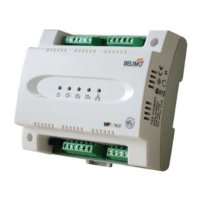
The T24-V42(-V02)LON room control module offers the advantages of network control via the high performance LON transceiver.
This controller features screw terminal blocks, analogue input, digital input, analogue output, three 24Vac digital outputs, MP-Bus
interface for connection to the Belimo VAV Compact and optional T24-MP room unit or TG-R10000 room sensor. Suitable for new
or existing VAV system installations.
MP
BUS
®
External
sensor (AI)
NTC 10k
Analogue
output (AO)
2-10Vdc
AC 24V
Power
supply
MP-Bus (MP1~3)
LonWorks
Digital input
(DI)
Electrical heaters,
parallel/series fan
(3 x DO)
System
reset
LonWorks
service pin
1
2
3
DI Com
LON
B
24V
ac
LON
A
MP2MP1Com MP3
ComDO1 DO3ComDO2 Com
ComAI ComAO
1 2 3 5
1 2 3 5
1 2 5
T24-MP
T24-V42(-V02)LON
*Relay supplied
by others
Heater
1
Heater
2
Parallel
or
series fan
3-point
reheat
valve
24Vac
External
sensor
NTC 10k
VAV Compact
Occupa ncy
sensor
24Vac
~ З
LonWork
Caution: live voltage
*Power
supply
M
Modulating
reheat valve
VAV Compact
System
reset
LonWorks
service pin
Input & output assignment
Inputs
- AI External temp. sensor TG-R10000 *
- DI Remote setpoint shift, e.g. Occupancy sensor *
Open - Normal mode, Close - Economy mode
* Optional
Outputs
-
-
-
-
DO3 Parallel or series fan output 24Vac ON/OFF
DO2 Heating output II 24Vac ON/OFF
DO1 Heating output I 24Vac ON/OFF
AO Modulating reheat control 2...10Vdc
xxx
Not available for T24-V02LON
MODE
C
ON
Functional keys
LCD display
Functions of TG-R10000 and wiring diagram
RJ
12
Services tools connection
RJ 12
2
1
5
З
~
MP
24Vac
5
2
1
Room unit with LCD display and MMI functions
2
1
2
1
External sensor NTC 10k
Room sensor without MMI function
(TG-R10000)
1 A
1A fuse
Subject to technical change V1-27102008
Please note: A standard RJ12 6/4 (1:1)
cable can be plugged onto the RJ12 and
connected to a Belimo MP-Bus level
converter (e.g. ZTH-USB-MP) for the
Belimo PC-Tool.
Question and Answer IconNeed help?

Do you have a question about the Belimo T24-V42 and is the answer not in the manual?

Summary

Controller Operation Overview

T24-V42(-V02)LON Functions and Wiring

Details the functions and wiring diagram for the T24-V42(-V02)LON controller module.

Input and Output Assignment

Explains the assignment of input and output signals for the controller.

T24-MP Functions and Wiring

Describes the functions and wiring diagram for the T24-MP room unit.

TG-R10000 Functions and Wiring

Details the functions and wiring diagram for the TG-R10000 room sensor.

T24-MP Functional Keys and Mounting

T24-MP Functional Key Operations

Details the function of the three functional keys on the T24-MP unit for operation and setting.

T24-V42(-V02)LON Mounting Instructions

Provides instructions for mounting the T24-V42(-V02)LON control module.

T24-MP or TG-R10000 Room Unit Mounting

Describes mounting guidelines for the T24-MP or TG-R10000 room unit.

Electrical Installation Guidelines

Covers electrical installation requirements and safety for the control module.

Controller Operation Menu and Parameters

Controller Menu Structure

Outlines the menu navigation structure for the controller's operation modes.

Device Start-up Procedure

Describes the device start-up sequence after power is applied.

Parameter Setting in Commissioning Mode

Explains how to set various parameter values via the controller interface.

MP-Bus Connectivity and TG-R10000

MP-Bus Address Requirements

Details MP-Bus requirements and address assignments for T24-V42(-V02)LON.

VAV Compact Pre-addressing

Instructions for pre-addressing VAV Compacts using Belimo PC-Tool V3.1.

PC-Tool Connection Methods

Describes how to connect the PC-Tool to room units or VAV-Compacts.

TG-R10000 External Sensor Principle

Explains the principle and connection of the TG-R10000 external sensor.

Summary

Controller Operation Overview

T24-V42(-V02)LON Functions and Wiring

Details the functions and wiring diagram for the T24-V42(-V02)LON controller module.

Input and Output Assignment

Explains the assignment of input and output signals for the controller.

T24-MP Functions and Wiring

Describes the functions and wiring diagram for the T24-MP room unit.

TG-R10000 Functions and Wiring

Details the functions and wiring diagram for the TG-R10000 room sensor.

T24-MP Functional Keys and Mounting

T24-MP Functional Key Operations

Details the function of the three functional keys on the T24-MP unit for operation and setting.

T24-V42(-V02)LON Mounting Instructions

Provides instructions for mounting the T24-V42(-V02)LON control module.

T24-MP or TG-R10000 Room Unit Mounting

Describes mounting guidelines for the T24-MP or TG-R10000 room unit.

Electrical Installation Guidelines

Covers electrical installation requirements and safety for the control module.

Controller Operation Menu and Parameters

Controller Menu Structure

Outlines the menu navigation structure for the controller's operation modes.

Device Start-up Procedure

Describes the device start-up sequence after power is applied.

Parameter Setting in Commissioning Mode

Explains how to set various parameter values via the controller interface.

MP-Bus Connectivity and TG-R10000

MP-Bus Address Requirements

Details MP-Bus requirements and address assignments for T24-V42(-V02)LON.

VAV Compact Pre-addressing

Instructions for pre-addressing VAV Compacts using Belimo PC-Tool V3.1.

PC-Tool Connection Methods

Describes how to connect the PC-Tool to room units or VAV-Compacts.

TG-R10000 External Sensor Principle

Explains the principle and connection of the TG-R10000 external sensor.

Overview

The Belimo T24-V42(-V02)LON room control module is a sophisticated device designed for network-controlled HVAC systems, leveraging a high-performance LON transceiver. This controller is equipped with screw terminal blocks for secure connections and offers a range of input and output capabilities, including an analogue input, digital input, analogue output, and three 24Vac digital outputs. A key feature is its MP-Bus interface, which allows for seamless integration with Belimo VAV Compact units and optional accessories like the T24-MP room unit or the TG-R10000 room sensor. It is suitable for both new installations and retrofitting existing VAV systems.

Technical Specifications and Wiring:

The module supports various external connections. For analogue input (AI), it accommodates an NTC 10k external temperature sensor (TG-R10000). The analogue output (AO) provides a 2-10Vdc signal for modulating reheat control. Digital inputs (DI) can be used for remote setpoint shifts, such as an occupancy sensor, or to switch between "Normal mode" (open) and "Economy mode" (close). Three digital outputs (DO1, DO2, DO3) provide 24Vac ON/OFF signals for heating output I, heating output II, and parallel or series fan output, respectively. The device requires a 24Vac power supply. The MP-Bus interface supports up to three MP devices (MP1-MP3), with MP1 typically reserved for the T24-MP room unit and MP2/MP3 for VAV Compact connections. LonWorks® connectivity is also integrated for network communication. A 1A fuse protects the power supply.

T24-MP Room Unit:

The T24-MP is an optional room unit featuring an LCD display and functional keys for user interaction. It allows users to view the current temperature, adjust the temperature setpoint, and access commissioning mode for parameter configuration. The functional keys include:

  • Up arrow (▲): Increments the temperature setpoint in Normal mode; adjusts options of parameters in Commissioning mode.
  • Down arrow (▼): Decrements the temperature setpoint in Normal mode; adjusts options of parameters in Commissioning mode.
  • MODE: Selects Standby or Normal mode; changes parameters in Commissioning mode.
  • ▲ + MODE (pressed for 5 seconds): Switches from Normal mode to Commissioning mode.

TG-R10000 Room Sensor:

The TG-R10000 is an external NTC 10k sensor designed for surface mounting. It connects directly to the analogue input (AI) point of the T24-V42(-V02)LON module. This device lacks an MMI and LCD display, with temperature readings accessible via a Building Management System (BMS) through LONWorks. It cannot be used simultaneously with the T24-MP.

Mounting Notes:

The T24-V42(-V02)LON control module can be mounted on a DIN rail (EN 50 022-35 x 7.5) with a minimum length of 120 mm, or wall-mounted using two screws. The T24-MP or TG-R10000 room unit should be wall-mounted at approximately 1.5 m above the floor, away from niches, bookshelves, curtains, heat sources, and direct solar radiation. Connecting wires can be routed from a recessed conduit box.

Electrical Installation:

The room control module operates on AC 24 V. For environments with high electromagnetic interference (EMI), shielded cables are recommended. The low voltage must comply with Safety Extra-Low Voltage (SELV) requirements as per EN 60730. Safety insulating transformers with double insulation (EN 60742) designed for 100% on-time must be used. Supplying voltages above AC 24 V to low voltage connections can damage the module. Wiring terminals are fixed screw terminals, accommodating wires from 0.5 to 1.5 mm².

Controller Operation Menu and Parameter Setting:

The device features a menu structure accessible through the T24-MP.

  • Standby mode: Entered by pressing "MODE" for 2 seconds.
  • Normal mode: Displays temperature and setpoint.
  • Override mode: Allows temporary override of settings.
  • Commissioning mode: Accessed by pressing "▲" and "MODE" for 5 seconds from Normal mode, leading to a sub-menu for parameter setpoint.

In Commissioning Mode, various parameters can be adjusted. To enter this mode, press "▲" and "MODE" simultaneously for 5 seconds. Parameters are changed using the "▲" or "▼" buttons and confirmed with the "MODE" button. After setup, the system returns to Standby Mode, and settings are stored in memory.

Key Parameters:

  1. Co: Starts commissioning mode (all input/output signals switch off).
  2. 28.0: Minimum setpoint limitation in Normal mode (range 10.0-30.0 °C, step 0.5; factory setting 10).
  3. 1...3 (K): P-band in heating mode (step 1; factory setting 2).
  4. 1...3 (K): P-band in cooling mode (step 1; factory setting 1).
  5. 0.5, 1.0, 2.0 (K): Deadband range (factory setting 1).
  6. 10.0-20.0 (°C): Setpoint of heating in Economy mode (step 0.5; factory setting 18).
  7. 20.0-30.0 (°C): Setpoint of cooling in Economy mode (step 0.5; factory setting 28).
  8. Application number selection: (10, 20, 30, 40, 50, 60, 21, 31, 41, 61, 12, 22, 32, 42, 52, 62; factory setting 10).
  9. 60-300 (sec): Integral action time (step 30; factory setting 120).
  10. 60-150 (sec): 3-point floating control for reheat valve (step 10; factory setting 60).
  11. Ory or Or: Enable/Disable override by BMS (factory setting Ory).
  12. SPE: Only setpoint/room temp. & setpoint display.
  13. PC or PC: Parameter or flow rates re-set by external tool (PC-Tool).

MP-Bus - VAV Compact Addresses:

The MP-Bus is Belimo's master/slave bus, supporting up to 8 slaves per master device. Each MP slave requires a unique address (MP1-MP8). Belimo VAV Compacts are delivered with point-to-point (PP) addressing, which is the standard control setting for CAV/VAV functions (0-10V / 2-10V signals). The T24-V42(-V02)LON module can manage up to three MP devices (MP1-MP3). MP1 is for the T24-MP, while MP2 and MP3 are for VAV Compacts. MP4-MP8 are not utilized at this stage.

Pre-addressing with Belimo PC-Tool V3.1:

VAV Compacts can be pre-addressed using the PC-Tool. Once connected to the T24-V42(-V02)LON, pre-addressed VAV Compacts are automatically detected and read.

Address Setting:

  • Room Unit - T24-MP: Defaulted to MP1, no PC-Tool addressing needed.
  • One VAV Compact: Pre-address to MP2 or MP3 using Belimo PC-Tool.
  • Two VAV Compacts: Pre-address the first actuator to MP2 and the second to MP3 using Belimo PC-Tool.

PC-Tool Connection:

  • On the Room Unit - T24-MP: Enabling (PC) on the room unit displays "PS" and allows entry into parameter setting mode via PC-Tool software. MP2 and MP3 can be read together.
  • On the VAV-Compact: Connecting the PC-Tool locally to the service socket of the VAV-Compact allows setting that specific MP device. Other MP devices cannot be accessed.

Maintenance Features:

The device is designed for indoor use in clean, dry environments and should not be exposed to dripping or splashing. It is not intended to perform normally under mains power fluctuations or strong electric fast transient/burst conditions. Servicing should only be performed by accredited agents. The unit is an electronic control with Type 2.B action (micro-disconnection operation). Separate collection for electrical and electronic equipment is required for disposal.

Belimo T24-V42 Specifications

General IconGeneral
BrandBelimo
ModelT24-V42
CategoryControl Panel
LanguageEnglish