Step 4 Configure your Router for Connection to your Internet
Service Provider (ISP)
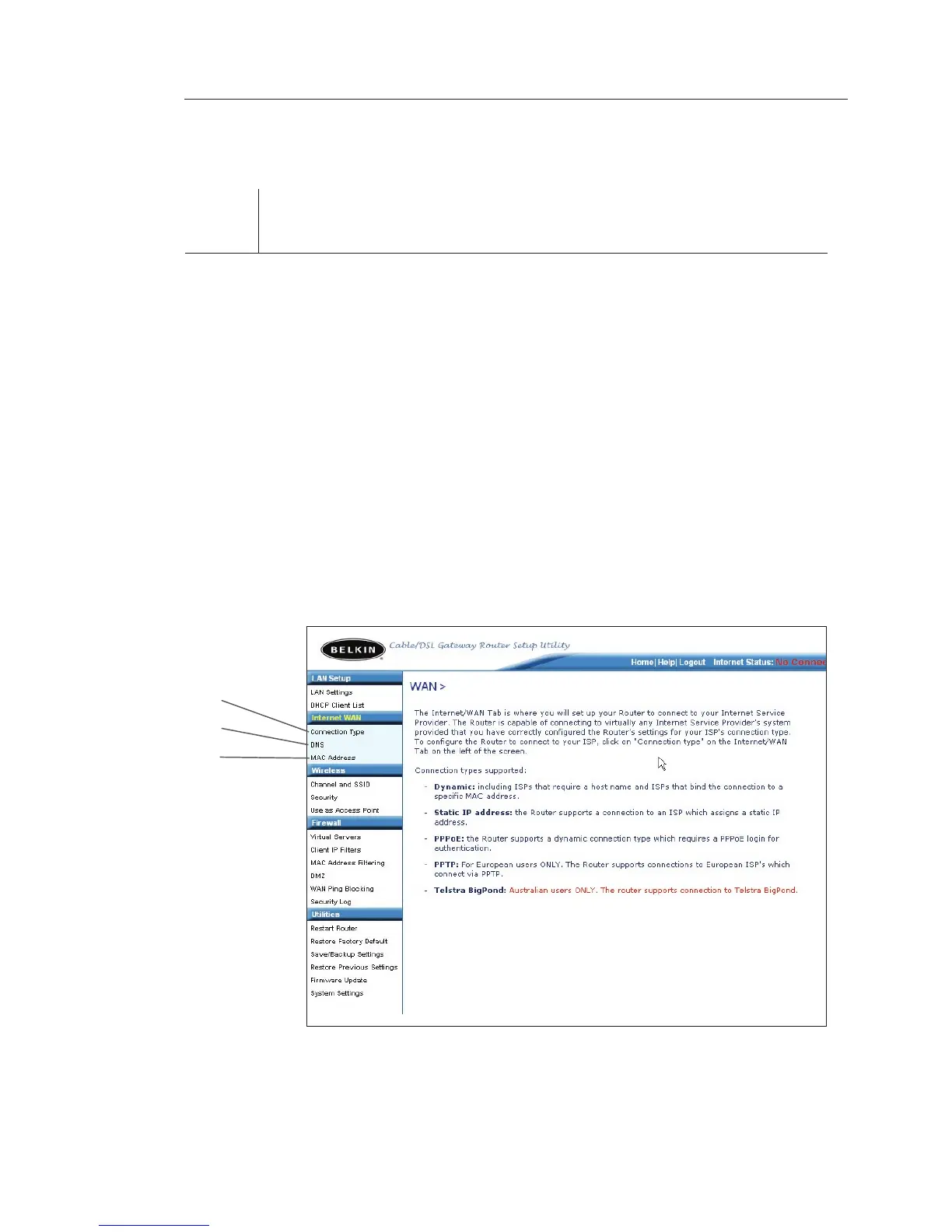
The “Internet/WAN” tab is where you will set up your Router to
connect to your Internet Service Provider (ISP). The Router is capable
of connecting to virtually any ISP’s system provided you have
correctly configured the Router’s settings for your ISP’s connection
type. Your ISP connection settings are provided to you by your ISP.
To configure the Router with the settings that your ISP gave you,
click “Connection Type” (A) on the left side of the screen. Select
the connection type you use. If your ISP gave you DNS settings,
clicking “DNS” (B) allows you to enter DNS address entries for ISPs
that require specific settings. Clicking “MAC address” (C) will let you
clone your computer’s MAC address or type in a specific WAN MAC
address, if required by your ISP. When you have finished making
settings, the “Internet Status” indicator will read “connection OK” if
your Router is set up properly.
(A)
(B)
(C)









 To Next Page