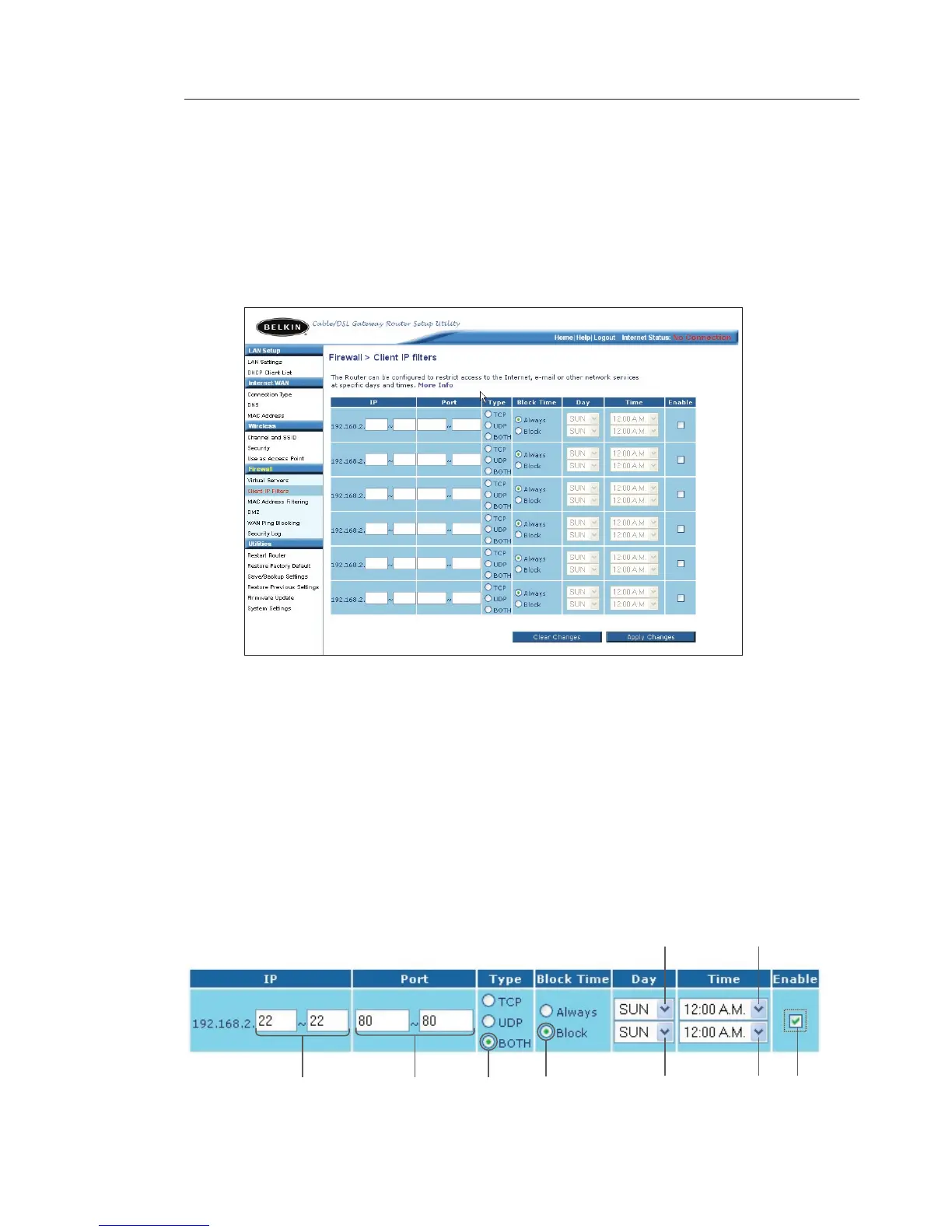
Setting Client IP Filters
The Router can be configured to restrict access to the Internet, email,
or other network services at specific days and times. Restriction can be
set for a single computer, a range of computers, or multiple computers.
To restrict Internet access to a single computer, for example, enter
the IP address of the computer you wish to restrict access to in the IP
fields
(1). Next, enter “80” in both the port fields (2). Select “Both” (3).
Select “Block” (4). You can also select “Always” to block access all
of the time. Select the day to start on top (5), the time to start on top
(6), the day to end on the bottom (7), and the time to stop (8) on the
bottom. Select “Enable” (9). Click “Apply Changes”. The computer at
the IP address you specified will now be blocked from Internet access
at the times you specified. Note: Be sure you have selected the correct
time zone under “Utilities> System Settings> Time Zone”.
(1) (2)
(3)
(4) (7) (8) (9)
(5)
(6)









 To Next Page