18
EN
5 Operating the product
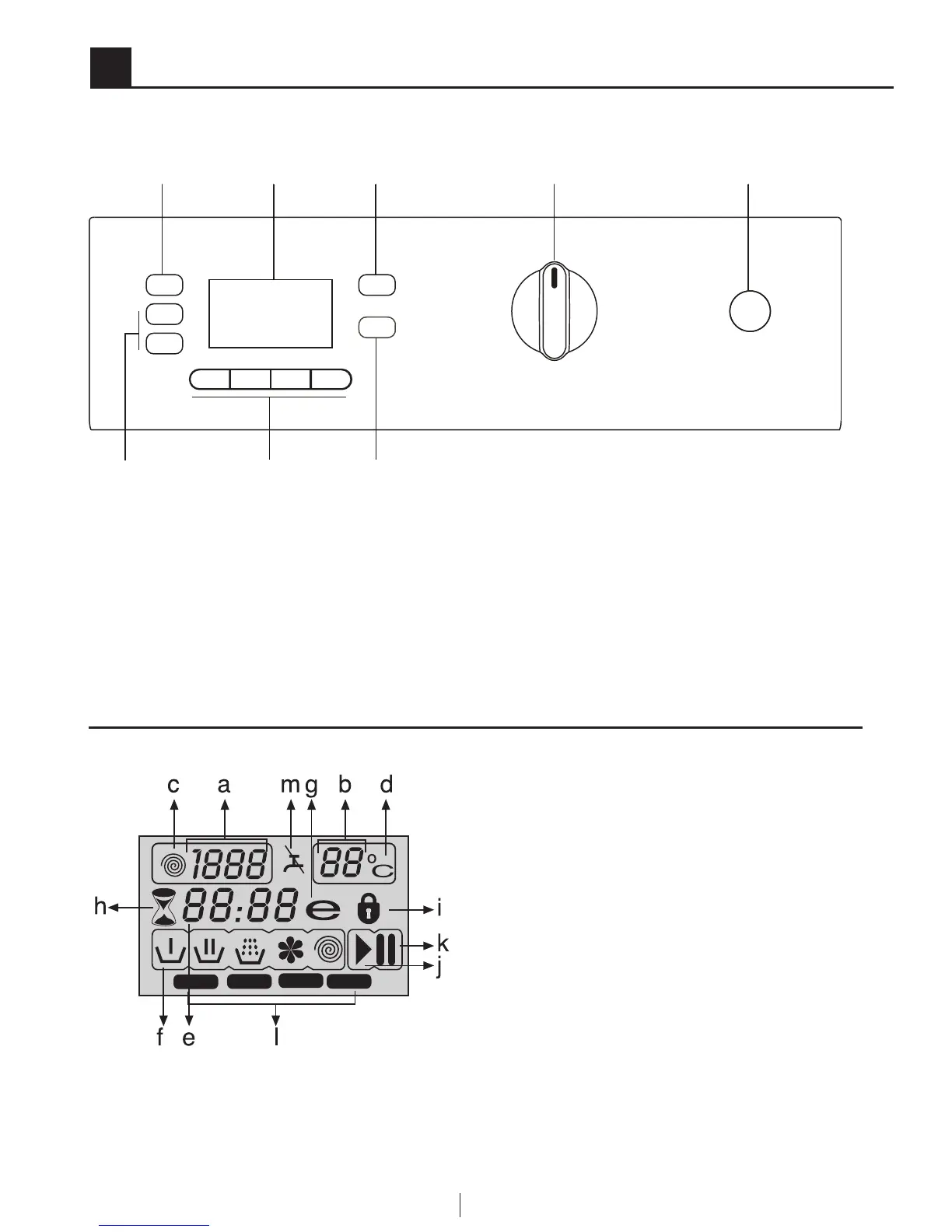
Control panel
1 - Spin Speed Adjustment button
2 - Display
3 - Temperature Adjustment button
4 - Programme Selection knob
5 - On / Off button
6 - Delayed Start buttons (+ / -)
7 - Auxiliary Function buttons
8 - Start / Pause / Cancel button
1
6 7
2 3 4 5
8
Display symbols
F1
F2
F3
F4
a - Spin Speed indicator
b - Temperature indicator
c - Spin symbol
d - Temperature symbol
e - Remaining Time and Delayed
Start indicator
f - Programme Indicator symbols
(Prewash / Main Wash / Rinse /
Softener / Spin)
g - Economy symbol
h - Delayed Start symbol
i - Door Locked symbol
j - Start symbol
k - Pause symbol
l - Auxiliary Function symbols
m - No Water symbol



 To Next Page