13
CHAPTER 6
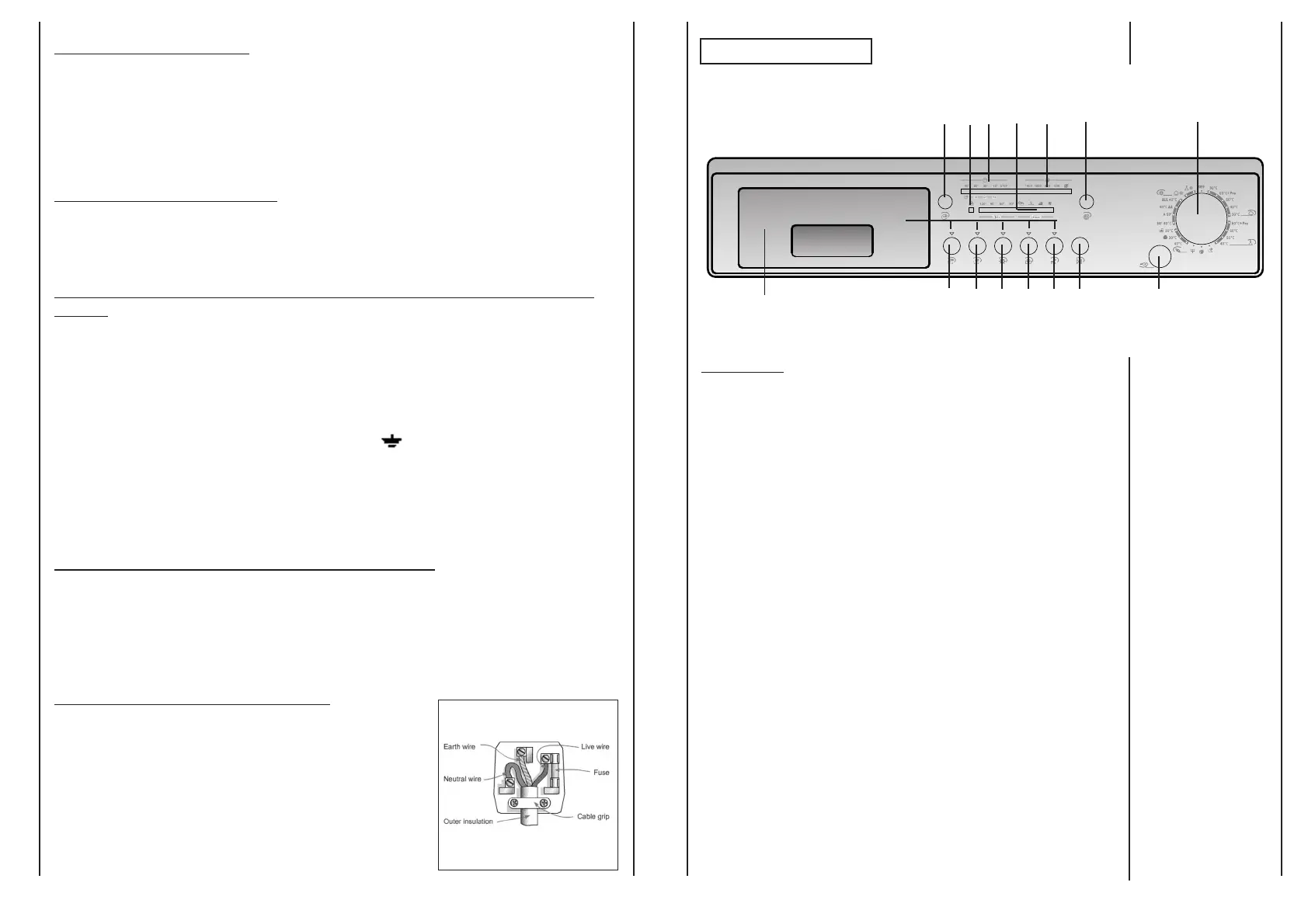
CONTROLS
12
REMO
VING THE PLUG:
If your appliance has a non-rewireable moulded plug and you should wish to re-route the
mains cable through partitions, units etc., please ensure that either:
the plug is replaced by a fused 13 ampere re-wireable plug bearing the BSI mark of approval.
or:
the mains cable is wired directly into a 13 amp cable outlet, controlled by a switch, (in
compliance with BS 5733) which is accessible without moving the appliance.
DISPOSING OF THE PLUG:
Ensure that before disposing of the plug itself, you make the pins unusable so that it cannot be
accidentally inserted into a socket.
INSTRUCTIONS FOR CONNECTING CABLE TO
AN ALTERNATIVE
PLUG:
Important: the wires in the mains lead are coloured in accordance with the following code:
Green & Yellow Earth
Blue Neutral
Brown Live
As the colours of the wires in the lead may not correspond with the coloured markings
identifyng the terminals in your plug, proceed as follows:
Connect Green & Yellow wire to terminal marked E or or coloured Green or Green &
Yellow. Connect Brown wire to terminal marked L or coloured Red.
Connect Blue wire to terminal marked N or coloured Black.
If a 13 amp plug (BS 1363) is used it must be fitted with a 13 amp fuse either in the plug or
adaptor or at the distribution board. If you are in any doubt the electrical supply to your
machine, consult a qualified electrician before use.
HOW TO CONNECT AN ALTERNATIVE PLUG:
The wires in this mains lead are coloured in accordance with the following code:
BLUE NEUTRAL(N)
BROWN LIVE(L)
GREEN&YELLOW EARTH(E)
DISPOSING OF THE APPLIANCE:
When disposing of the appliance please remove the plug by
cutting the mains cable as close as possible to the plug body
and dispose of it as described above.
R
D
Q
C
E
MG
FB
H
ILNOP A
Door open button
Programme selector with “OFF” position
"Door Security" indicator light
"Delay Start" button
"Time countdown system" and “Delay Start” indicator lights
"Spin Selection" button
Spin speed indicator light
"Super Rapid" button
"Extra Rinse" button
"Drying Selection" button
Drying programme indicators
"Cold Wash" button
“Crease Guard” button
"Start/Pause" button
Buttons indicator light
Detergent drawer
A
B
C
D
E
F
G
H
I
L
M
N
O
P
Q
R


 To Next Page
 Loading...