Operation Instruction
3
Control Panel
5
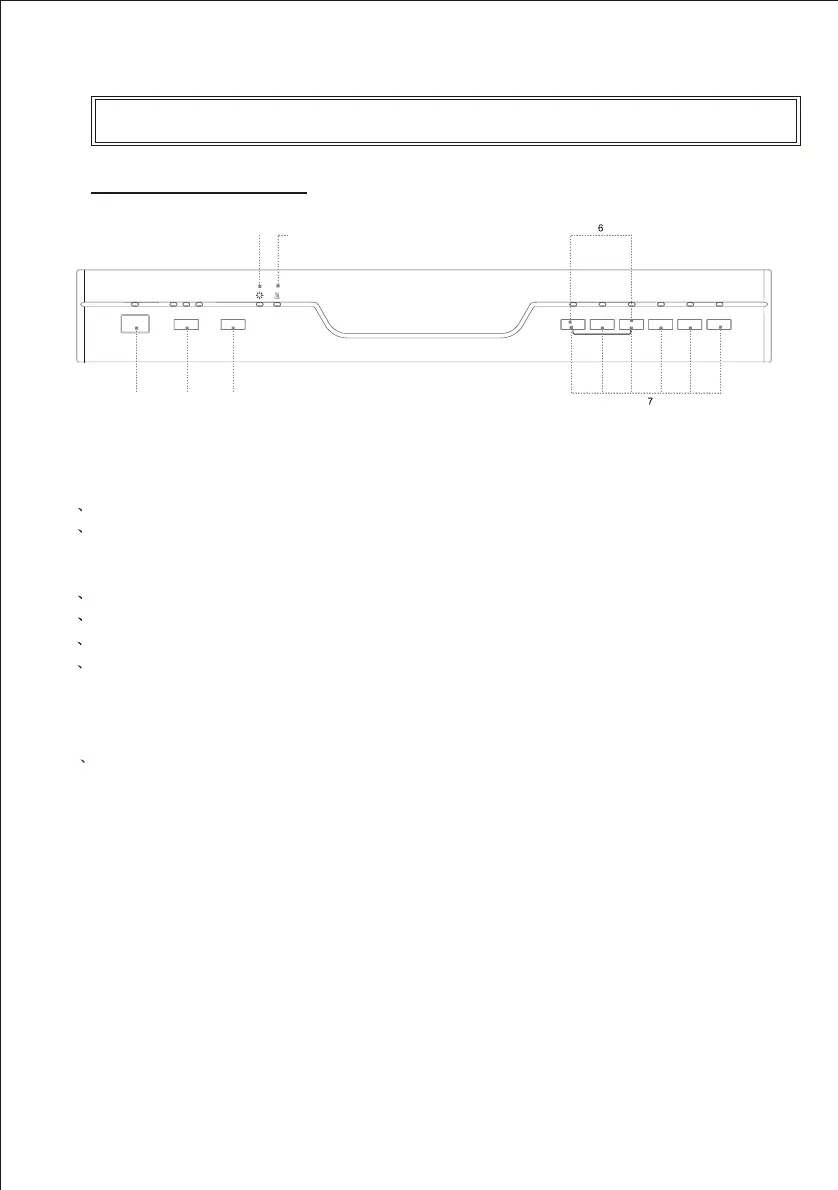
1 Power switch: To control the power supply.
2 Delay time: Pressing the DELAY pad one time can select
3h delay time, continuous pressing second
time will
increase the delay hours to 6h, third time increase to 9h.
Continuous pressing the fourth
time can cancel the delay
selection.
3 Start/Pause Button: Press this button to start or pause
the dishwasher, the light will come when starting.
4 Rinse Aid Light: To come on when dispenser
needs to be refilled.
Indicator
5
6 Child lock:To lock the dishwasher controls, press and hold the
INTENSIVE & NORMAL pad at t
he
same
time
for
3
seconds
.
The INTENSIVE & NORMAL light will turn on. To unlock the
dishwasher controls, press the same pad
in the same way, the
light will turn off.
7 Program Button: To select washing program when press the
button.
Drying light: To come on when the dishwasher is drying
Power
3h
6h
9h
Intensive
Heavy
Normal
Rinse
Rapid
Soak
Child Lock
Delay
Start/Pause
4
5
1 2 3
Bellini
GSM Retail Australia Pty Ltd ABN: 53 007 582 475
For Warranty and technical queries: 1300 373 199 Aus Or 0508123108 NZ www.belliniappliances.com.au
Model: BDW6WP-F FN5104071 Aus, BDW6XP-F FN5104072 Aus Only 60CM Freestanding Dishwasher



 To Next Page