12
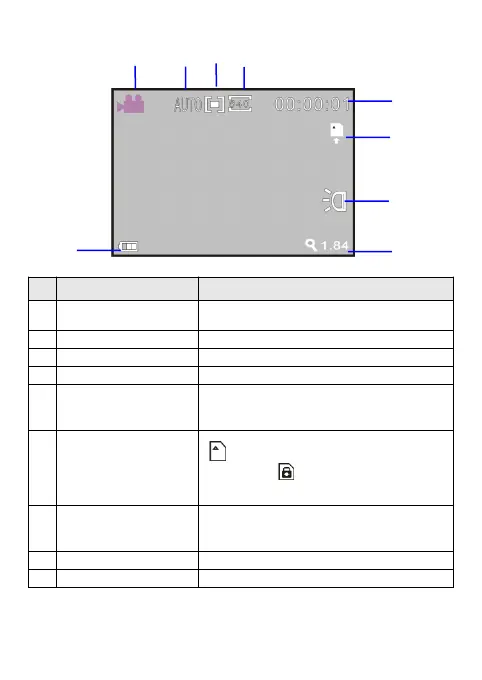
The screen displayed information in the video recording mode
Icon Name Description
Video recording icon
Indicates that the video recording mode has
been selected
White balance Indicates the current white balance setting
Metering mode Indicates the current metering mode
Video format Indicates the current video resolution
Recording time
Indicates the remaining recordable time in free
state and the used recording time in recording
state
Card
Indicates that a memory card has been
inserted, and Indicates that the employed
SD card is write-protected
Battery
Indicates the current battery state; when the
icon is in red, it indicates low battery and the
camera will be automatically shut down
LED light Indicates that the LED light has been turned on
Zoom indication Indicates the current digital zoom ratio


 To Next Page