EasyManua.ls Logo

BELL+HOWELL DC5 - Key Functions and Indicator Icons

BELL+HOWELL DC5
24 pages
Print Icon
To Next Page IconTo Next Page
To Previous Page IconTo Previous Page
Loading...
5
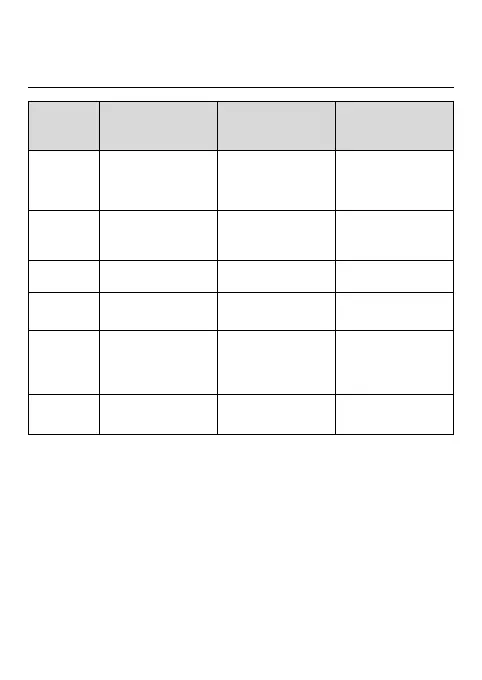
Key Functions and Indicator Icons
Key
Photographing /
Video-recording
mode
Playback mode
Menu setup mode
Power key
Long press to start up
/ shut down
Short press to enter
menu
Long press to start up
/ shut down
Short press to enter
menu
Long press to start up
/ shut down
Short press to close
menu
Shutter key
Take a photo
Start/pause video
recording
Start/stop playing
Switch over to setup
menu; confirm menu
T key
Digital zoom in
Select file rightwards
Switch over to the
previous menu
W key
Digital zoom out
Select file leftwards
Return to the next
menu
Mode key
Switch over between
video-recording mode
and playback mode
Enter photographing
mode
N/A
Delete key
Turn on/ Turn off flash
light
Delete a photo or
video rapidly
N/A

Related product manuals