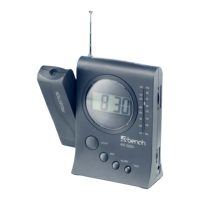
CONTROL ELEMENTS
Time (display) Focus for projection
Radio station display Tuner
Snooze, Light Volume control/buzzer
Display background
External 3V DC connection,
Time Set radio only
Alarm Battery compartment
Minutes Projection On/Off
Hours Alarm On/Off
FM antenna FM/AM selector
RADIO OPERATION
· To switch on the radio, turn the dial clockwise
(audible »click«).
· Now set the desired volume with the control
.
· Set the band selector
to the desired wave (AM/FM).
· Use the tuner
to set the radio station of your choice.
The radio station display
indicates the frequency.
· To switch off, turn the dial
counter clockwise until a »click«
can be heard.
SETTING THE ALARM CLOCK
· Turn off the radio – set the control to BUZZ (audible »click«).
· Press button
(ALARM) for alarm time. The alarm time will
show on the display.
· To change the alarm time, hold the alarm button until
the correct time is set with
Hour
and Minute . To activate the alarm function,
set the ALARM On/Off
switch to “ON”.
11GB


 To Next Page