SNOOZE
Operate the SNOOZE button to interrupt the alarm for
8 minutes.
After 8 minutes, the alarm is reactivated. To switch off
the alarm entirely, set the ALARM On/Off switch
to “OFF”.
SETTING THE TIME
· To set the full hour hold the Time Set button and the
Hour button
simultaneously until the current hour is
indicated on the display.
· To set the minutes hold the Time Set button
and the
Minute button
simultaneously until the current minutes are
indicated on the display.
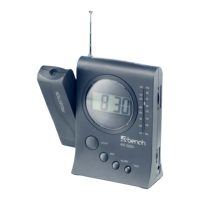
PROJECTION
To correctly project the time on a wall or on the ceiling
the swivelling projection element has to be turned to the front
and the room has to be darkened accordingly.
1. Set the Projection On/Off switch
to ON.
2. Turn the projection element as requested. The time will
be projected to the desired point. Projection distance approx.
2 metres.
3. Adjust the clarity of the projection with Focus
.
BACKGROUND LIGHT FOR DISPLAY
AND PROJECTION
Operate Snooze once to activate the display light and time
projection for around 10 seconds.
12GB


 To Next Page