3
2
4
1
5073-039
20V MAX BRUSHLESS GRASS TRIMMER
14
6. It is normal for the battery charger to hum and be warm to the touch
during operation.
7. If the battery pack does not charge properly, check to make sure the electrical
outlet is “live”.
8. Do NOT charge batteries when the work area or the battery temperature
is at or below 5°C / 41°F or above 40.5°C / 105°F.
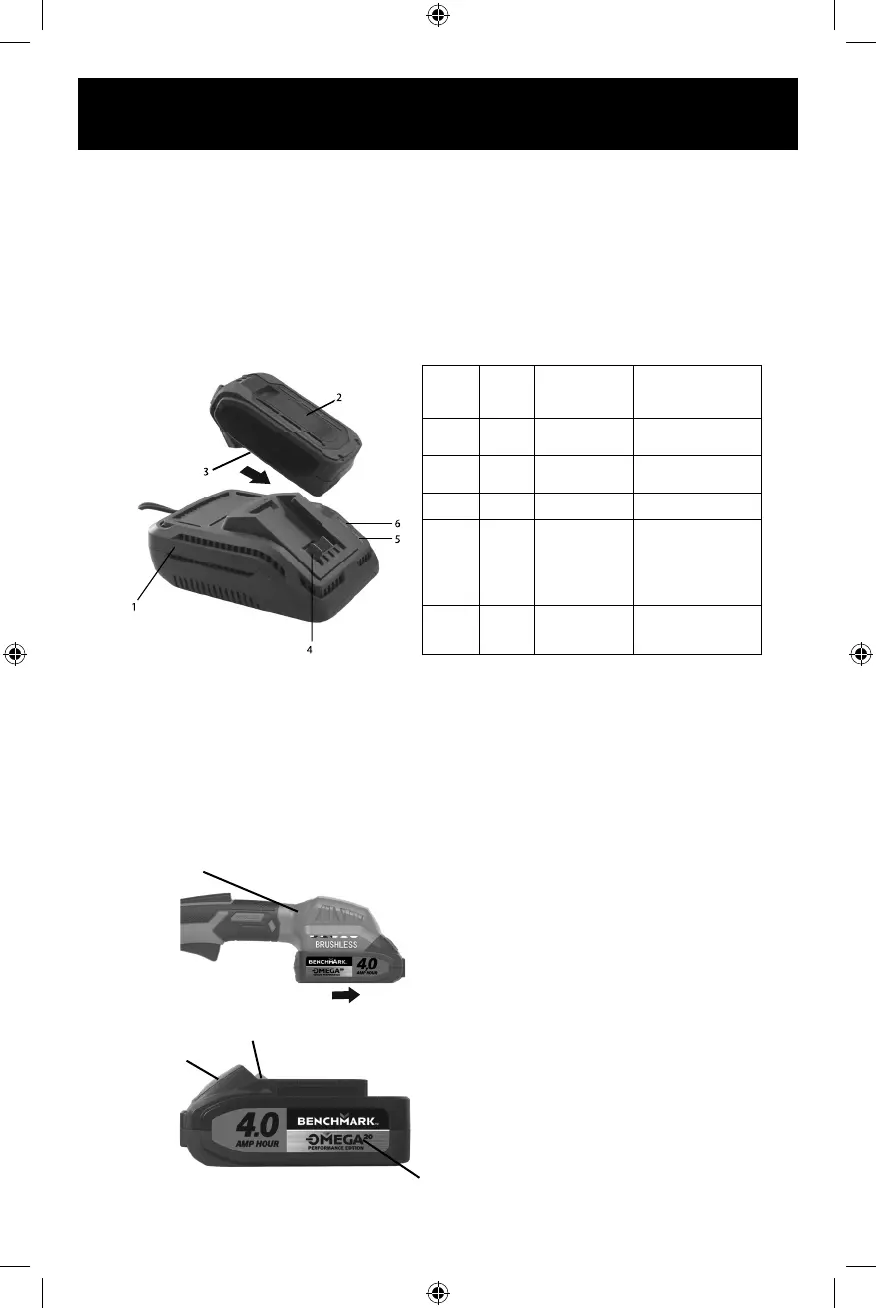
INSTALLING A BATTERY ON THE BRUSHLESS GRASS TRIMMER
1. Remove the discharged battery (1) from the brushless grass trimmer by pressing
downward on the battery release button (2) and sliding the battery backward
until it is removed from the brushless grass trimmer port (3) (Fig. 4).
2. Slide the fully charged battery onto the matching keys (4) in the brushless grass
trimmer port (3) where the discharged battery has been removed.
GREEN
LIGHT
RED
LIGHT
BATTERY
INSERTED
INTO CHARGER
CHARGING STATUS
ON OFF NO
Charger connected
to power supply
OFF Blink YES
Battery being
charged
ON OFF YES
Battery fully charged
OFF ON YES
Battery is charged
but not operational
on tool. This may
indicate defective /
bad contact
on battery.
ON ON YES
Charging conditions
are either too hot
or too cold
FIG. 2 FIG. 3
FIG. 4
NOTE: Make sure the slots in the
battery are fully engaged with the
mounting keys in the brushless grass
trimmer port (3) . The battery release
button will “click” into place when the
battery is fully installed.
WARNING: Do not immerse the battery
pack in water. Sudden cooling could
cause a hot battery to explode or leak.
5073-039f EnProdManual P.indd 145073-039f EnProdManual P.indd 14 2020-12-17 1:59 PM2020-12-17 1:59 PM


 To Next Page