
 Need help?
Do you have a question about the Benchmark SureTemp H2505-40 and is the answer not in the manual?
Lists available capacities (40L-130L) and internal/external dimensions for different models.
Details temperature range, accuracy, stability, and uniformity specifications.
Covers voltage, frequency, power consumption, and warranty period.
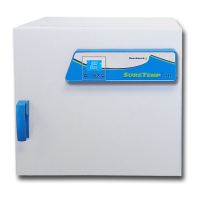
Identifies major physical parts of the incubator via a diagram and labels.
Guides on bench-top installation, electrical connection, and powering on.
Explains setting desired temperature, run time, and continuous operation modes.
Details setting fan speed (High, Low, Off) for optimal temperature uniformity.
Includes sample placement advice and internal outlet usage precautions.
Provides guidance on cleaning with a damp cloth and keeping fan vents clear.
Instructions for inserting a USB drive and setting the data logging time interval.
Describes transferring data to a computer with LabTech Software.
Guides on selecting devices and data files within the LabTech software.
Mentions data can be exported to Microsoft Excel for further analysis.
Displays a table of logged data including timestamps and temperature readings.
Shows graphical representations of temperature data over time.
Details how to select specific device curves for visualization.
The Benchmark SureTemp™ Dual-Convection Incubators, available in models H2505-40, H2505-70, and H2505-135, are advanced laboratory instruments designed for a wide range of incubation applications. These incubators are micro-processor controlled, integrating both forced air and gravity convection technologies to ensure precise and consistent temperature regulation. The design emphasizes accuracy and uniformity in temperature control, making them suitable for sensitive experiments and processes that require stable environmental conditions.
The core function of these incubators is to provide a controlled environment for samples, maintaining temperatures within a specified range from ambient +5°C up to 75°C. This broad temperature capability allows for diverse applications, from cell culture and microbiology to material testing and general laboratory incubation. The dual-convection system is a key feature, combining the benefits of forced air for rapid temperature recovery and uniformity with gravity convection for gentle, undisturbed incubation. Users can adjust the fan speed to "High," "Low," or "Off" settings, offering flexibility to optimize airflow based on the specific requirements of the samples and experimental protocols. This adaptability ensures that delicate samples are not subjected to excessive air movement, while robust samples can benefit from enhanced temperature distribution.
A significant usage feature of the SureTemp incubators is their user-friendly interface and data logging capabilities. The incubators are equipped with a built-in data logger that allows users to record temperature data over time. This function is crucial for regulatory compliance, quality control, and experimental documentation. To utilize this feature, a USB memory stick (flash drive) can be inserted into a dedicated port on the right side of the incubator. Users can then select a desired time interval (in minutes) for data saving using the Up/Down keys. Once data is collected, the flash drive can be removed and inserted into a computer with the LabTech Software installed (provided via CD-Rom with the incubator). The software enables users to open and analyze the saved .DAT files, which can then be exported to Microsoft Excel for further analysis and reporting. This comprehensive data management system ensures that all critical temperature parameters are meticulously tracked and easily accessible for review.
Setting up and operating the incubator is designed to be straightforward. The incubator is intended for bench-top installation, requiring a clean, level surface capable of supporting its weight. After plugging the electrical cord into a properly grounded outlet, the instrument is powered on by pressing the power button on the left side. To set the desired temperature, users press the "SET" key, which displays "SP." The temperature can then be adjusted using the Up, Down, and Shift keys. Once the temperature is set, pressing "SET" again allows for the selection of a time value, indicated by "SI." If "0000" is entered, the time function is disabled, and the incubator runs continuously. After programming the time, pressing "SET" again stores the values and initiates the incubation process. The incubator will begin heating to the set temperature, and once reached, the timer starts. Upon completion of the set time, the incubator will emit a beep and display "end." The beep can be disabled by pressing the down key, and the "End" message can be cleared by pressing and holding the down key for three seconds. During operation, the display shows both the current chamber temperature and the set chamber temperature, or the remaining run time if a specific duration was chosen.
The internal structure of the incubator is designed for optimal performance and ease of use. It features a stainless steel incubation chamber, which is durable, corrosion-resistant, and easy to clean, ensuring a sterile environment for samples. Removable shelves provide flexibility in arranging samples and maximizing the usable space within the chamber. An internal outlet is also included, providing the same electrical voltage as the main power outlet. This feature is convenient for powering small devices or stirrers directly within the incubator. However, a critical warning is provided: when loading samples, users must avoid placing them directly in front of fan vents to prevent obstruction of airflow and maintain temperature performance. Additionally, in the event of condensation, the internal outlet should always be wiped down with a dry towel before plugging in any electrical device to ensure safety.
Maintenance of the SureTemp incubators is minimal, focusing primarily on cleanliness to ensure longevity and optimal performance. No routine maintenance beyond cleaning is typically required. When cleaning the incubator, both internal and external parts should be wiped down with a damp cloth. It is important to avoid the use of solvents, as these can potentially damage the product housing. Furthermore, users must ensure that the fan vents remain clear of any dirt, dust, or other obstructions to maintain proper airflow and prevent overheating. This simple maintenance regimen helps to preserve the integrity of the instrument and ensure consistent, reliable operation over time. The robust construction, combined with straightforward care instructions, makes these incubators a reliable asset for any laboratory.
 General
| Type | Digital Thermometer |
|---|---|
| Brand | Benchmark |
| Category | Accessories |
| Display Type | LCD |
| Resolution | 0.1°F/°C |
| Model | H2505-40 |
| Auto Power Off | Yes |
| Waterproof | Yes, IP65 |

 To Next Page