BenQ DC 5530 User’s Manual
English
Using the DC C520 5
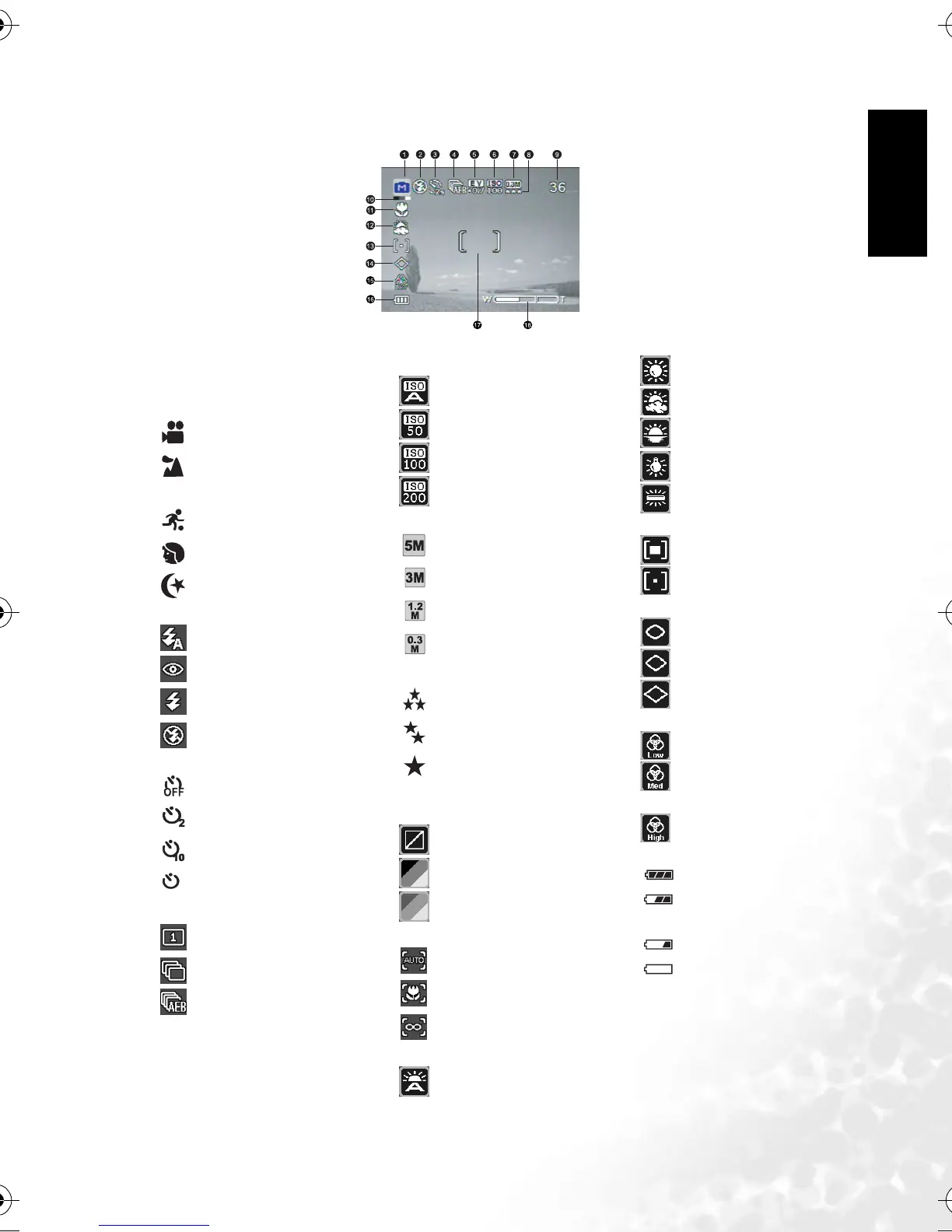
3.2 LCD monitor information (camera mode)
1. Mode indicator
[ A ] Auto Mode
[SET] Setup Mode
[] Video Mode
[] Landscape Mode
[ M ] Manual Mode
[] Sports Mode
[ ] Portrait Mode
[] Night Mode
2. Flash mode
[ ] Auto Flash (Default)
[] Red Eye
[] Forced Flash
[] No Flash
3. Self-timer mode
[] OFF
[] 2 sec. delay
[ ] 10 sec. delay
[ ] 10+2 sec. delay
4. Capture mode indicator
[] Single
[] Burst
[] AEB
5. EV (Exposure Value)
-0.3, -0.7, -1.0, -1.3,
-1.7, -2.0, +0.3, +0.7, +1.0,
+1.3, +1.7, +2.0
6. ISO
[]ISO Auto
[]ISO 50
[ ] ISO 100
[ ] ISO 200
7. Resolution
[ ] 2560 x 1920
[ ] 2048 x 1536
[ ] 1280 x 960
[ ] 640 x 480
8. Image Quality
[] Quality Fine
[ ] Quality Normal
[ ] Quality Economy
9. Possible number of shots
10. Effect
[ ] Effect Normal
[] B & W
[] Sepia
11. Focus indicator
[] Focus Auto
[] Macro
[] Infinity
12. White balance
[] Auto WB
[] Sunny
[] Cloudy
[] Sunset
[] Tungsten
[] Fluorescent
13. Metering
[] Center Average
[] Spot
14. Sharpness
[ ] Sharpness - Low
[ ] Sharpness - Medium
[ ] Sharpness - High
15. Saturation
[ ] Saturation - Low
[ ] Saturation -
Medium
[ ] Saturation - High
16. Remaining battery status
[ ] Full battery power
[ ] Medium battery
power
[ ] Low battery power
[ ] No battery power
17. AF area
18. Zoom status
10+2
DC_C520_UM.book Page 5 Monday, July 4, 2005 4:40 PM



 To Next Page