English
Using the Camera14
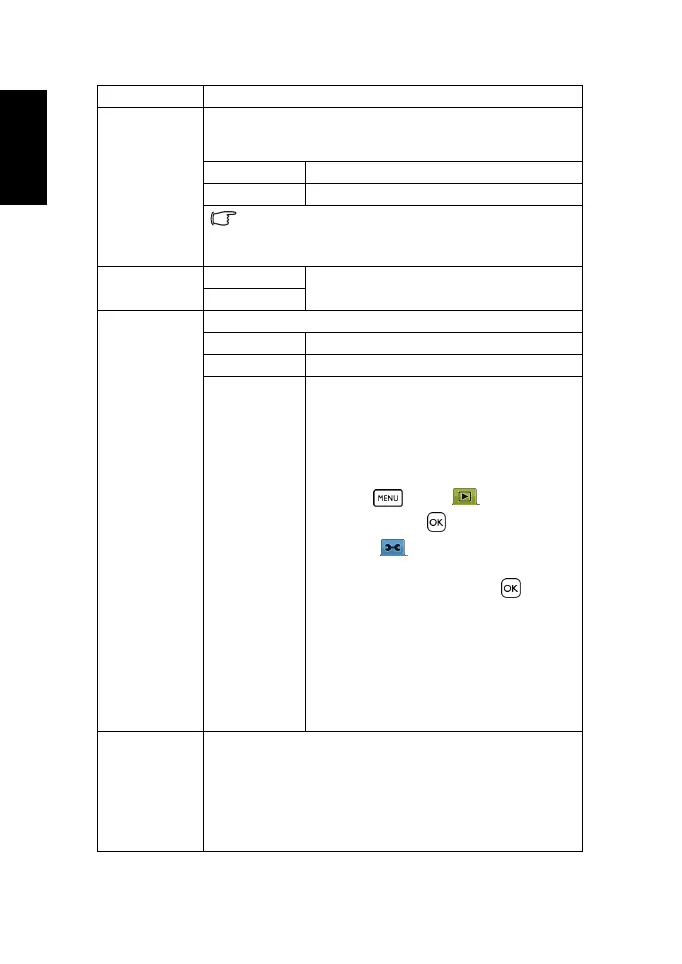
TV Out You can review images on a television with a supplied AV cable.
TV Out should be set to either NTSC or PAL depending on your
region.
[NTSC] America, Japan, Taiwan and others
[PAL] Europe, Oceania and others
TV Out should be set to either NTSC or PAL depending on
your region. For details about which system should be used, check
with your local authorities.
USB [Computer] Sets the USB mode to connect the camera with
a printer or computer.
[Printer]
Start-up Image Sets a captured image as the start-up image.
[Off] Does not use the start-up image.
[System] Uses the default start-up image
[My image] Uses a customized image stored in the camera
firmware.
To select a customized start-up image:
1. In the playback mode, move to one image
from the internal memory or an inserted
memory card.
2. Press . Under , select
Start-up
image > Yes > .
3. Under , select
Start-up image > My
image (the camera has automatically
switched to this selection) > .
– The customized start-up image is stored
in the camera firmware. You can remove
it only by changing it to another
customized image or by resetting the
camera.
–As long as
My image is selected, you can
skip Step 3 when changing to another
customized image.
Format To erase all data stored in the memory card if you are using a card,
or all data stored in the internal memory if there is no card
inserted.
A “Busy...please wait” message displays while the memory card is
being formatted.
A “Completed” message displays when formatting is finished.
All data will be deleted, including protected files. Be sure to
download important files to your computer before formatting.
Menu item Functions
DC_C1060_C850_UM CD EN.book Page 14 Thursday, September 18, 2008 9:12 AM



 To Next Page