Operation 21
Using the menus
The projector is equipped with On-Screen Display (OSD) menus for making various
adjustments and settings.
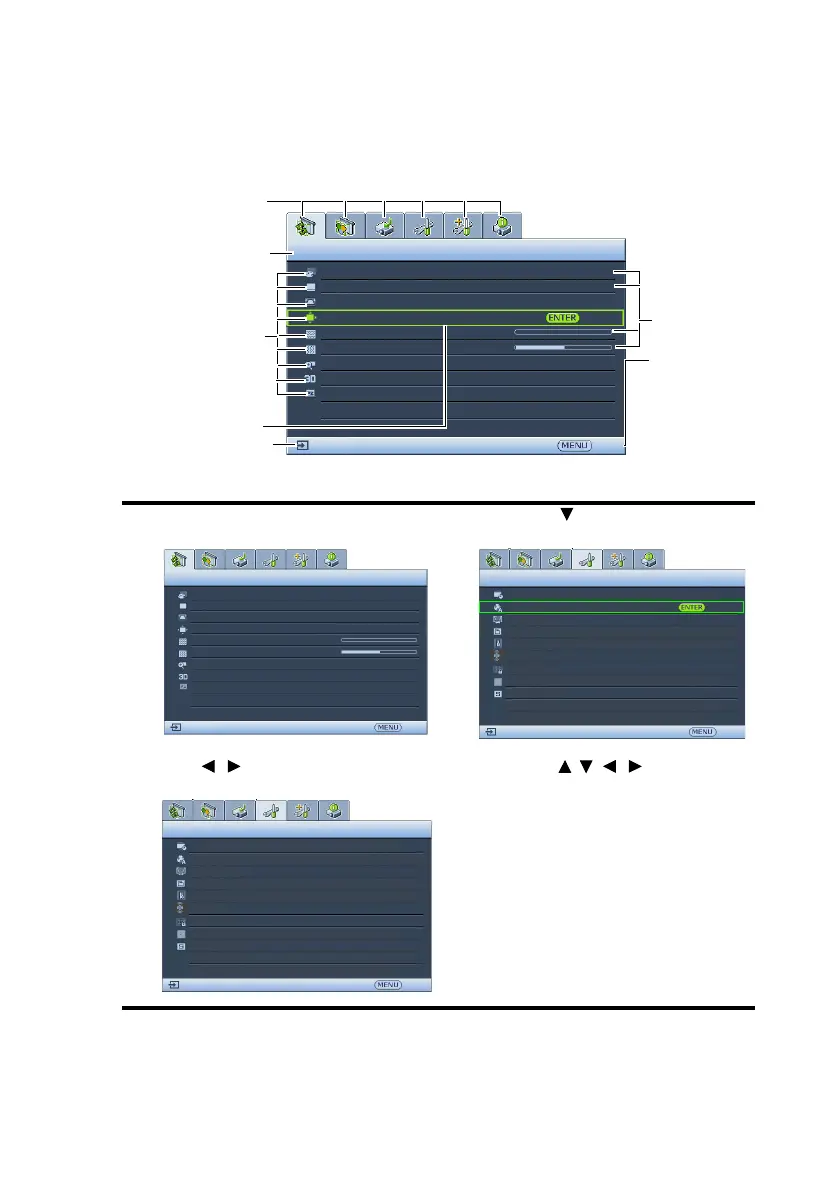
Below is the overview of the OSD menu.
The following example describes how to set the OSD language.
1. Press MENU/EXIT on the projector or
remote control to turn the OSD menu on.
3. Press to highlight Language
and press MODE/ENTER.
2. Use / to highlight the SYSTEM
SETUP: Basic menu.
4. Press / / / to select a
preferred language.
5. Press MENU/EXIT on the
projector or remote control to
leave and save the settings.
Current input signal
Main menu icon
Main menu
Sub-menu
Highlight
Press MENU/
EXIT to the
previous
page or to
exit.
Status
DISPLAY
Wall Color
Aspect Ratio
Keystone
Position
Phase
H. Size
Digital Zoom
Off
Auto
0
0
Exit
Analog RGB
3D
Teaching Template
DISPLAY
Wall Color
Aspect Ratio
Position
Phase
H. Size
Digital Zoom
Keystone
Analog RGB
Off
Auto
0
0
Exit
3D
Teaching Template
SYSTEM SETUP: Basic
Presentation Timer
Language
Projector Installation
Operation Settings
Panel Key Lock
Splash Screen
Background Color
Analog RGB
Exit
Front Table
Off
BenQ
BenQ
Menu Settings
Front+Rear
Remote Receiver
SYSTEM SETUP: Basic
Presentation Timer
Language
Projector Installation
Operation Settings
Panel Key Lock
Splash Screen
Background Color
Analog RGB
Exit
Front Table
Off
BenQ
BenQ
Menu Settings
Front+Rear
Remote Receiver


 To Next Page