Maintenance46
Replacing the filter
In order to prolong the lifetime of your projector and ensure smooth air circulation for
efficient light source cooling, it is important to replace the dust filter periodically. We
recommend replacing the filter every 500 hours to keep the best dust-proof ability.
• Be sure to turn OFF the projector and unplug it from power source before replacing the filter.
• If your projector is ceiling-mounted or is not easily accessible, pay special attention to your personal
safety when replacing the dust filter.
To replace the dust filter, follow the steps below:
Resetting the filter timer
5. After the startup logo, open the On-Screen Display (OSD) menu. Go to the
SYSTEM SETUP: Basic > Operation Settings menu. Press MODE/ENTER.
The Operation Settings page displays. Highlight Reset Filter Timer and press
MODE/ENTER. A warning message is displayed asking if you want to reset the
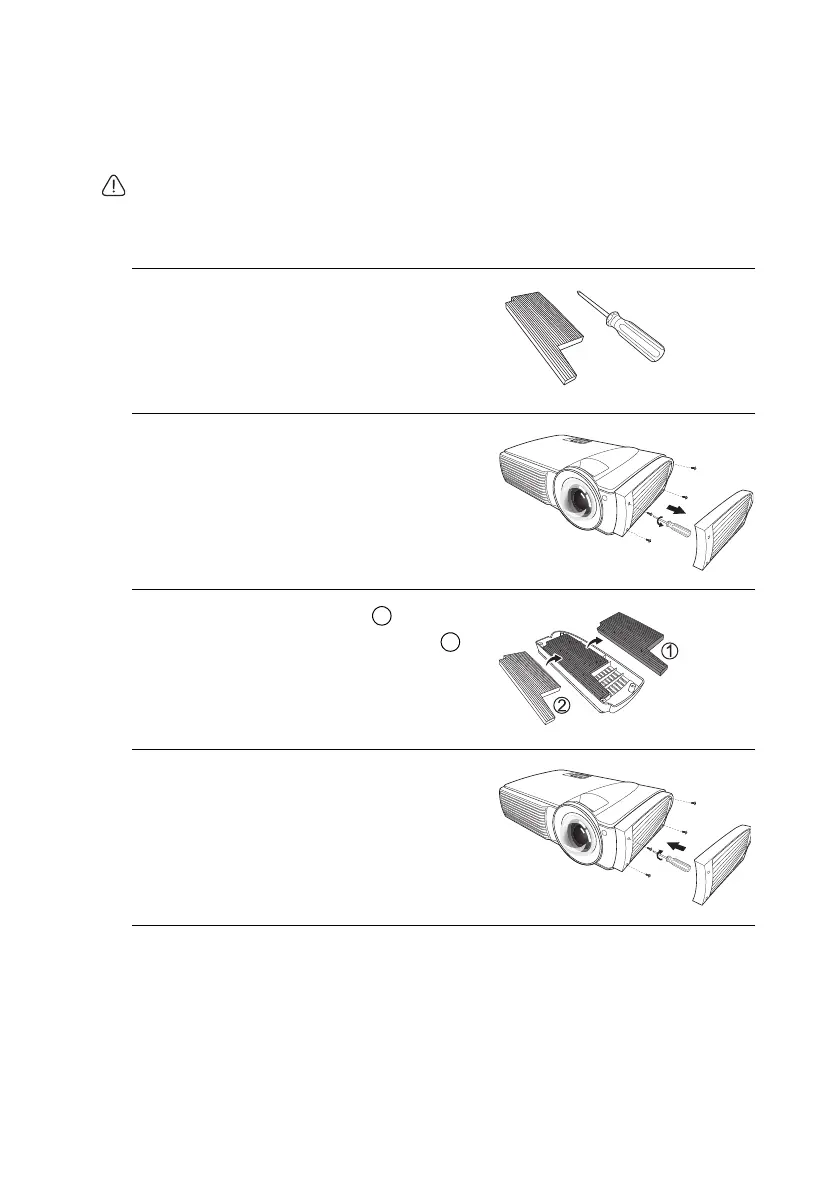
1. Have the following item ready:
• Spare dust filter (available from your
dealer)
• A suitable cross-head (phillips type)
screwdriver
2. Locate the dust filter cover on the side of the
projector and loosen the 4 screws using the
screwdriver. Keep the screws in a safe place
for later use. Detach the dust filter cover
from the projector.
3. Replace the old (used) filter in the dust
filter cover with the spare (new) filter .
Dispose of the old filter properly according to
your local regulations.
4. Re-install the dust filter cover using the
screwdriver and the screws removed in step
2.


 To Next Page