Maintenance64
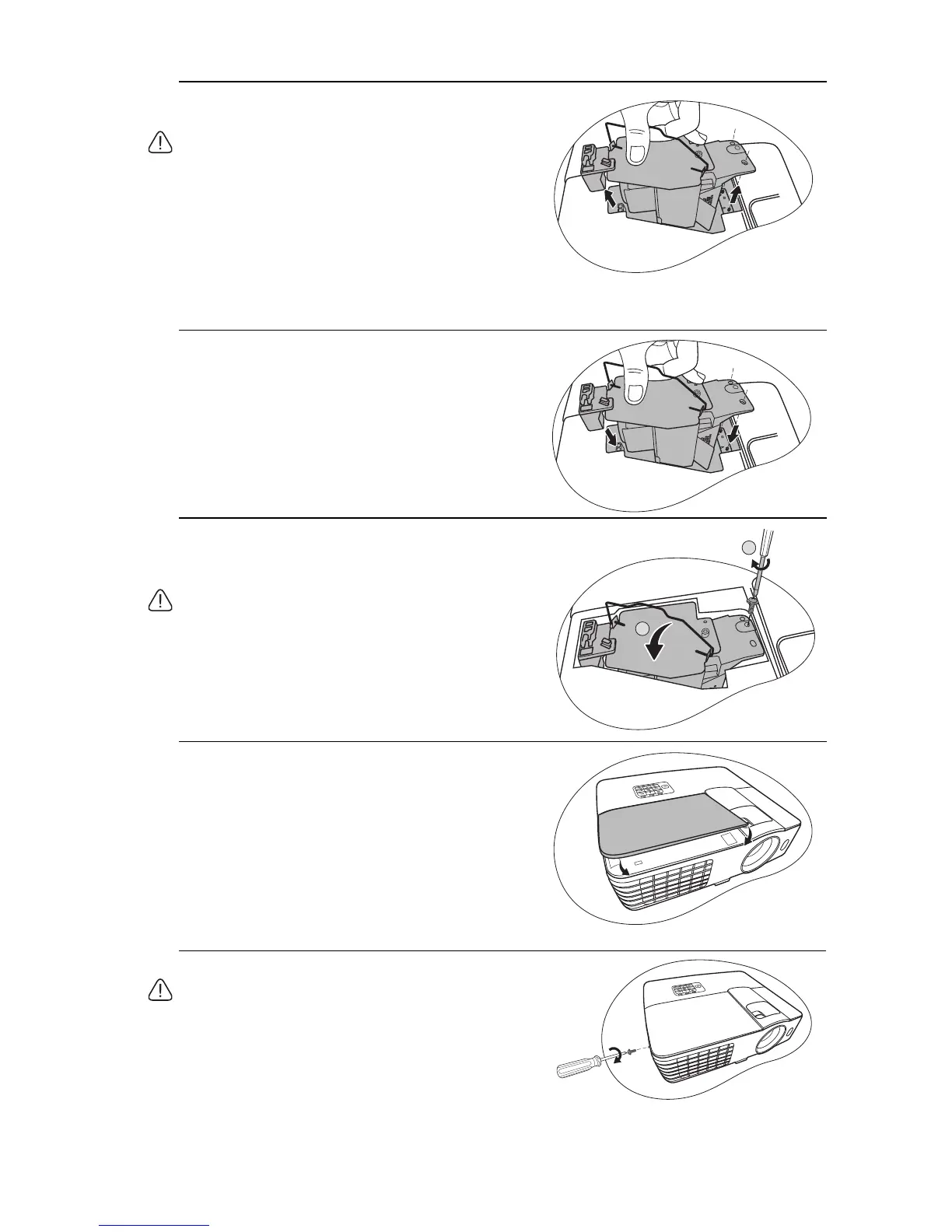
7. Use the handle to slowly pull the lamp out of
the projector.
• Pulling it too quickly may cause the lamp to break
and scatter broken glass in the projector.
• Do not place the lamp in locations where water
might splash on it, children can reach it, or near
flammable materials.
• Do not insert your hands into the projector after
the lamp is removed. If you touch the optical
components inside, it could cause color
unevenness and distortion of the projected
images.
8. As shown in the figure, lower the new lamp.
9. Tighten the screw that secures the lamp.
10. Ensure the handle is fully laid flat and locked
in place.
• Loose screw may cause a bad connection, which
could result in malfunction.
• Do not over tighten the screw.
11. Replace the new protection film that comes
with the new lamp.
12. Replace the lamp cover on the projector.
13. Tighten the screw that secures the lamp cover.
• Loose screw may cause a bad connection, which
could result in malfunction.
• Do not over tighten the screw.



 To Next Page