The OSD (On-Screen Display) menu 33
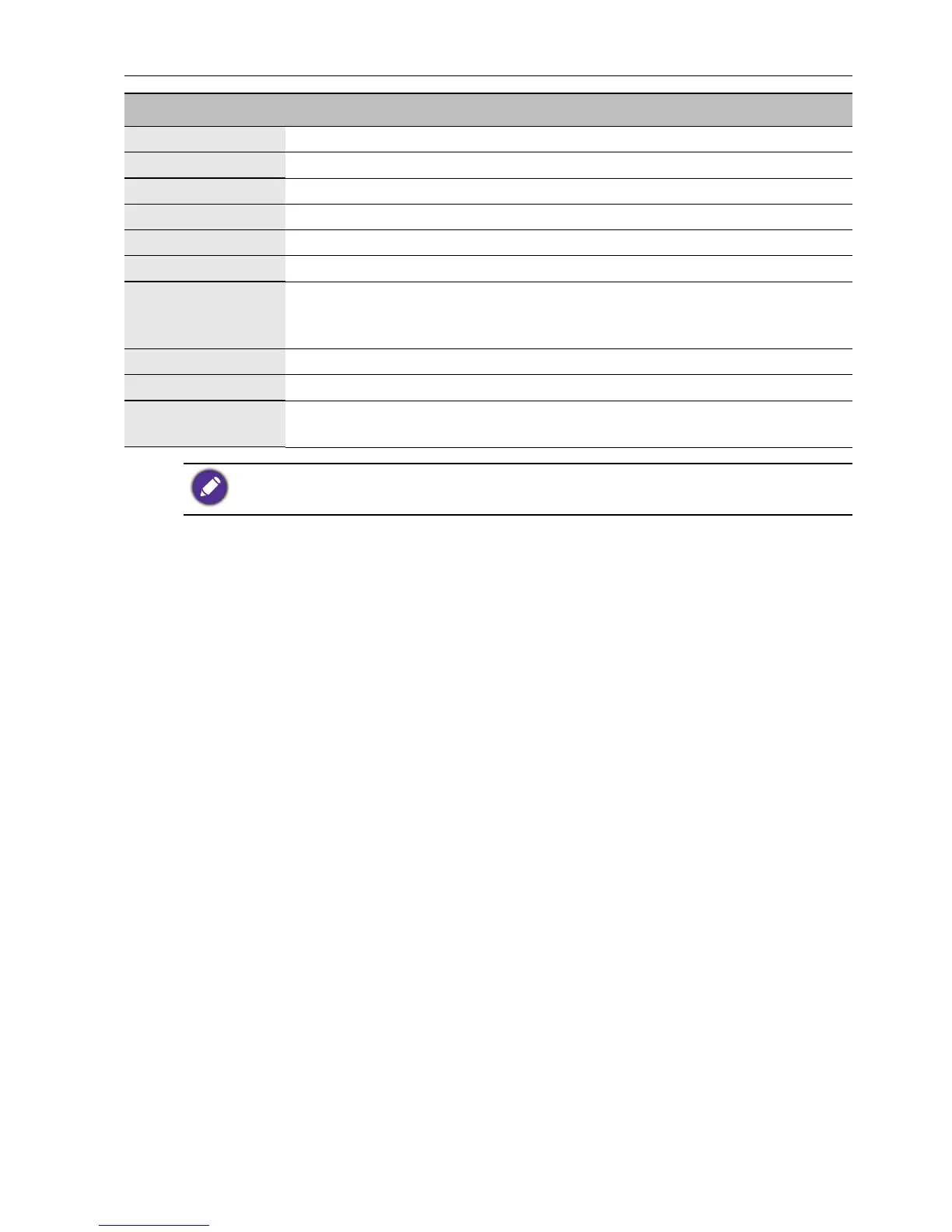
Name Description
Sound Mode Select the audio mode: Standard, Music, Movie, User.
120Hz Base frequency (Bass)
500Hz Base frequency (Low midrange)
1.5KHz Carrier frequency (Midrange)
5KHz Carrier frequency (Presence)
10KHz Carrier frequency (Brilliance)
Balance
Adjust the balance degree of the right & left sound track: move the analog
value to left to increase the left volume; move the analog value to right to
increase the right volume (L50-R50). Generally, the balance is set to 0.
Surround Select to turn on/off the surrounding sound.
SPDIF Output Select the digital audio output mode: PCM, Auto.
Audio only
Select this option to blank and output the audio only; press any key to
exit.
120Hz, 500Hz, 1.5KHz, 5KHz, and 10KHz can be used only under User
mode.



 To Next Page