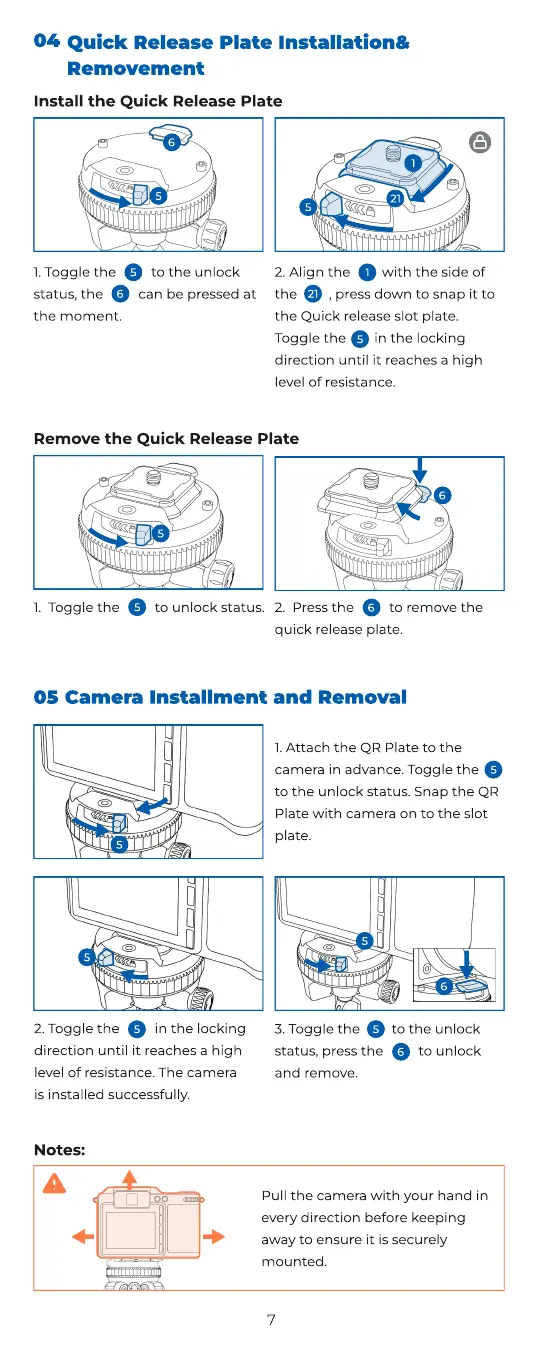
Remove the Quick Release Plate
5
6
6
1. Toggle the to unlock status.
5
2. Press the to remove the
quick release plate.
6
5
1. AttachtheQRPlatetoth
camerainadvance.Togglethe
totheunlockstatus.SnaptheQR
Platewithcameraontotheslot
plate.
5
5
2. Togglethe inthelocking
directionuntilitreachesahigh
level of resistance. The camera
isinstalledsuccessfully
5
5
6
Camera Installment and Removal05
3. Togglethe totheunlock
status,pressthe to unlock
and remove
6
5
1. Toggle the to the unlock
status, the can be pressed at
the moment.
5
6
5
6
5
1
21
Install the Quick Release Plate
Quick Release Plate Installation
Removement
04
2. Alignthe withthe side of
the , press down to snap it to
the Quick release slot plate.
Toggle the in the locking
direction until it reaches a high
level ofresistance.
5
21
1
Pull
the
camera
with
your
hand
in
every
direction
before
keeping
away
to
ensure
it
is
securely
mounted
.
N
otes
:
7



 To Next Page