220 Series 35
PC PROGRAMMING
For the communicator to work properly, you must use a 32 kB or better SIM card.
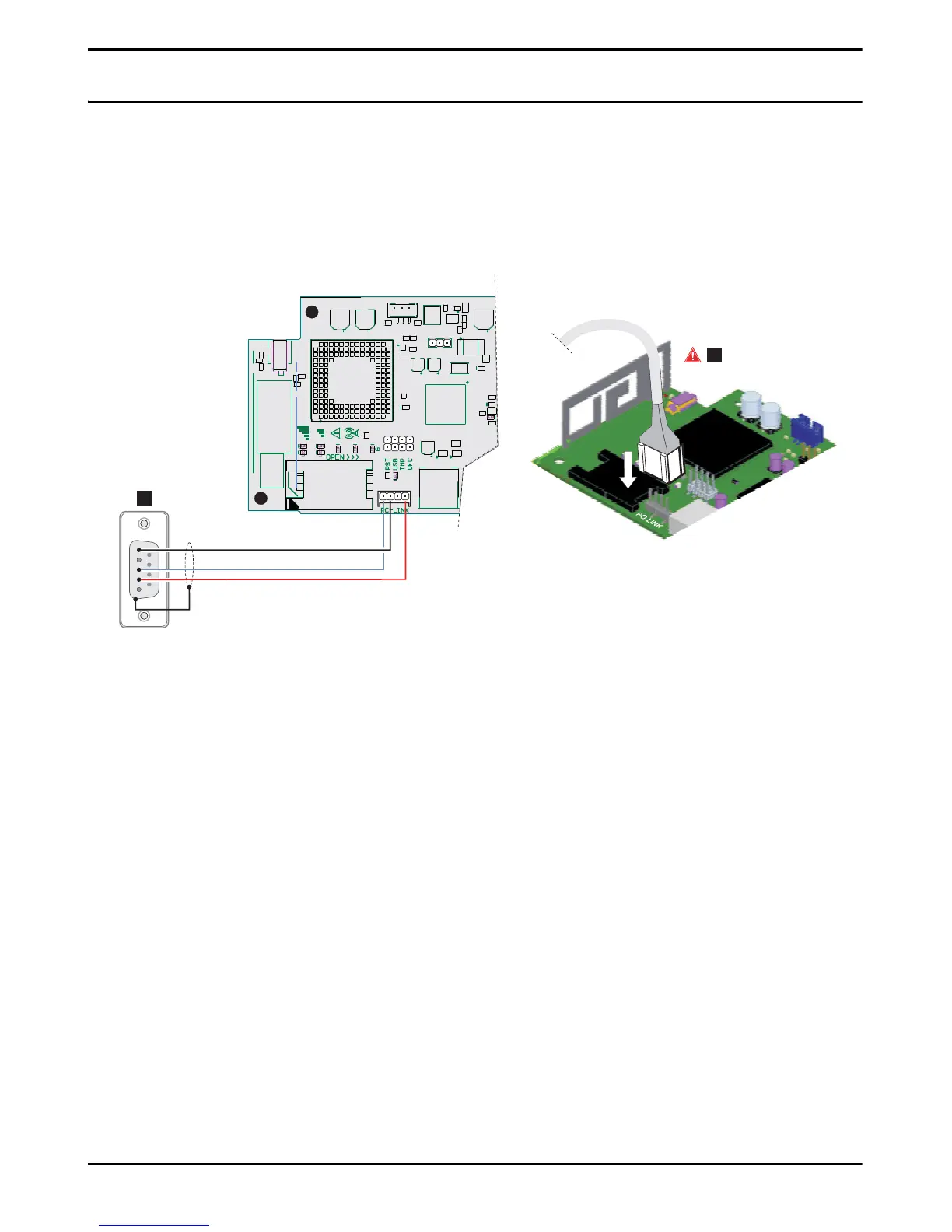
To program the system with a PC, you need a PC-Link cable (not included), connected between connector 15 of the communicator
and a PC COM port, and the Console (Figure 7). Take care to insert the PC-Link cable properly. Once the connection has been
made, select the COM with Tools > Modem Manager Configuration. If you have a problem with communications, check the
cable and the serial port settings.
Figure 7 – PC-Link cable connection: A) RS-232 female connector, solder side B) insert the PC-Link cable properly.
Alternatively, connect the communicator to a PC with a USB A-A cable (hub cable), see “USB connector functions” on page 21.
To install and run the Console, you must have admin rights on the PC; we also recommend that you check the firewall settings
if you encounter problems during the installation procedure.
The Console can be downloaded from www.bentelsecurity.com.
1. Install the Console.
2. Run the Console.
3. Select the user name and enter the password to enter the session: the factory setting uses the username admin and the
password is 1234.
4. Open the File menu and click on New Account to create a new account or open an account listed in the Start Page:
double click on the account to open it.
To change the Console's language, click on Tools > Edit Current User; select the language in the next page.


 To Next Page