HYDRONIC UNIT
6
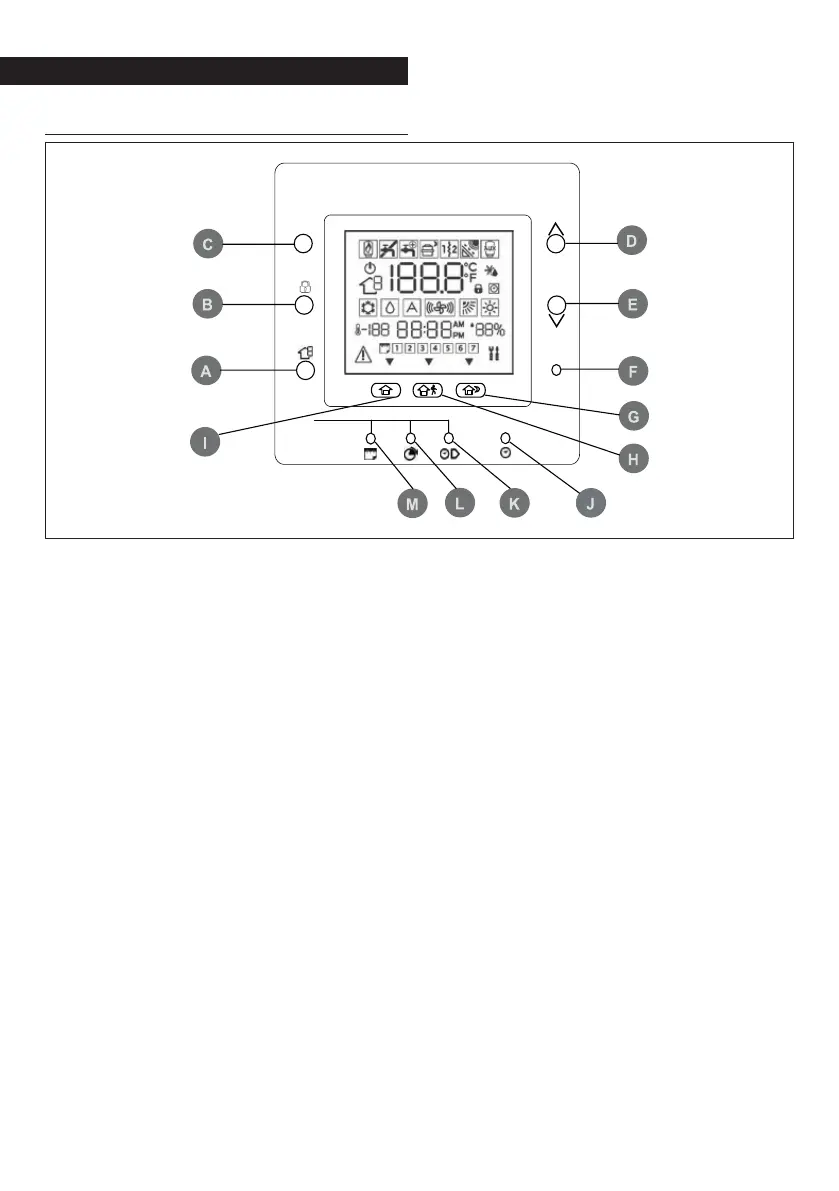
Identifying the keys
A ZONE: This key is used for program-
ming.
B LOCK: Keeps the temperature cur-
rently set or starts the hourly pro-
gram.
C MODE: Selects the operating mode
among heating, cooling or off.
D UP: Raises the temperature or in-
creases the number of elements se-
lected on the display when adjusting
the advanced programming settings.
E DOWN: Lowers the temperature or
decreases the number of elements
selected on the display when ad-
justing the advanced programming
settings.
F OK: Saves the settings once set-up or
a programming step have been com-
pleted.
G NIGHT: Enables the programmed
heating and cooling settings for the
home period at night.
H AWAY: Enables the programmed
heating and cooling settings for the
“away” period.
I HOME: Enables the programmed
heating and cooling settings for the
home period during the day.
J D/H/M SET TIME: Enables the time
setting mode.
K PERIOD START: Enables the program-
ming menu, displaying the start of
the six programmed time periods.
L PERIOD: Enables the program-
ming menu, displaying the six pro-
grammed time periods.
M DAYS: Enables the programming
menu, displaying three options -
from 1 to 7 (every day), from 1 to 5
(weekdays), from 6 to 7 (weekends)
and day by day (1,2,3,4,5,6,7).
OK
M
P



 To Next Page