HYDRONIC UNIT
7
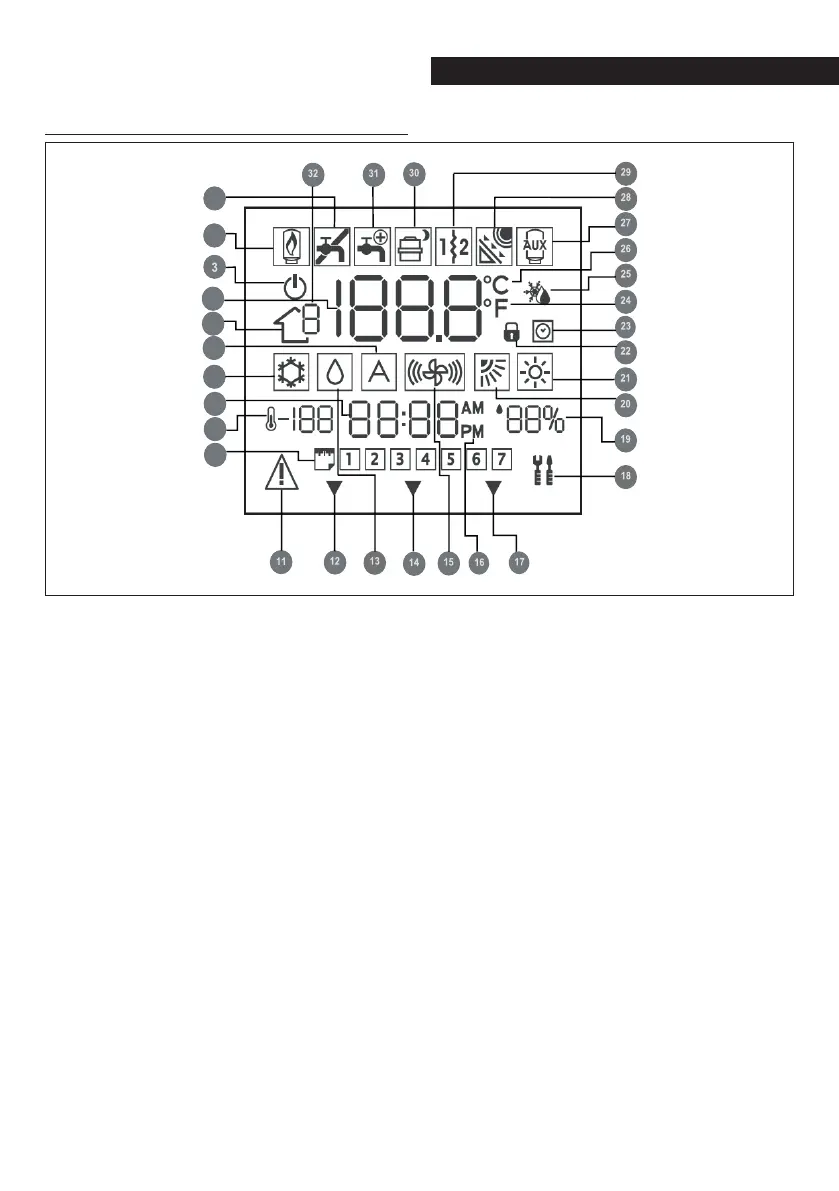
Display indicators
1 Not used
2 Not used
3 System off
4 Air temperature inside the room
5 Zone
6 Not used
7 Cooling Mode
8 Time
9 Outdoor temperature
10 Day of the week
11 Alarm
12 The system is using the “Home” set-
tings
13 Dehumidification / humidification
request
14 The system is using the “Away” set-
tings
15 Not used
16 AM or PM indicator for the correct
time
17 The system is using the “Night” set-
tings
18 Maintenance / Installer mode
19 Percentage relative humidity
20 Not used
21 Heating Mode
22 Keypad locked
23 Hourly program enabled
24 Fahrenheit
25 Thermostat set to anti-freeze tem-
perature
26 Celsius
27 Auxiliary heat source
28 Not used
29 Auxiliary electric heating element
30 Heat pump on / Frequency reduction
31 Domestic hot water
32 Not used
1
2
4
5
6
7
8
9
10



 To Next Page