HYDRONIC UNIT
14
Changing the factory settings
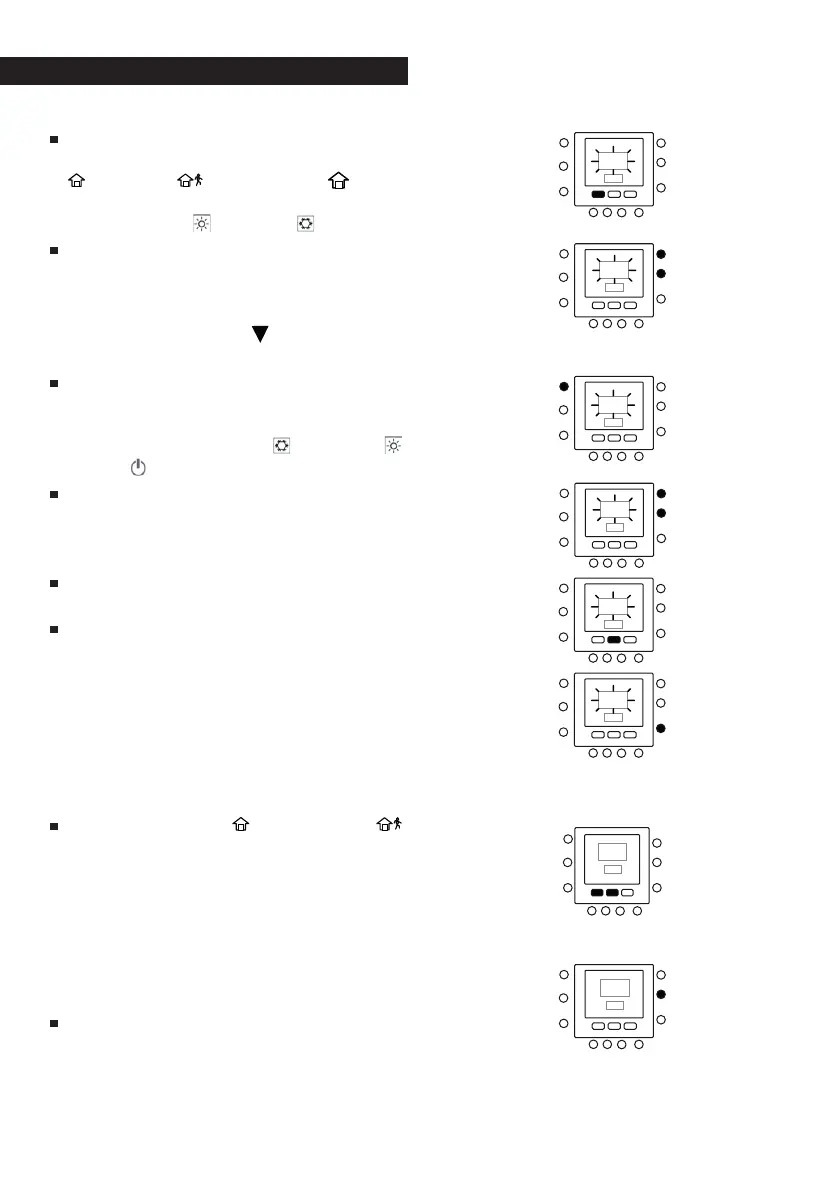
Hold down the Touch ‘N’ Go key you
want to change for 3 seconds: HOME (
), AWAY ( ) or NIGHT ( ). The
temperature set will flash, together
with the hot ( ) or cold ( ) symbol.
Press the UP or DOWN keys on the
right-hand side of the display until
you reach the desired temperature
value for the current operating mode.
The triangular icon (
) above the se-
lected key will now start flashing.
To change mode, press the MODE key
repeatedly until the symbol for the
required mode flashes on the dis-
play: either Summer (
), Winter ( )
or Off ( ).
Press the UP or DOWN keys on the
right-hand side of the display until
you reach the desired temperature
value.
Press one of the other Touch ‘N’ Go,
keys to repeat the above steps.
Press the OK keys to confirm the
changes made and exit the mode for
the Comfort parameter variation.
Default factory settings for the
user configuration
The procedure for the switch from us-
er-defined parameters to the default
factory parameters is described below.
Press the HOME (
) and AWAY ( )
keys simultaneously for 10 seconds to
enter the user configuration mode.
When this parameter is selected for
the first time, the number 999 is in-
dicated in the time zone of the dis-
play and an initial numerical value of
10 is displayed in the temperature
zone.
Press and hold down the DOWN. key.
When the counter reaches a value of
zero, the acronym “Fd” is displayed
in the temperature zone. This means
that the factory default values are



 To Next Page