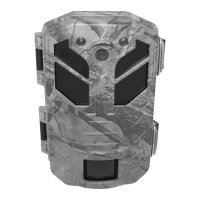
The device described in this manual is the Bergen & Schröter DH1 Wildgame Camera, 16MP. It is a wildlife camera designed for outdoor use, capable of capturing still images and videos of wildlife.
Function Description
The DH1 Wildgame Camera operates by detecting motion within its PIR (Passive Infrared) detection range. Once motion is detected, it automatically captures either still images or videos, depending on the user's settings. The camera does not have built-in memory and requires a TF card (Micro SD card) for operation and storage of captured media. It can be powered by internal AA batteries or an external 6V DC power source, such as solar panels.
The camera features a three-level power/mode switch: OFF, TEST, and ON.
- OFF Mode: The camera is turned off.
- TEST Mode: In this mode, the user can access the settings menu, take manual photos or videos, and adjust various parameters. An LED indicator shows red for PIR monitoring and white for image or video recording. The display will show "Low Battery" if the battery level is low.
- ON Mode: The camera switches to real-time monitoring. It operates automatically, capturing images or videos when game or other objects enter the PIR detection range. When the detected object leaves the range, the camera returns to standby mode.
Captured images and videos are saved in the PHOTO or VIDEO folder on the TF card, with filenames like PICT0001.JPG for images and PICT0001.AVI for videos. These files can be downloaded to a computer using the supplied USB data cable or by inserting the TF card into a card reader. AVI video files are compatible with most multimedia players like Windows MediaPlayer and Quick Time.
Important Technical Specifications
- Model: DH1 Wildgame camera, 16MP
- Dimensions (LxWxH): 135x95x65mm
- Memory: Supports up to 32GB TF (Micro SD) memory card
- Power Supply:
- Internal: 8x Mignon alkaline batteries
- External: 6V DC connector, 2A
- Standby Power Consumption: <0.35mA
- Display: 2.0" TFT Display
- Image Size: Selectable from 0.3MP to 16MP (1x - 3x image burst)
- Video Size: 1920x1080, 1280x720, 640x480
- Video Length: 10 seconds to 3 minutes
- Sound Recording: Yes
- Trigger Mode: Single image, single image + video, video
- Trigger Time: 0.7 seconds (with 4GB Micro SD card)
- White Balance: Automatic
- Lens Angle: 60°
- Infrared Light: 38 Black-LEDs, 940nm (invisible to the naked eye)
- PIR Sensor Range: Up to 10 m
- Flash Range (Bitz range): Approximately 20m
- Protection Class: IP66 (dust-tight and protected against powerful water jets)
- Installation: Mounting tape or tripod
- Menu Languages: German (D), English (GB), French (F), Czech (CZ), Polish (PL), Portuguese (P), Dutch (NL)
- Special Features: Password protection, date, time, moon phase, and temperature displayed on each image.
Usage Features
The camera offers a range of customizable settings accessible via the menu in TEST mode.
- Photo Mode: Users can choose to capture only photos, only videos, or a combination of both (Cam+Video mode, which first takes a photo and then a video).
- Languages: Multiple language options are available for the menu interface, including English, Simplified Chinese, Traditional Chinese, Japanese, Korean, Russian, French, German, Czech, Portuguese, Polish, Dutch, Turkish, and Thai.
- Image Size: Users can select the desired image resolution from 0.3MP up to 16MP. Higher resolutions provide better image quality but consume more TF card memory and may slightly slow down the exposure time.
- Video Length: Video recording duration can be set from 10 seconds to 3 minutes.
- Date/Time: The date and time can be set via the menu.
- Password Protection: A password can be set to prevent unauthorized access and use of the camera.
- Camera Name: Users can assign a 6-character alphanumeric name to their camera.
- Monitoring Period: A specific time frame can be set for when the camera should be active.
- Sound Recording: This feature can be turned ON or OFF. When ON, the camera records sound; otherwise, it records silent videos.
For optimal performance, it is recommended to place the camera at a height of 1 to 2 meters above the ground. To avoid false triggers, the camera should not be pointed at heat sources (e.g., the sun) or near branches that might move in the wind.
Maintenance Features
- Battery Management: The manual recommends using AA batteries for power. It is crucial to ensure correct polarity. If the camera is not used for an extended period, remove the batteries to prevent leakage and potential damage. The camera can also be powered by an external 6V/2A DC source.
- TF Card Insertion: The camera requires a TF card (up to 32GB) for operation. Before inserting, verify the card's capacity and ensure it has been tested for functionality.
- Formatting: The camera offers a formatting function for the TF card. If a TF card has been used in other devices, it is strongly recommended to format it with the camera to ensure proper operation and clear all existing files.
- Reset Factory Settings: The camera can be reset to its factory settings, which will delete all user-defined parameters, including any passwords. This is done by holding down the "M" and "E" keys, turning the camera ON in TEST mode, and then turning it OFF.
- Troubleshooting Low Voltage: If the camera displays "It is difficult to obtain night video under low voltage," it indicates low battery. If the battery voltage drops below 4.0V, the infrared light cannot be activated, preventing night photos or videos. In such cases, it is advised to shorten the video length or use the camera during the day. The camera can still record videos without infrared light.

 Need help?
 General

 To Next Page