
 Need help?
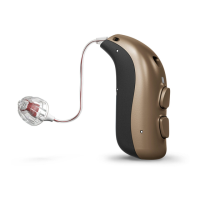
Do you have a question about the Bernafon ZR5 MNR T and is the answer not in the manual?
Details on removing the old battery from the hearing aid drawer.
Instructions for preparing the new battery, including removing the label and waiting.
Instructions for inserting the new battery into the drawer correctly.
Instructions for closing the battery drawer and confirming the hearing aid is on.
First step for wearing the hearing aid: placing it behind the ear.
Second step: holding the speaker wire and pointing the earpiece towards the ear canal.
Third step: gently pushing the earpiece into the ear canal.
Details the tool used for replacing the ProWax filter, with its two pins.
Instructions for using the tool to remove the old wax filter from the speaker.
Instructions for using the tool to insert a new wax filter.
Details the tool used for replacing the ProWax filter in molds.
Instructions for removing the old wax filter from the mold.
Instructions for inserting a new wax filter into the mold.
How to activate and deactivate flight mode by pressing the push button for at least 7 seconds.
Notes that opening/closing the battery drawer deactivates flight mode.
How to adjust volume using short presses on the hearing aid's push buttons.
How to change between up to 4 different hearing aid programs using push buttons.
How to use a long press on the push button to mute the hearing aid.
How to reactivate the hearing aid from mute mode with a brief button push.
Confirms the hearing aid is 'Made for iPhone' for direct communication and control with Apple devices.
Steps to navigate iPhone settings to Bluetooth and General menus for pairing.
Instructions to find and select 'Accessibility' within the iPhone's General settings.
How to select 'MFi Hearing Devices' from the Accessibility screen.
Steps to open/close battery drawer on hearing aids and place them near the iPhone.
How the iPhone detects and lists hearing aids for selection during pairing.
Instructions to confirm pairing for each hearing aid if two are connected.
Explains hearing aid capabilities, limitations, and correct usage to prevent damage.
Details risks of swallowing small parts and batteries, and safe battery handling.
Covers potential device malfunctions and safety precautions for active implants.
Lists possible causes for no sound, such as dead battery or clogged earpieces.
Identifies causes for intermittent or reduced sound, including moisture and dead battery.
Explains potential causes of squealing noise, like incorrect earpiece insertion or earwax.
Addresses specific beeping patterns requiring service and Bluetooth pairing failures.
Provides solutions like replacing the battery, cleaning molds, or re-inserting the earpiece.
Recommends contacting a hearing care professional for unresolved issues.
Steps to troubleshoot pairing issues, including unpairing and re-pairing Bluetooth connections.
 General
| Technology | Digital |
|---|---|
| Battery Size | 312 |
| IP Rating | IP68 |
| Wireless Connectivity | Yes |
| Bluetooth Compatibility | Yes |
| Tinnitus Masking | Yes |
| Tinnitus Masker | Yes |
| Feedback Cancellation | Yes |
| Directional Microphones | Yes |
| Noise Reduction | Yes |
| Wind Noise Reduction | Yes |
| Telecoil | Yes |
| Battery Type | Zinc Air |
| Style | Receiver-in-the-ear (RITE) |


 To Next Page