
 Need help?
Do you have a question about the Bernafon Alpha 7 MNR T R and is the answer not in the manual?
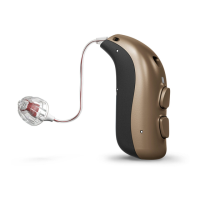
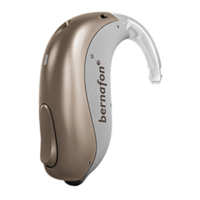
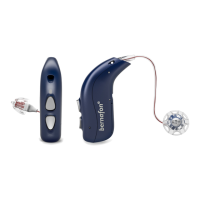
Lists the Bernafon Alpha hearing aid models covered in this booklet.
Details who the hearing aid is for and its intended use.
Illustrates different speaker types compatible with the hearing aid.
Describes standard and custom earpiece options and available sizes.
Information on how long it takes to charge the hearing aid's battery.
Factors affecting battery life and performance of rechargeable batteries.
Instructions for powering hearing aids on and off using the charger.
How to turn hearing aids on and off using the device's push button.
Method for turning the MNR T hearing aid on/off using the battery drawer.
How the hearing aid signals a low battery status through sound and LED.
Methods for distinguishing between left and right hearing aids using indicators.
Step-by-step guide to replacing the disposable battery in MNR T models.
Instructions on how to correctly place and wear the hearing aid.
How to clean the hearing aid using the MultiTool.
Specific instructions for cleaning the microphone openings.
Instructions for removing and attaching standard earpieces to the speaker.
Information on the ProWax miniFit filter and when to replace it.
Step-by-step guide to replacing ProWax miniFit filters using the tool.
How to clean customized earpieces and their wax filters.
Procedure for replacing the ProWax filter in customized earpieces.
How to adjust the hearing aid's volume using the push button.
How to switch between different hearing aid programs.
Specifics on how to cycle through programs using the push button.
How to activate and deactivate flight mode to disable Bluetooth.
Methods for muting and unmuting the hearing aids.
Using hearing aids with iPhone, iPad, and iPod touch.
Using hearing aids with Android devices for audio streaming and control.
Information on pairing devices and checking compatibility.
Overview of accessories like SoundClip-A, TV-A, RC-A.
Details on EduMic and the EasyControl-A App.
Information on Tinnitus SoundSupport's purpose, target users, and general guidance.
Further guidance for users of the tinnitus sound generator.
How to adjust sound options and volume for Tinnitus SoundSupport.
Guidance on safe daily usage duration for Tinnitus SoundSupport.
Information for professionals and warnings regarding Tinnitus SoundSupport use.
Specific warnings related to the use of Tinnitus SoundSupport.
Covers warnings on charging, battery hazards, explosives, and general handling.
Details risks related to rechargeable batteries and potential dysfunction.
Risks associated with active implants, cochlear implants, and environmental factors.
Hazards from chemicals, scanning procedures, and connecting to external equipment.
Precautions for power hearing aids, side effects, aircraft use, and modifications.
Guidance on managing electromagnetic interference affecting hearing aid performance.
Table of common symptoms, possible causes, and solutions for hearing aid issues.
Solutions for issues related to the hearing aid charger and LED indicators.
Information on IP68 rating and operating/storage conditions.
Details on radio technologies, FCC compliance, and RF exposure.
Information on hearing aid compatibility with mobile phones.
Explanations of symbols and abbreviations used in the booklet.
Details on the manufacturer's international warranty.
A form to record warranty details for the hearing aid.
Forms for personalizing Tinnitus SoundSupport and general hearing aid settings.
Explains sounds and LED light patterns for various hearing aid statuses and functions.
 General
| Brand | Bernafon |
|---|---|
| Model | Alpha 7 MNR T R |
| Category | Hearing Aid |
| Language | English |



 To Next Page