
 Need help?
Do you have a question about the Bernafon Alpha miniRITE Series and is the answer not in the manual?
Lists Bernafon Alpha 9, 7, and 5 MNR T R hearing aid models with corresponding numbers.
Details available speaker options for the Bernafon Alpha hearing aid models.
Defines a hearing care professional and their role in hearing aid services.
The hearing aid is designed to amplify and transmit sound to the ear.
Suitable for bilateral or unilateral hearing loss from slight to profound degrees.
Not for infants under 36 months; caution with active implants.
Instructions on charging the hearing aid, LED indicators (ORANGE/GREEN), and charging time.
How the hearing aid turns ON/OFF when removed/placed in the charger.
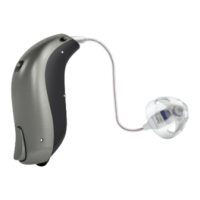
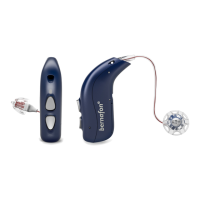
Diagram and description of the hearing aid, its components, and available speaker types.
Illustrations and labels for standard and power mould speakers.
Details standard and custom earpieces, including dome sizes and specific types like OpenBass dome.
Illustrates different dome sizes available for speakers.
Diagram labeling the parts of the hearing aid: microphones, LED light, push button, wax filter, speaker, rechargeable battery.
Explains charging times for different battery levels and automatic stop of charging.
Discusses factors affecting daily battery performance, like streaming, and optimal charging temperature.
Explains how the hearing aid automatically turns ON when removed from the charger and OFF when placed in it.
Instructions on pressing the lower part of the push button to turn the hearing aid ON.
Instructions on pressing the lower part of the push button to turn the hearing aid OFF.
Describes audible (beeps) and visual (LED) indicators for low battery status.
Explains how to identify left and right hearing aids using color indicators.
Shows placing the hearing aid behind the ear with an earpiece attached.
Illustrates holding the speaker wire bend and positioning the earpiece.
Details gently pushing the earpiece into the ear canal and fitting the ear grip.
Describes using the MultiTool for cleaning the hearing aid, including brush and wire loop functions.
Instructs to use the MultiTool brush to clean microphone openings carefully.
Step 1: Hold on to the speaker and pull off the earpiece.
Step 2: Insert speaker into earpiece middle for a secure fit.
Step 3: Push firmly to ensure earpiece is securely fastened.
Explains the function of the white wax filter and when to replace it.
Illustrates the tool for wax filter replacement and its components.
Shows how to remove the old wax filter using the tool's pin.
Details inserting the new wax filter using the tool.
Instructions for cleaning customised earpieces, including the vent.
Illustrates the tool used for replacing ProWax filters.
Shows the process of removing an old wax filter from the earpiece.
Details inserting a new wax filter into the earpiece using the tool.
Recommends storing the hearing aid in its charger when not in use.
Advice on preparing the hearing aid for long-term storage, including charging.
Explains how to activate/deactivate Flight mode using the push button and its LED indicators.
Clarifies that Bluetooth is turned OFF in Flight mode, but the hearing aid remains ON.
Introduces optional features and accessories that enhance hearing aid functionality.
Details how to adjust the hearing aid volume using the push button.
Explains how to switch between different hearing aid programs using the push button.
Describes using the push button to cycle through hearing aid programs forwards or backwards.
Explains how to mute the hearing aid using optional devices or apps.
Describes methods to unmute the hearing aid, including using devices/apps or the push button.
Details compatibility and direct communication with iPhone, iPad, and iPod touch.
Explains support for Audio Streaming for Hearing Aids (ASHA) and direct communication with Android devices.
Provides website links for instructions on pairing hearing aids with various devices.
Describes SoundClip-A as a remote microphone and hands-free headset.
Describes TV-A for streaming sound from TVs or audio devices.
Describes RC-A for changing programs, volume, and muting the hearing aid.
Describes EduMic for use as a remote microphone in various environments.
Explains the EasyControl-A app for controlling hearing aids via mobile devices.
Explains Telecoil for improved hearing in loop-equipped environments.
Defines Tinnitus SoundSupport as a tool for temporary tinnitus relief within a management program.
Specifies the target population for Tinnitus SoundSupport as adults over 18 years old.
Indicates that Tinnitus SoundSupport is for licensed hearing care professionals to fit.
Provides instructions for users of Tinnitus SoundSupport, emphasizing following HCP advice.
States that Tinnitus SoundSupport requires a medical evaluation by an ear physician before use.
Explains how Tinnitus SoundSupport is programmed and how sound options are selected.
Describes activating Tinnitus SoundSupport in up to four different programs.
Details how the push button can control Tinnitus SoundSupport volume in one or both ears.
Warns about potential hearing damage from prolonged use at high volumes and advises consulting HCP.
Explains Tinnitus SoundSupport as a module function enabled by the hearing care professional.
Discusses how wearing time decreases with higher volume levels and mentions fitting software warnings.
States that the volume control for the sound generator is deactivated by default.
Explains warnings displayed if volume control is activated and its relation to hearing damage.
Alerts users to potential concerns like worsening tinnitus or changes in hearing thresholds.
Emphasizes following the maximum daily wearing time advised by the hearing care professional.
Covers general safety advice for hearing aid usage, charging, and battery safety.
Advises on using hearing aids as directed by HCP and warns against misuse.
Warns to keep hearing aids and parts away from children to prevent choking hazards.
Advises against using the hearing aid in explosive environments like mines or areas with flammable anesthetics.
Warns about severe risks, including death, from swallowing or inserting lithium-ion batteries.
Instructions on handling the rechargeable battery, warning against opening or replacing it.
Warns that the hearing aid may stop working unexpectedly due to battery expiry or blockages.
Discusses the hearing aid's compatibility with active implants and recommended precautions.
Provides instructions if an earpiece becomes detached in the ear canal.
Advises on precautions during medical imaging or treatments that may affect the hearing aid.
Warns against exposing the hearing aid to extreme heat, microwaves, and certain chemicals.
Provides guidance on selecting and using hearing aids with high sound pressure levels.
Mentions possible side effects like earwax accumulation or skin irritation.
Instructs to use Flight mode on aircraft to deactivate Bluetooth unless permitted.
Recommends using only manufacturer-supplied accessories to maintain EMC.
Warns that unauthorized modifications void the warranty.
Explains potential electromagnetic interference and how to mitigate it.
Table listing symptoms like 'No sound', 'Intermittent sound', 'Squealing noise', 'Beeping' and their causes/solutions.
Provides solutions for common hearing aid issues, such as charging, cleaning, and re-inserting earpieces.
Troubleshooting steps for when the hearing aid LED remains OFF in the charger.
Troubleshooting for hearing aid LED blinking GREEN when placed in the charger.
Troubleshooting for hearing aid LED blinking ORANGE when placed in the charger.
Troubleshooting steps for pairing issues with Apple devices, including unpairing and re-pairing.
Provides solutions for LED status issues and pairing problems with Apple devices.
Explains the IP68 rating, meaning the hearing aid is dust-tight and protected against water ingress.
Specifies temperature, humidity, and atmospheric pressure for optimal operating conditions.
Defines temperature, humidity, and atmospheric pressure for charging conditions.
Outlines temperature and humidity limits for transportation and storage.
Details the hearing aid's radio technologies (magnetic induction, Bluetooth Low Energy) and power output.
Lists FCC and IC identification numbers for the device in USA and Canada.
States compliance with FCC and Canadian RSS standards, subject to interference conditions.
Declares compliance with EU directives and medical device regulations.
Provides manufacturer details and website for documentation.
Explains that text marked with a warning symbol requires careful reading before use.
Explains the CE mark and its associated notified body identification number.
Defines the IP code, indicating protection against water and dust ingress.
Indicates compatibility with iPhone, iPad, and iPod touch.
Explains the hearing loop symbol, indicating installation of a hearing assistance loop.
Indicates that the hearing aid contains an RF transmitter.
Indicates a medical device requiring protection from moisture.
Advises consulting instructions for use regarding warnings and cautions.
Defines the SN symbol for identifying the manufacturer's serial number.
Details the 12-month limited international warranty, exclusions, and service procedures.
Guides users on how to obtain service for their hearing aid through their hearing care professional.
A form to fill out for warranty registration, including owner and professional details.
A table for hearing care professionals to record Tinnitus SoundSupport usage limitations per program.
Details how to change Tinnitus SoundSupport volume separately or simultaneously for both ears.
Table for recording hearing aid settings like volume control and program change preferences.
Settings for volume control indicators, including beeps at min/max and changing volume.
Explains sound and LED light patterns indicating hearing aid status and functions.
Details sound and LED light indicators for turning the hearing aid ON and OFF.
Describes sound and LED light indicators for volume adjustments.
Details sound and LED light indicators for accessories like TV-A and SoundClip-A.
Explains sound and LED light indicators for activating and deactivating Flight mode.
Details the sound and LED light indications for a low battery status.
Explains the sound and LED light indicators for battery shutdown.
Describes the sound and LED light indicators for a required microphone service check.
Advises checking troubleshooting for LED blinking ORANGE in the charger.
Advises checking troubleshooting for LED blinking GREEN in the charger.
 General
| Brand | Bernafon |
|---|---|
| Model | Alpha miniRITE Series |
| Category | Hearing Aid |
| Language | English |



 To Next Page