7
BATTERY TEST
1
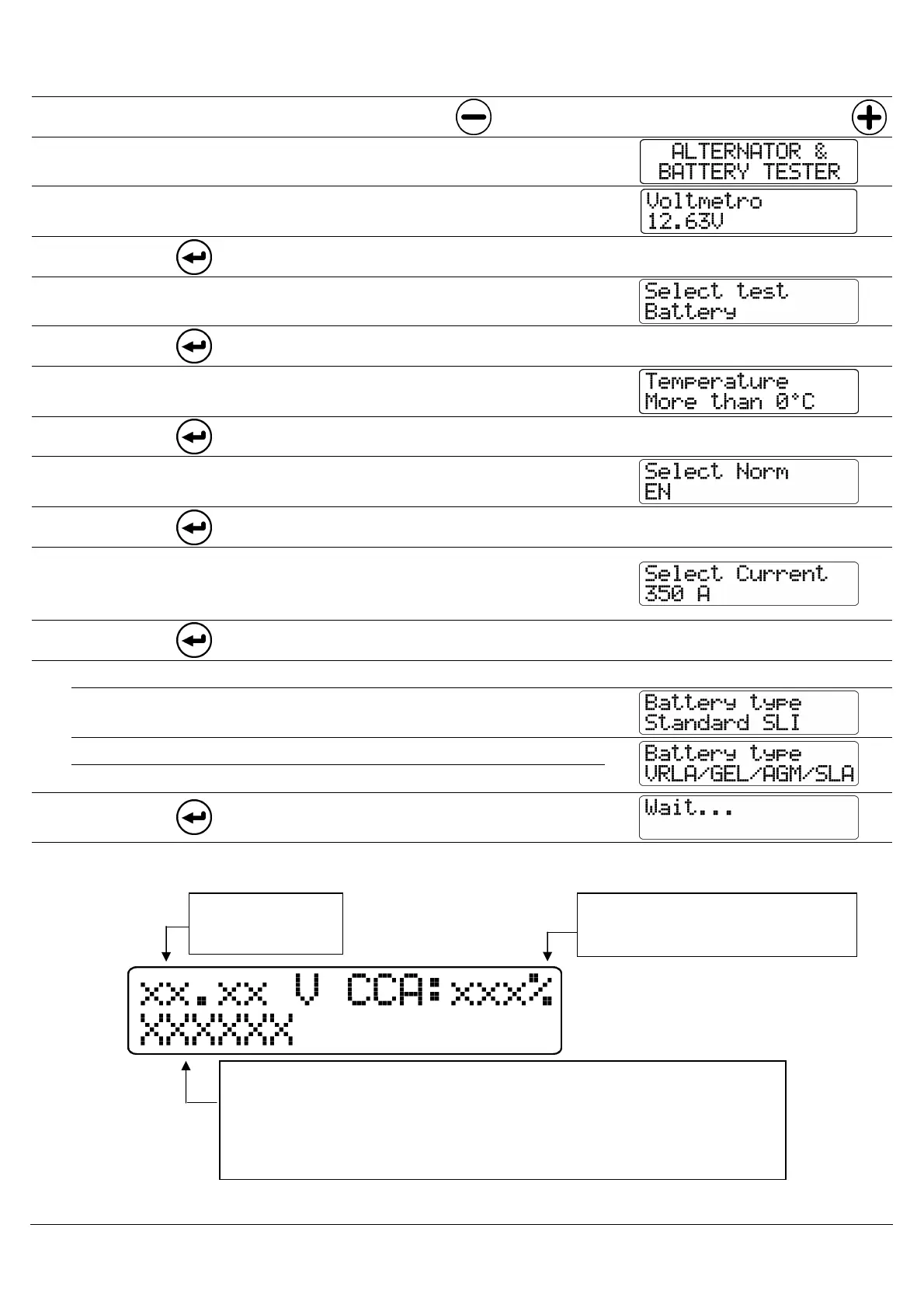
Connect the black clip to the neg. pole
and the red clip to the positive pole
3
The following message will be displayed on screen:
4
After a few seconds, the battery voltage without load
will be displayed on screen.
5
Press
6
Select test: Battery
7
Press
8
Select the battery temperature
(Higher than 0°C or Lower than 0°C)
9
Press
10
Select the test standard (Printed on the battery): EN,
SAE, DIN, IEC. For JIS standard, select SAE.
11
Press
12
Select the battery start-up current.
For JIS standard, see the table shown on Page 1 or see
the back of the tester.
13
Press
14
Select battery type:
Standard SLI UNSEALED liquid acid battery
VRLA GEL AGM
Battery with gelled electrolite
SLA SEALED liquid acid battery
15
Press
16
After a few seconds, the result will be displayed on
screen.
Power at startup can exceed 100%
Battery
Voltage
Power at startup shown as a
% of nominal current
Battery status:
- GOOD
- REPLACE
- GOOD RECHARGE
Recharge the battery and repeat the test



 To Next Page