76
Setting instructions: Models without date
See case back engraving for model/case type.
Models: A-1S, A-2S, A-2T, A-3T, A-4T, M-1SE
If packaging clip is on the crown (setting knob), please remove. Note:
Crown may already be in the out position or unscrewed when new.
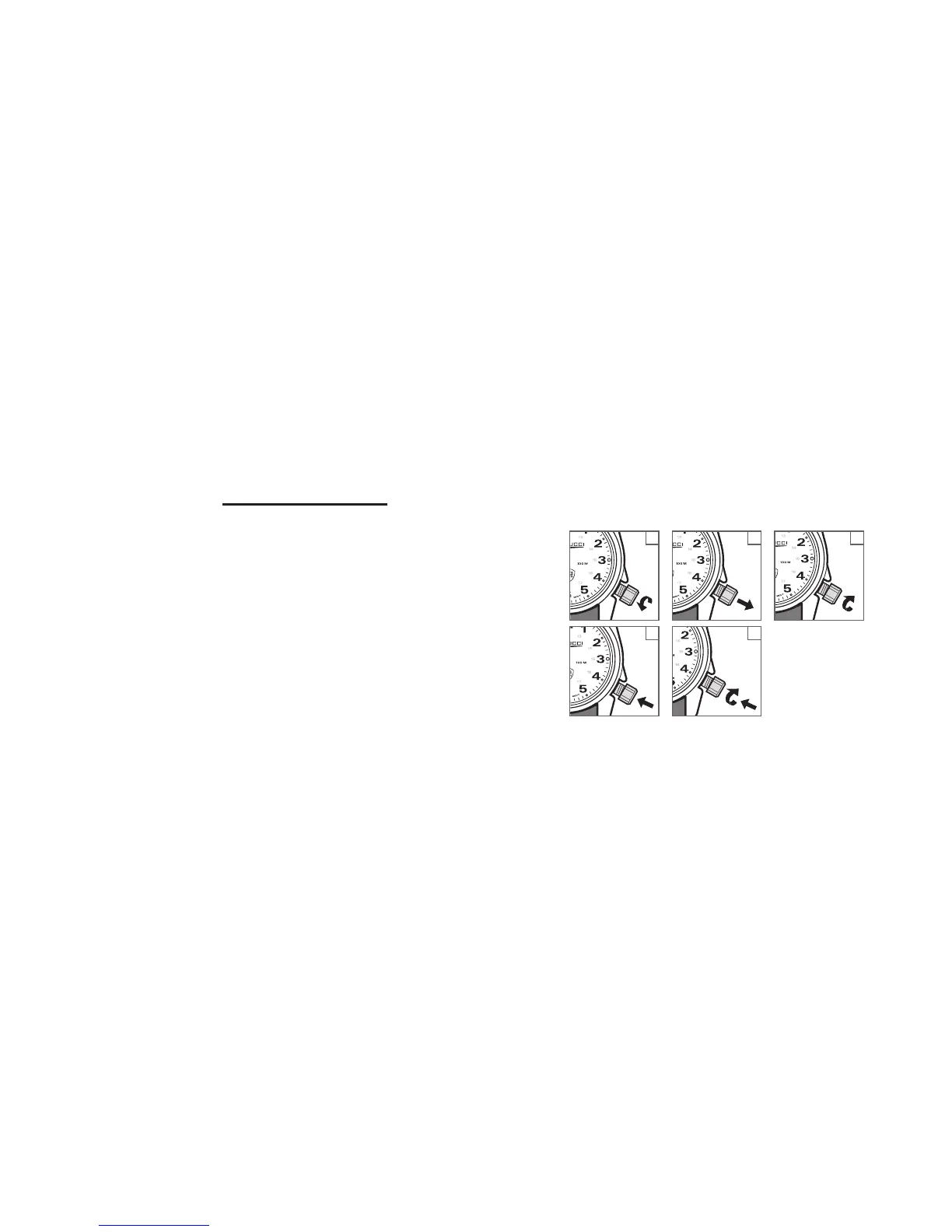
Step 1: Turn crown counter clock-wise to unscrew crown (fig. 1).
The crown is completely unscrewed when it turns freely.
Step 2: Gently and carefully pull crown out to stop second hand
(fig. 2).
Step 3: Turn crown, moving hour and minute hands to set the
desired time (fig. 3).
Step 4: Push crown in to re-start second hand (fig. 4).
Step 5: Push in and turn crown clock-wise to engage threads.
Continue to turn clockwise to firmly screw down crown.
Do not overtighten (fig. 5).
Note: Please screw down crown (setting knob) to ensure water
resistance and maintain warranty. Do not overtighten.
1
23
45



 To Next Page