11
TROUBLESHOOTING
FAQs
CAUSES
SOLUTIONS
Filters do not darken, or
fl ickers
Protector is damaged Clean or replace it
Arc sensor is not clear Clean sensor surface
Welding current is too low Adjust sensitivity to maximum
Battery is low Replace battery
Reaction is slow
Ambient temperature is too low Do not use below -5 °C
Sensitivity setting is too low Raise sensitivity properly
Filter is not clear
Protector is stained Clean or replace protector
Protective fi lm has not been removed Remove protective fi lm
Filter lenses have stains Wipe both sides of fi lter lenses
CAUTION! If the above-mentioned questions cannot be solved, stop using the product immediately and
contact the dealer.
PRODUCT GUARANTEE
12 months from date of purchase – The warranty consists in free repairs or replacments at our headquar-
ters – The warranty does not cover replacements or repairs of any parts subject to normal wear and tear
as the result of operation – The warranty will not apply if the device is damaged through misuse.
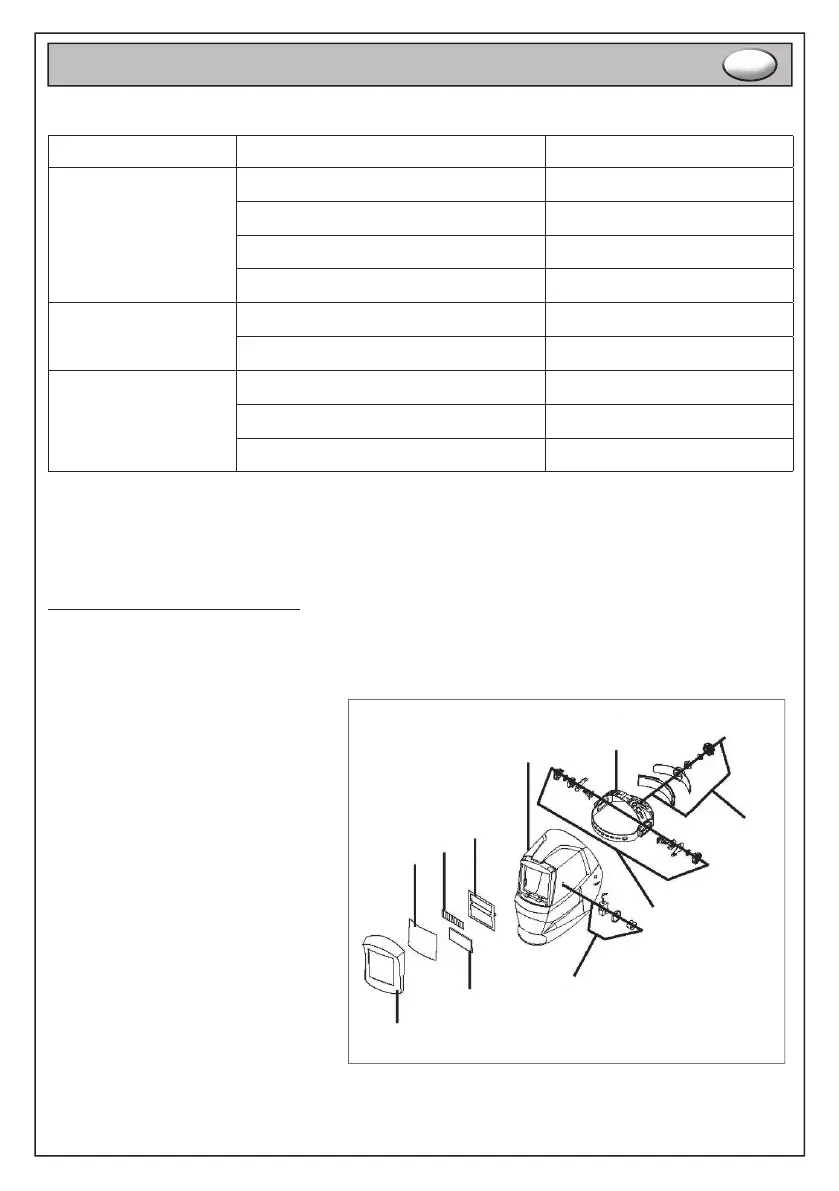
1. Helmet body
2. Headgear
3. Headgear angle adjusting knobs
4. Headgear adjusting knob
5. Shade number adjustment
6. Protective plate
7. Solar panel
8. Fixed plate
9. Front frame
10. UV/IR fi lter
INSTRUCTIONS FOR USE
EN
9
10
5
6
7
8
1
2
3
4


 To Next Page