EasyManua.ls Logo

BETOPPER LP001 - User Manual

BETOPPER LP001
2 pages
Print Icon
To Next Page IconTo Next Page
Loading...
B i g D i pp e r
R
Big Dipper Laser Science And Technology Co., Ltd
Attention
S afety T ips
1.Please read these operating instructions carefully to familiarize you with basic operations of this unit
BEFORE USE.
2.Without permitted, it is prohibited to spread the contents of this manual to others.
3.This manual is only to provide related information, and the contents of this manual will be changed at
any time without notice.
4.Unless the instructions have already stated, please do not freely modified the unit.
Operating Ins truc tions
1. Before installation and maintenance, please confirm the power is OFF. make sure that the ventilation
around the unit is good.
2.The lighting is designed for indoor demonstration, please do not use this product in a wet environment
for long-term.
3.The use and maintenance of this unit should avoid contact with water. when using it outdoor, please take
waterproofing measures.
4.Personnel, who to take the installation, operation and maintenance, must be familiar wi
th the lighting
performance. Most of the damage is resulted from unfamiliar with its performance.
5.Please do not face up to the luminous unit for a long time, so as not to cause discomfort to your eyes.
6.Please often wipe the unit with a clean cloth.
S afety g uide
S afety g uide
S afety g uide
DMX C ontrol
Menu o peration
Operation I ns tructions
Master slave mode: connect by DMX cable, D001 mode is slave light while the first light is master one.
Numerical
0-9 9
0-9 9
MENU
CC
CP
DE
BEBE
R000-255
G000-255
B000-255
W000-255
D001-D512
Last radix point flickers on digital display board when has DMX signal
Channels
0-255
0-255
0-10
11-49
50-100
101-149
150-199
200-255
1-255
0
1-255
0
1-255
0
1-255
0
1-255
Numerical
CH 1
CH 2
CH 3
CH 4
CH 5
CH 6
CH 7
CH 8
Function
RGB or mixed color brightness control
together with CH5, CH6 , Ch7orCH8 )
Strobe flash, speed adjustable. (This channel should use together
with CH5, CH6 , Ch7orCH8 )
Select colors by manual
Colors transition automatically
Colors shade automatically
Colors pulse transform automatically
Sound mode
Select colors when CH3 at 11-50
Red light off
Red brightnes
s from dark to bright
Green light off
Green brightness from dark to bright
Blue light off
Blue brightness from dark to bright)
White light off
White brightness from dark to bright)
(This channel should use
All light off
Description
Colors transition, change speed by UP and Down
Colors shade, change speed by UP and Down
Auto-play mode,change speed by UP and Down
Sound control mode
Red color brightness setting, change brightness by UP and Down
Green color brightness setting, change brightness by UP and Down
Blue color brightness setting, ch
ange brightness by UP and Down
White color brightness setting, change brightness by UP and Down
DMX mode, change numerical value by UP and Down
Note: "MENU" is the Function Transforming Button, "UP & Down" is the No. Transforming Button,
"ENTER" is the Confirming Button.
Model:LP001/LP003/LP001-H/LP003-H/LP010/LP010-H
54x3W 54x2W 54x1W
Rated 50,000 hours
100-240V/50-60HZ
180W 115W 60
W
Auto/Sound/DMX/Master-slave
8
Color change,Strobe
2.8KG 2.88KG 2.7KG 2.8KG 2.88KG
L
P001 L
P001-H L
P003 L
P003-H
Power cable
Model
Light source
Source lifetime
Power supply
Rating power
Play mode
DMX channel
Effect
Dimensions
N.W.
Standard
configuration
235*235*295mm
P010
LP010-H
L
Par Light User's Manual
Question and Answer IconNeed help?

Do you have a question about the BETOPPER LP001 and is the answer not in the manual?

Summary

Attention

General Operation Precautions

Read instructions before use, avoid unauthorized spreading, and do not modify the unit.

Safety Tips

User Safety Guidelines

Ensure ventilation, avoid wet environments, protect eyes, and maintain with care.

Operation Instructions

Control Button Functions

Details the purpose of MENU, UP/Down, and ENTER buttons for operation.

Technical Parameters

DMX Control

DMX Channel Functions

Details DMX channel functions for color control, modes, and effects.

Master Slave Mode Configuration

Explains connecting lights in master-slave configuration using DMX cable.

Overview

This document describes the Big Dipper Par Light User's Manual, covering models LP001, LP003, LP001-H, LP003-H, LP010, and LP010-H. It provides essential information for safe and effective operation, technical specifications, and maintenance guidelines for these par lights.

Function Description

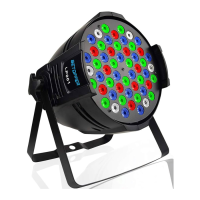
The Big Dipper Par Light is a versatile lighting unit designed primarily for indoor demonstration, though it can be used outdoors with appropriate waterproofing measures. It offers a range of operational modes including automatic play, sound control, and DMX control, allowing for dynamic and customizable lighting effects.

Operational Modes and Effects:

  • Color Transition (CC 0-99): This mode allows for smooth transitions between colors. The speed of these transitions can be adjusted using the UP and Down buttons.
  • Color Shade (CP 0-99): In this mode, the light displays various shades of colors. Similar to color transition, the speed of shading changes can be controlled with the UP and Down buttons.
  • Auto-play Mode (DE 0-99): This mode enables automatic playback of lighting sequences. The speed of the auto-play sequence can be adjusted using the UP and Down buttons.
  • Sound Control Mode (BEBE): The light responds to sound, creating dynamic effects synchronized with music or other audio inputs.
  • Individual Color Brightness Control (R000-255, G000-255, B000-255, W000-255): Users can precisely adjust the brightness of red, green, blue, and white colors independently. The brightness levels range from 0 to 255, with adjustments made via the UP and Down buttons. This allows for the creation of a vast spectrum of mixed colors and intensities.
  • DMX Mode (D001-D512): For professional lighting setups, the par light can be controlled via DMX. This mode allows for integration into larger lighting systems, with numerical values adjusted using the UP and Down buttons. The DMX control offers granular control over various aspects of the light's performance.

DMX Control Details (8 Channels):

The DMX control system provides comprehensive command over the par light's functions:

  • CH 1 (0-255): R, G, B or mixed color brightness control. This channel works in conjunction with CH5, CH6, CH7, or CH8 to control the overall brightness of individual or mixed colors.
  • CH 2 (0-255): Strobe flash, speed adjustable. This channel also works with CH5, CH6, CH7, or CH8 to control the strobe effect and its speed.
  • CH 3 (0-255): Main Function Selector.
    • 0-10: All light off.
    • 11-49: Select colors by manual.
    • 50-100: Colors transition automatically.
    • 101-149: Colors shade automatically.
    • 150-199: Colors pulse transform automatically.
    • 200-255: Sound mode.
  • CH 4 (1-255): Select colors when CH3 is at 11-50. This channel allows for specific color selection when the manual color selection mode is active on CH3.
  • CH 5 (0-255): Red color control.
    • 0: Red light off.
    • 1-255: Red brightness from dark to bright.
  • CH 6 (0-255): Green color control.
    • 0: Green light off.
    • 1-255: Green brightness from dark to bright.
  • CH 7 (0-255): Blue color control.
    • 0: Blue light off.
    • 1-255: Blue brightness from dark to bright.
  • CH 8 (0-255): White color control.
    • 0: White light off.
    • 1-255: White brightness from dark to bright.

Master-Slave Mode: The par lights support a master-slave configuration. By connecting units with a DMX cable, one unit can be designated as the master (first light), and others as slaves (D001 mode), allowing for synchronized operation across multiple fixtures without a dedicated DMX controller.

Important Technical Specifications

The manual details several models with varying light sources and power ratings, but share common features:

  • Models: LP001, LP003, LP001-H, LP003-H, LP010, LP010-H.
  • Light Source:
    • LP001, LP001-H: 54x3W LEDs
    • LP010, LP010-H: 54x2W LEDs
    • LP003, LP003-H: 54x1W LEDs
  • Source Lifetime: Rated for 50,000 hours, indicating a long operational lifespan.
  • Power Supply: Universal input of 100-240V AC, 50-60Hz, making it suitable for use in various regions.
  • Rating Power:
    • LP001, LP001-H: 180W
    • LP010, LP010-H: 115W
    • LP003, LP003-H: 60W
  • Play Mode: Supports Auto, Sound, DMX, and Master-slave modes, offering flexibility in control.
  • DMX Channel: 8 channels, providing extensive control options through DMX.
  • Effect: Capable of color change and strobe effects.
  • Dimensions: 235mm x 235mm x 295mm (common across models).
  • Net Weight (N.W.):
    • LP001, LP003, LP010: 2.8KG
    • LP001-H, LP003-H, LP010-H: 2.88KG (slight variation for 'H' models)
  • Standard Configuration: Includes a power cable.

Usage Features

  • Intuitive Control Interface: The device features a simple control panel with "MENU" for function transformation, "UP & Down" for numerical adjustments, and "ENTER" for confirmation. This design aims for user-friendliness in setting up and operating the light.
  • Indoor Use Focus: Primarily designed for indoor demonstrations, ensuring optimal performance in controlled environments.
  • Outdoor Adaptability: While primarily for indoor use, the manual acknowledges potential outdoor use, emphasizing the necessity of waterproofing measures to protect the unit from moisture.
  • Ventilation Requirement: Good ventilation around the unit is crucial for proper operation and to prevent overheating, ensuring longevity and consistent performance.
  • Safety Precautions: Users are advised to avoid prolonged direct exposure to the luminous unit to prevent eye discomfort. This highlights a commitment to user safety during operation.
  • DMX Signal Indication: A flickering radix point on the digital display board indicates the presence of a DMX signal, providing clear feedback on the control status.

Maintenance Features

  • Power Disconnection for Maintenance: A critical safety instruction is to confirm the power is OFF before any installation or maintenance tasks, preventing electrical hazards.
  • Regular Cleaning: Users are advised to often wipe the unit with a clean cloth. This simple maintenance step helps maintain the unit's appearance and potentially its performance by preventing dust buildup.
  • Water Avoidance: The manual explicitly states that the use and maintenance of the unit should avoid contact with water, underscoring the importance of keeping the device dry to prevent damage.
  • Familiarity with Performance: Personnel responsible for installation, operation, and maintenance must be familiar with the lighting performance. This suggests that understanding the device's capabilities and limitations is key to preventing damage and ensuring proper function.
  • Anti-Counterfeit Identification: All products from Big Dipper Laser Company include anti-fake identification. Consumers are encouraged to verify the anti-counterfeit label at the bottom of the case to ensure product authenticity and protect their interests. This feature helps in ensuring that users are maintaining a genuine product with expected quality and support.

BETOPPER LP001 Specifications

General IconGeneral
BrandBETOPPER
ModelLP001
CategoryLighting Equipment
LanguageEnglish

Related product manuals