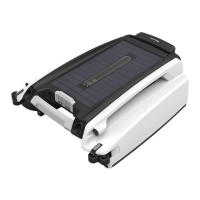
The Betta 2 Smart Pool Skimmer is an autonomous, solar-powered device designed to clean the surface of swimming pools. It operates as a self-driving pool surface cleaner and skimmer, collecting floating debris into a removable collection basket. The unit is powered entirely by a high-capacity solar panel that charges an internal battery, allowing it to run on 100% solar energy without the need for AC/DC/USB charging ports.
Function Description:
The Betta 2 is designed to continuously skim the pool surface, removing leaves, insects, and other floating debris. It utilizes a control system with various sensors, including a Gyro scope, to navigate and maneuver on the pool surface. The unit can operate in two modes: Auto Mode and Remote Control Mode. In Auto Mode, it is fully self-driving, using its sensors to guide itself and manage operations and charging. In Remote Control Mode, users can manually control its movement and travel path using an included remote control. The remote allows for directional control (forward, stop, left, right, back) and can be used to direct the skimmer to specific areas of the pool. If the remote is not operated for 2 minutes, the unit automatically reverts to Auto Mode.
Important Safety Instructions:
- Do NOT swim while Betta is working in the pool. Remove it and keep it in a cool, shaded place when the pool is in use.
- It is NOT a toy and should be kept away from children.
- Maintain balance and watch your steps when working by the poolside.
- Do not use Betta while other pool cleaning devices are in the pool.
- During swimming season, keep Betta in the pool unless it's in use or needs cleaning/service.
- Do NOT leave Betta in a hot and dry spot out of the pool unattended to prevent severe damage.
- Do NOT wash Betta using a pressure washer, as it can cause damage.
Components:
The Betta 2 consists of several key components:
- Cover Lock (1): Secures the cover.
- Distance Measure Sensor (2): Used for navigation and obstacle detection.
- LED Status Indicator (3): Provides visual feedback on the unit's operational status.
- Guide Wheel (4): Assists in movement and navigation.
- Propeller (5): Provides propulsion for movement.
- Anti-stranding Bar (6): Adjustable bars designed to prevent the unit from getting stuck on shallow stairs or other pool structures.
- Solar Panel (7): The primary power source, charging the internal battery.
- Power Switch (8): Turns the unit on and off.
- Cover (9): Protects internal components.
- Debris Collection Basket (10): Removable basket for collecting debris.
- Debris Intake Impeller (11): Draws water and debris into the collection basket.
- Handle (12): For lifting and handling the unit.
Usage Features:
- First-time Use: To start, slide the power switch to the "ON" position. The LED indicators will flash, and the propellers and impeller will begin running. Place the unit in the pool, and it will start moving and cleaning.
- Solar Charging: The unit ONLY charges when the power switch is ON and there is sunlight.
- Remote Control: The included remote control is pre-paired at the factory. If it needs re-pairing (e.g., if it doesn't work or has been replaced), turn the unit OFF, then ON, and press any button on the remote within 5 seconds.
- LED Light Status Indicator:
- Standard Mode (Green flashing lights): Sufficient power, unit running normally.
- Intermittent Mode (Red flashing lights): Low battery, unit running at irregular intervals to find sunlight for recharging.
- Sleep Mode (All lights off): Very low or completely discharged battery.
- Remote Mode (Steady Green lights): Unit is being manually controlled.
- Strand Mode (Red and Green flashing lights): Propellers or impeller are stuck by obstacles or cannot run freely. The unit will stop and attempt to restart every 20 minutes.
- Anti-stranding Bars: These bars can be adjusted in two height positions to prevent the skimmer from getting stuck on shallow pool structures. To deploy, press the upper button on the bar housing and pull down. To retract, press the lower button and push up. Adjust in pairs (front and/or rear) to maintain balance.
- Winter Operation: During winter months, expect shorter run times due to less intense sunlight and slower charging.
Maintenance Features:
- Collection Basket Cleaning: Clean the debris collection basket every 2-3 days for optimal efficiency.
- Use the remote or wait for Betta to be in the shallow end for safe access.
- Lift the unit flat with two hands (front handle and rear lift grip) to prevent debris spillage. Place it on a flat surface.
- Slide the power switch OFF.
- Unlock the cover lock.
- Lift the basket handle to remove the basket and empty debris.
- Rinse the basket with a water hose until clean.
- Return the basket to the unit, secure the cover lock, and turn power ON.
- Solar Panel Cleaning: While cleaning the basket, clean the solar panel. White residues (chemicals, minerals) from pool water can be washed off with a water hose and wiped with a soft dry cloth. Do NOT use a pressure washer or any tools to scrape or brush the panel to avoid damage.
- Winter and Long-Term Storage: If closing the pool for winter, remove Betta, rinse it with hose water, let it dry completely, and store it indoors at room temperature in a dry place away from high heat. Before the next season's use, inspect all parts for signs of trouble.
Technical Specifications:
- Suitable for fresh water or salty water up to 5000 P.P.M.
- Powered by a high-capacity solar panel and internal battery.
- No external charging ports (AC/DC/USB).
- Remote control uses 2x AAA batteries.
The Betta 2 comes with a 1-Year Manufacturer's Warranty from the date of purchase. Using the unit in seawater pools will void the warranty. Extended warranty is honored ONLY through Betta Care. For warranty registration or extended warranty information, QR codes are provided to visit www.bettabot.com/pages/warranty.
Customer Service:
- Phone: 1-888-692-3882 (1-888-MyBetta) or 562-579-0001
- Fax: 562-579-0008
- Live Chat: Any webpage on www.BettaBot.com
- Email: info@BettaBot.com


 To Next Page
 General